
 WineZGUILinux
vs
ProtonWindows
WineZGUI as a Linux alternative to Proton
Updated
Our verdict
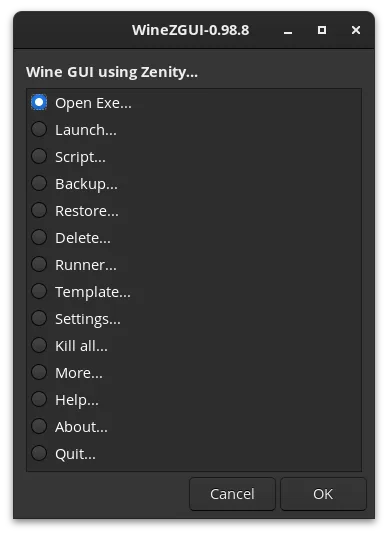
WineZGUI is not a direct replacement for Proton, but a complementary tool. Proton is a compatibility layer that translates DirectX to Vulkan, while WineZGUI is a management frontend that organizes how you run games using various backends, including Proton-GE. If you need the underlying translation layer, WineZGUI does not provide it; it relies on you installing Wine or Proton builds. It is a good choice for users who want a simple, file-manager-integrated way to manage multiple game prefixes without using a heavy suite like Lutris, provided they are comfortable installing the necessary runners manually.
- License
- GPL-3.0-or-later
- Price
- Free
- Latest version
- 0.99.16 (January 16, 2026)
- Rating
- —
What works the same
- Both allow running Windows executables on Linux
- Both support managing isolated Wine prefixes
- Both can utilize Proton builds (Proton natively, WineZGUI via custom runners)
- Both aim to simplify the process of playing Windows games
What is different
- Proton is a compatibility layer; WineZGUI is a GUI frontend that does not translate DirectX itself
- Proton is deeply integrated with Steam; WineZGUI works with any .exe via file manager
- Proton handles driver and library dependencies automatically; WineZGUI requires manual installation of DXVK and VKD3D via Winetricks
- WineZGUI offers prefix backup, restore, and bundle creation features that Proton lacks
- WineZGUI is a Bash script collection; Proton is a complex C++ codebase maintained by Valve
Opening your Proton files
WineZGUI can import existing Wine prefix directories from other sources, which includes the structure used by Proton if you have extracted or copied them. However, it does not natively read Steam's specific Proton configuration files to automatically map your Steam library. You would likely need to manually point WineZGUI at the prefix directories or use its import feature for standalone prefixes. It does not directly open Steam's internal database files to migrate your entire Steam library configuration automatically.
Switching from Proton to WineZGUI, step by step
- Install WineZGUI from your package manager or Flathub
- Install a compatible runner like Proton-GE or standard Wine with DXVK/VKD3D
- Locate your existing Wine or Proton prefix directories
- Use WineZGUI's import feature to bring in the prefix
- Create a desktop shortcut for the game executable
- Test the game to ensure all dependencies are present
Key features of WineZGUI
- Runs Windows .exe files directly from file manager
- Creates desktop shortcuts for games
- Manages separate Wine prefixes per executable
- Imports existing Wine prefixes from Lutris, Bottles, or Heroic
- Supports custom Wine runners like Proton-GE
- Backs up and restores game prefixes
- Creates shareable game bundles (prefix + game + runner)
- Includes terminal access for debugging
How to install WineZGUI on Linux
flatpak install flathub io.github.fastrizwaan.WineZGUIsudo apt install winesudo apt install winesudo dnf install winesudo pacman -S wine-stagingsudo zypper install mingw32-cross-wineFrequently asked questions
Does WineZGUI replace the need to install Proton?
No. WineZGUI is a manager. You still need to install a runner, such as Proton-GE or a standard Wine build with DXVK, to actually run the games. WineZGUI just makes it easier to launch and manage them.
Can I use WineZGUI with my Steam library?
WineZGUI is not integrated with Steam. You would run games via WineZGUI from your file manager. If you want Steam integration, you should use Steam's built-in Proton support or a launcher like Heroic that supports Proton.
What is the main advantage of WineZGUI over Lutris?
WineZGUI is lighter and simpler, relying on Bash and Zenity. It focuses specifically on prefix management and desktop integration without the overhead of a full application suite. It is ideal if you prefer a minimal, script-based approach.
