
 ZettlrLinux
vs
Microsoft OneNoteWindows
ZettlrLinux
vs
Microsoft OneNoteWindows
Zettlr, alternative Linux à Microsoft OneNote
Mis à jour le
Notre avis
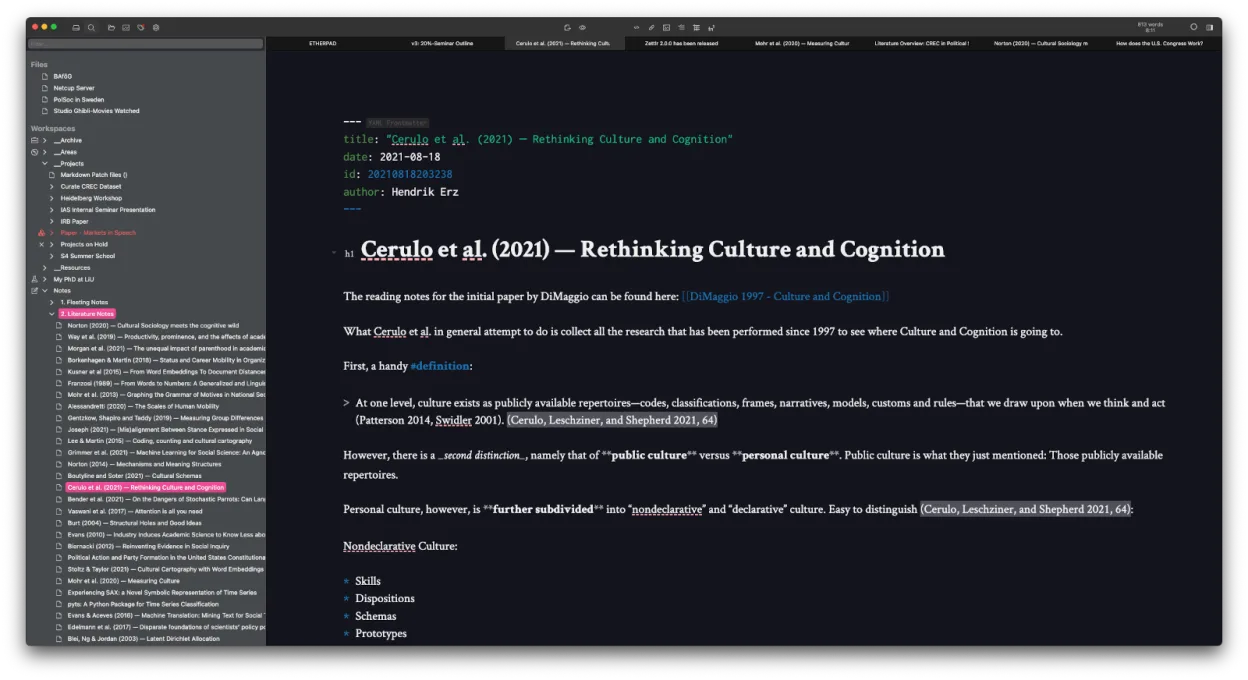
Zettlr can replace Microsoft OneNote for users who prefer Markdown and file‑based workflows, especially researchers and writers who need citation integration and Zettelkasten linking. It is not a drop‑in replacement for casual note‑taking with rich media or tight cloud sync.
- Licence
- GPL-3.0-or-later
- Prix
- Gratuit
- Dernière version
- 4.9.0 (25 octobre 2026)
- Note
- —
Ce qui fonctionne pareil
- Both allow creation of notebooks/sections/pages (Zettlr via folders/files),
- Both support tagging and searching of notes,
- Both offer cross‑platform availability and offline use,
- Both provide export to PDF and other formats
Ce qui change
- Zettlr lacks native cloud sync and real‑time collaboration;
- Zettlr does not support embedded audio, drawings, or Office‑style page layout;
- Zettlr stores notes as plain Markdown files, not in a proprietary database;
- OneNote imports .one files directly, Zettlr does not;
- Zettlr does not offer native handwriting or ink support
Ouvrir vos fichiers Microsoft OneNote
Zettlr cannot open Microsoft OneNote (.one) files directly. Exporting from OneNote to PDF or plain text and then importing into Zettlr is possible, but formatting may be lost.
Passer de Microsoft OneNote à Zettlr, étape par étape
- Export OneNote notebooks to PDF or plain text from the Windows app.
- Save exported files in a dedicated folder structure for Zettlr.
- Open Zettlr and create a new project pointing to that folder.
- Use Zettlr’s import tools or copy‑paste content into Markdown files.
- Re‑link internal references manually or use Zettlr’s search to reconnect notes.
- Re‑apply tags and add citations where needed.
Fonctionnalités clés de Zettlr
- Édition Markdown avec aperçu en direct
- Liens et tags à la Zettelkasten
- Prise en charge des citations via CSL‑JSON, BibTeX, Zotero, JabRef
- Mode sombre et multiples thèmes, CSS personnalisable
- Recherche heatmap pour découvrir rapidement les notes
- Stockage basé sur des fichiers – aucune base de données propriétaire
- Exportation vers PDF, HTML et autres formats
- Multiplateforme (Linux, Windows, macOS)
Installer Zettlr sous Linux
flatpak install flathub com.zettlr.Zettlrsudo pacman -S zettlrQuestions fréquentes
Does Zettlr sync notes to the cloud?
No, Zettlr does not provide built‑in cloud sync. Users must rely on external services like Dropbox, Syncthing, or Git for synchronization.
Can I collaborate on notes with others in real time?
Zettlr does not support real‑time collaboration. Collaboration requires sharing files via a version control system or a shared folder.
Is there a way to import my OneNote notes into Zettlr?
Direct import is not supported. Export notes from OneNote as PDF or plain text, then copy or move them into Zettlr’s folder structure.
5 autres alternatives à Microsoft OneNote
 JoplinJoplin est une application open source et multiplateforme de prise de notes et de gestion de tâches qui…Open sourceGratuitFlatpakJoplin ou Microsoft OneNote
 Standard NotesStandard Notes est une application de prise de notes sécurisée, chiffrée de bout en bout, qui synchronise vos…Open sourceGratuitFlatpakStandard Notes ou Microsoft OneNote
 ObsidianObsidian est une application de base de connaissances basée sur le markdown qui stocke les notes sous forme…FlatpakObsidian ou Microsoft OneNote
 LogseqLogseq est un outil de base de connaissances non linéaire, privilégiant le stockage local, qui enregistre les…Open sourceGratuitFlatpakLogseq ou Microsoft OneNote
 SimplenoteSimplenote est une application de prise de notes gratuite, multiplateforme, qui synchronise les notes…Open sourceGratuitFlatpakSimplenote ou Microsoft OneNote