
 ZettlrLinux
vs
ObsidianWindows
ZettlrLinux
vs
ObsidianWindows
Zettlr, alternative Linux à Obsidian
Mis à jour le
Notre avis
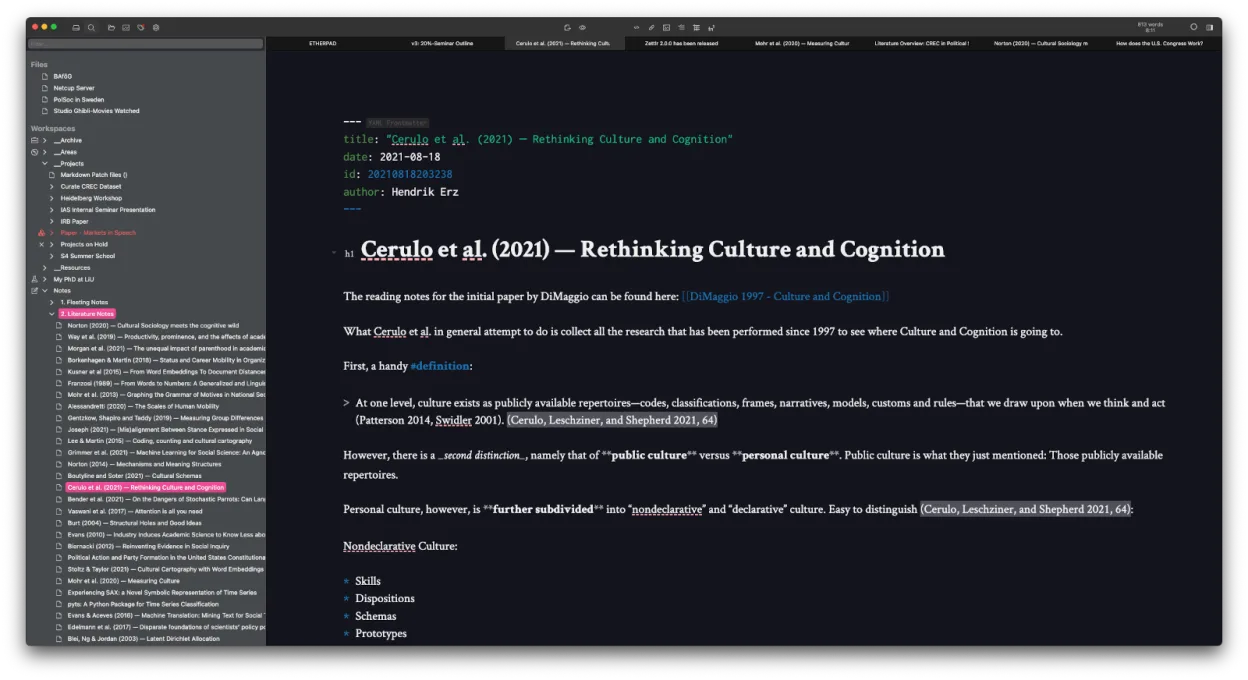
Zettlr is a solid replacement for Obsidian if you prioritize writing, citation support, and Zettelkasten workflows over flashy visual tools. It handles local Markdown files, bidirectional linking, and fast search well, and works offline with no forced cloud. While it lacks Obsidian’s interactive graph view and plugin ecosystem, it makes up for it with strong academic writing features and full file compatibility. Best for researchers, writers, or minimalists who want a lean, open-source editor without vendor lock-in.
- Licence
- GPL-3.0-or-later
- Prix
- Gratuit
- Dernière version
- 4.9.0 (25 octobre 2026)
- Note
- —
Ce qui fonctionne pareil
- Both use local Markdown files with no proprietary database
- Support bidirectional linking and tagging for knowledge management
- Offer fast full-text search and quick note navigation
- Work offline and support custom themes and CSS
- Are cross-platform and support plugin-like customization
Ce qui change
- Zettlr has no interactive graph view like Obsidian’s; connections are shown in text or file structure
- No large plugin ecosystem — fewer community extensions
- Stronger built-in citation and academic writing support via Zotero/BibTeX
- Uses Zettelkasten-style file IDs by default, but less emphasis on backlinks visualization
- Heatmap search helps find frequently accessed notes, a feature Obsidian lacks
Ouvrir vos fichiers Obsidian
Zettlr can open and edit Obsidian’s Markdown files directly since both use plain text and standard Markdown. Links using [[Wikilinks]] are supported. However, Obsidian-specific metadata like dataview fields or plugin-added frontmatter may be ignored but won’t break files. Zettlr won’t read Obsidian’s .graph folder or generate the same visual graph, but the underlying link structure remains intact. Exporting from Obsidian to Zettlr is straightforward: just copy the vault folder.
Passer de Obsidian à Zettlr, étape par étape
- Close Obsidian and copy your entire vault folder to a safe location
- Open Zettlr and use 'Add Workspace' to point to the copied vault
- Enable [[Wikilinks]] in Zettlr settings if not already active
- Review internal links to ensure they resolve correctly
- Optionally, add Zettelkasten-style IDs to new notes for better integration
Fonctionnalités clés de Zettlr
- Édition Markdown avec aperçu en direct
- Liens et tags à la Zettelkasten
- Prise en charge des citations via CSL‑JSON, BibTeX, Zotero, JabRef
- Mode sombre et multiples thèmes, CSS personnalisable
- Recherche heatmap pour découvrir rapidement les notes
- Stockage basé sur des fichiers – aucune base de données propriétaire
- Exportation vers PDF, HTML et autres formats
- Multiplateforme (Linux, Windows, macOS)
Installer Zettlr sous Linux
flatpak install flathub com.zettlr.Zettlrsudo pacman -S zettlrQuestions fréquentes
Can Zettlr show a visual graph of my notes like Obsidian?
No, Zettlr does not have an interactive graph view. It shows connections through file links and tags, but not as a dynamic map.
Does Zettlr support Obsidian plugins or themes?
No, Zettlr doesn’t support Obsidian plugins or CSS themes directly. You can use its own themes and custom CSS, but they must be adapted.
Is Zettlr good for academic writing?
Yes, especially if you use Zotero or BibTeX. Zettlr has built-in citation support with CSL-JSON and over 9,000 citation styles.
5 autres alternatives à Obsidian
 JoplinJoplin est une application open source et multiplateforme de prise de notes et de gestion de tâches qui…Open sourceGratuitFlatpakJoplin ou Obsidian
 LogseqLogseq est un outil de base de connaissances non linéaire, privilégiant le stockage local, qui enregistre les…Open sourceGratuitFlatpakLogseq ou Obsidian
 CherryTreeCherryTree est une application de prise de notes hiérarchique offrant du texte enrichi, la coloration…Open sourceGratuitFlatpakCherryTree ou Obsidian
 Standard NotesStandard Notes est une application de prise de notes sécurisée, chiffrée de bout en bout, qui synchronise vos…Open sourceGratuitFlatpakStandard Notes ou Obsidian
 QOwnNotesQOwnNotes est un éditeur Markdown en texte brut avec prise en charge des listes de tâches, pouvant se…Open sourceGratuitFlatpakQOwnNotes ou Obsidian