
 EvolutionLinux
vs
ThunderbirdWindows
EvolutionLinux
vs
ThunderbirdWindows
Evolution como alternativa Linux ao Thunderbird
Atualizado em
Nossa avaliação
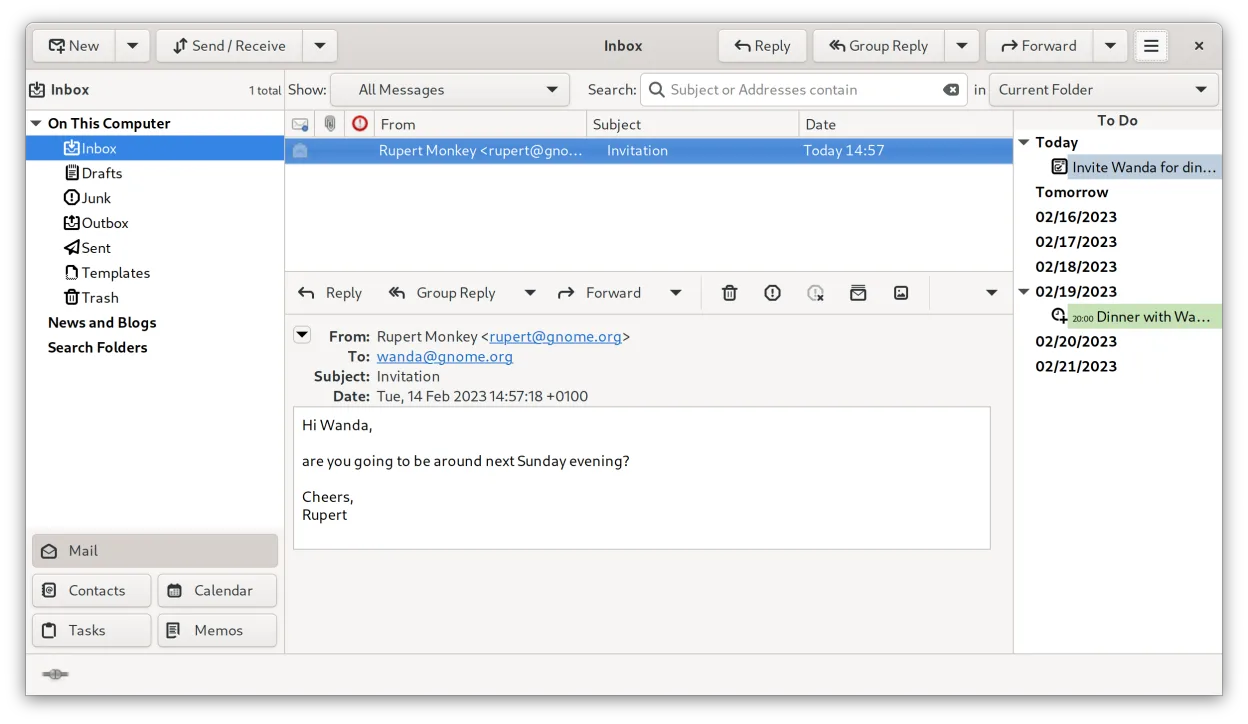
Evolution is a solid replacement for Thunderbird if you want tight integration between email, calendar, and contacts in a single native Linux application. It handles IMAP/POP3, has strong standards compliance, and supports CalDAV, LDAP, and Exchange via EWS. While it lacks built-in RSS and native chat (IRC/XMPP/Matrix), it covers core email, calendar, and contact needs well. Users who rely on RSS or real-time chat inside the client will need external tools. It's best suited for those prioritizing organization and integration over extensibility or lightweight design.
- Licença
- GPL-2.0+ and GFDL-1.3
- Preço
- Grátis
- Versão mais recente
- 3.62.1 (9 de outubro de 2026)
- Avaliação
- —
O que funciona igual
- Both support IMAP, POP3, and SMTP for email handling
- Integrated calendar and contact management with vCard and iCalendar support
- Offer mail filtering, search, and address books
- Support S/MIME and GnuPG for encryption
- Open-source and free with active development
O que muda
- Evolution lacks a built-in RSS feed reader
- No native support for IRC, XMPP, or Matrix chat
- No Usenet or news reader functionality
- Evolution has deeper Exchange (EWS) and LDAP integration than Thunderbird
- Evolution combines mail, calendar, and tasks in one interface, while Thunderbird separates them more
Abrindo seus arquivos do Thunderbird
Evolution does not directly import Thunderbird profiles, but you can export mail folders in standard .mbox format from Thunderbird and import them into Evolution. Contacts and calendars can be transferred via vCard and iCalendar (.ics) files. While there's no one-click migration, all core data types are exportable and compatible using standard formats. Third-party tools like Thunderbird's ImportExportTools add-on can assist in preparing data.
Trocando o Thunderbird pelo Evolution, passo a passo
- Export your Thunderbird mail folders as .mbox files using ImportExportTools or manual copy
- Export contacts as vCard (.vcf) and calendars as .ics files from Thunderbird
- Install Evolution via your distribution's package manager or Flathub
- Import .mbox files into Evolution via 'Import' in the mail folder context menu
- Import vCard and .ics files into Evolution's address book and calendar
- Reconfigure email accounts manually in Evolution using IMAP/POP3 settings
Principais recursos do Evolution
- E-mail, calendário, contatos e tarefas integrados em uma única janela
- Suporte completo para IMAP, POP3, SMTP, CalDAV e EWS
- Formatos de dados padrão (MIME, iCalendar, vCard)
- Criptografia integrada com GnuPG e S/MIME
- Livro de endereços com LDAP e armazenamento local
- Compartilhamento de calendário e agendamento via CalDAV
- Regras de filtragem de e-mail e busca
- Atalhos de teclado personalizáveis
Como instalar o Evolution no Linux
flatpak install flathub org.gnome.Evolutionsudo apt install evolutionsudo apt install evolutionsudo dnf install evolutionsudo pacman -S evolution-bogofiltersudo zypper install evolutionPerguntas frequentes
Can Evolution replace Thunderbird for calendar and email together?
Yes, Evolution handles both email and calendar tightly, using CalDAV and standard formats. It's a strong fit if you use these together and don't rely on RSS or chat.
Does Evolution support modern encryption like Thunderbird?
Yes, Evolution supports GnuPG and S/MIME for signing and encrypting emails, comparable to Thunderbird's capabilities.
Is Evolution as lightweight as Thunderbird?
No, Evolution is heavier and more integrated, resembling Outlook in scope. It's less suitable for minimal setups than Thunderbird.
Outras 5 alternativas ao Thunderbird
 MailspringUm cliente de e‑mail desktop rápido e cheio de recursos para Linux com um motor de sincronização em C++ e…Código abertoGrátisFlatpakMailspring vs Thunderbird
 Claws MailClaws Mail é um cliente de e‑mail leve e rápido baseado em GTK para Linux.Código abertoGrátisFlatpakClaws Mail vs Thunderbird
 KMailO KMail é o cliente de e-mail completo do KDE, parte da suíte Kontact, com suporte a IMAP, POP3 e caixas…Código abertoGrátisKMail vs Thunderbird
 SylpheedSylpheed é um cliente de e-mail e notícias leve, baseado em GTK, para Linux, Windows e macOS.Código abertoGrátisSylpheed vs Thunderbird
 GearyO Geary é um cliente de e-mail baseado no GNOME para Linux que permite enviar, receber e organizar e-mails em…Código abertoGrátisFlatpakGeary vs Thunderbird