
 EvolutionLinux
vs
Windows Live MailWindows
EvolutionLinux
vs
Windows Live MailWindows
Evolution como alternativa Linux ao Windows Live Mail
Atualizado em
Nossa avaliação
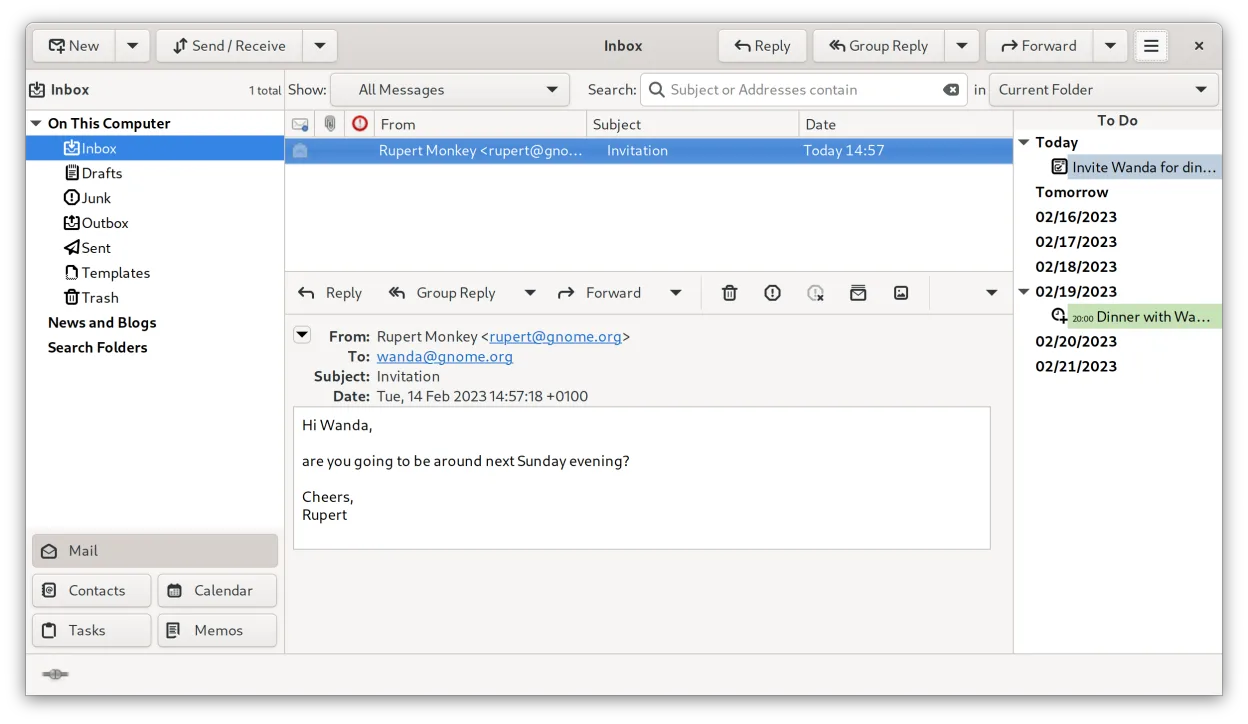
Evolution is a solid replacement for Windows Live Mail. It bundles email, calendar, contacts and tasks in a single window, supports IMAP, POP3, SMTP, CalDAV, and EWS, and offers built‑in encryption. It is best for users who need a full‑featured personal information manager on Linux and are comfortable with a slightly steeper learning curve. For casual users who only need basic email, a lighter client might be easier.
- Licença
- GPL-2.0+ and GFDL-1.3
- Preço
- Grátis
- Versão mais recente
- 3.62.1 (9 de outubro de 2026)
- Avaliação
- —
O que funciona igual
- Both provide integrated email, calendar, and contact management
- Both support IMAP and POP3 protocols
- Both allow multi‑account handling
- Both offer RSS feed reading and basic newsreader features
O que muda
- Evolution lacks native Windows Live Mail import/export tools; migration requires manual setup
- Evolution does not include a built‑in newsreader like Windows Live Mail’s newsreader tab
- Evolution’s RSS support is limited to third‑party extensions
- Evolution does not provide a simple one‑click migration wizard
- Evolution’s UI is more complex than Windows Live Mail’s straightforward layout
Abrindo seus arquivos do Windows Live Mail
Windows Live Mail stores data in .pst files and a proprietary database format. Evolution does not natively import .pst files; users must export mail as .eml or use a third‑party tool such as pst-utils to convert to mbox before importing into Evolution. Contacts and calendar data can be exported as vCard or iCalendar and then imported. No direct compatibility exists, so migration requires intermediate conversion steps.
Trocando o Windows Live Mail pelo Evolution, passo a passo
- Export all mail from Windows Live Mail as .eml files (or use a tool to convert .pst to mbox).
- Export contacts as vCard (.vcf) and calendar events as iCalendar (.ics).
- In Evolution, create new mail accounts and point them to the exported folders or import the mbox files via File → Import.
- Import vCard files into Evolution’s address book and iCalendar files into the calendar.
- Verify that all accounts and data appear correctly and adjust any missing settings such as server ports or SSL options.
Principais recursos do Evolution
- E-mail, calendário, contatos e tarefas integrados em uma única janela
- Suporte completo para IMAP, POP3, SMTP, CalDAV e EWS
- Formatos de dados padrão (MIME, iCalendar, vCard)
- Criptografia integrada com GnuPG e S/MIME
- Livro de endereços com LDAP e armazenamento local
- Compartilhamento de calendário e agendamento via CalDAV
- Regras de filtragem de e-mail e busca
- Atalhos de teclado personalizáveis
Como instalar o Evolution no Linux
flatpak install flathub org.gnome.Evolutionsudo apt install evolutionsudo apt install evolutionsudo dnf install evolutionsudo pacman -S evolution-bogofiltersudo zypper install evolutionPerguntas frequentes
Can Evolution import my Windows Live Mail .pst files directly?
No, Evolution does not support .pst import. You need to convert .pst to mbox or .eml first using tools like pst-utils.
Does Evolution support the same RSS feeds I used in Windows Live Mail?
Evolution can read RSS feeds, but it requires installing the Evolution RSS plugin or using a separate RSS reader. It does not have a built‑in feed reader like Windows Live Mail.
Will my calendar events sync with my Exchange server after migration?
Yes, if you set up the Exchange account via EWS in Evolution, your calendar events will sync. You may need to re‑import existing events into the Exchange calendar if they were stored locally.
Outras 5 alternativas ao Windows Live Mail
 ThunderbirdThunderbird é um cliente de e-mail, feed de notícias, chat e calendário gratuito e de código aberto.Código abertoGrátisFlatpakThunderbird vs Windows Live Mail
 MailspringUm cliente de e‑mail desktop rápido e cheio de recursos para Linux com um motor de sincronização em C++ e…Código abertoGrátisFlatpakMailspring vs Windows Live Mail
 Claws MailClaws Mail é um cliente de e‑mail leve e rápido baseado em GTK para Linux.Código abertoGrátisFlatpakClaws Mail vs Windows Live Mail
 KMailO KMail é o cliente de e-mail completo do KDE, parte da suíte Kontact, com suporte a IMAP, POP3 e caixas…Código abertoGrátisKMail vs Windows Live Mail
 GearyO Geary é um cliente de e-mail baseado no GNOME para Linux que permite enviar, receber e organizar e-mails em…Código abertoGrátisFlatpakGeary vs Windows Live Mail