

Linux · Sound & Video
Kwave
Kwave is a full-featured audio editor for recording, editing, and processing sound files on Linux.
- Licença
- GPL-2.0+
- Versão mais recente
- 26.08.2 (8 de outubro de 2026)
- Desenvolvedor
- KDE
- Instalações
- 663 (Flathub, 30 dias)
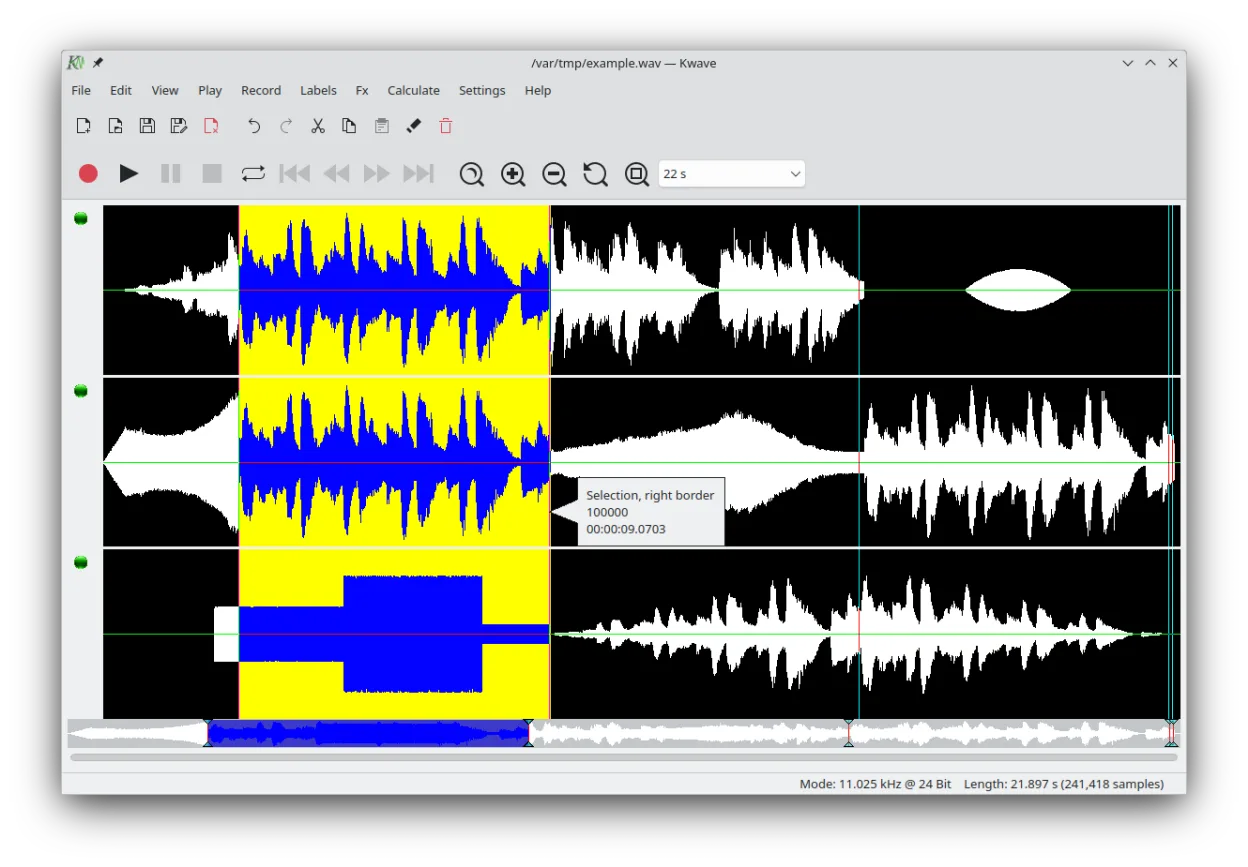
O que é o Kwave?
Kwave is a mature audio editor developed by KDE, originally released in the late 1990s. It has evolved steadily over the years and is now part of the KDE ecosystem with solid integration on Linux desktops. The latest release, 26.08.2, shows active development and ongoing support.
It's best suited for users who need more than basic recording — like podcasters, educators, or audio hobbyists — but don't require a full digital audio workstation (DAW). Its interface is functional and familiar to those used to traditional audio editors, though not as modern or flashy as some newer tools.
Compared to Windows Voice Recorder, Kwave is far more capable but also more complex. While Windows Voice Recorder is minimal and automatic, Kwave gives you full control over edits, effects, and file handling. If you're used to simple recording apps, expect a learning curve, but not an insurmountable one.
Ideal para: Users who need precise, single-track audio editing with effects and format flexibility.
Principais recursos do Kwave
- Record, play, and edit audio in multiple formats
- Apply fade in/out and normalize volume
- Use filters like lowpass, bandpass, and notch
- Shift pitch and adjust sample rate
- View spectrogram (sonagram) for frequency analysis
- Insert silence, reverse audio, add noise
- Save labeled regions as separate files
- Supports WAV, MP3, FLAC, Ogg, Opus, and more
Prós
- Free and open source with active development
- Supports a wide range of audio formats
- Includes essential editing and effects tools
- Integrated well with KDE and Qt environments
- Can handle both simple cuts and detailed waveform work
Contras
- Interface feels dated compared to modern editors
- Limited multitrack capabilities — not a DAW
- Some formats are import-only via libaudiofile
Programas do Windows que o Kwave substitui
Como instalar o Kwave no Linux
flatpak install flathub org.kde.kwavesudo apt install kwavesudo apt install kwavesudo dnf install kwavesudo pacman -S kwavesudo zypper install kwaveDicas para quem vem do Windows
If you're coming from Windows Voice Recorder, note that Kwave doesn't auto-save — save manually. Use Ctrl+R to record, Ctrl+Z to undo. File formats like MP3 and FLAC are supported, but avoid ASCII files unless needed. Workflow is more manual, so label sections and save early. Navigation with 'Go to position' helps when editing longer clips.
Versões recentes
- 26.08.2 —
- 26.08.1 —
- 26.08.0 —
- 26.04.3 —
Kwave: perguntas frequentes
Can Kwave record audio directly?
Yes, Kwave can record audio from your microphone or input device. Use the record button or Ctrl+R to start. Make sure your audio input is selected in the system settings.
Does Kwave support MP3 files?
Yes, Kwave supports MP3 playback and editing, provided the necessary codecs are installed. Export to MP3 may require additional packages depending on your distribution.
Is Kwave similar to Audacity?
Kwave is similar in purpose but simpler. It lacks multitrack editing and some advanced effects, but it's lighter and more integrated with KDE. Audacity is more powerful; Kwave is more focused.
Why can't I edit some audio files fully?
Some formats supported via libaudiofile are import-only. You may not be able to save in those formats. Stick to WAV, FLAC, or Ogg for full edit-save workflows.
Atualizado em