
 SpyderLinux
vs
JetBrains PyCharmWindows
Spyder como alternativa Linux ao JetBrains PyCharm
Atualizado em
Nossa avaliação
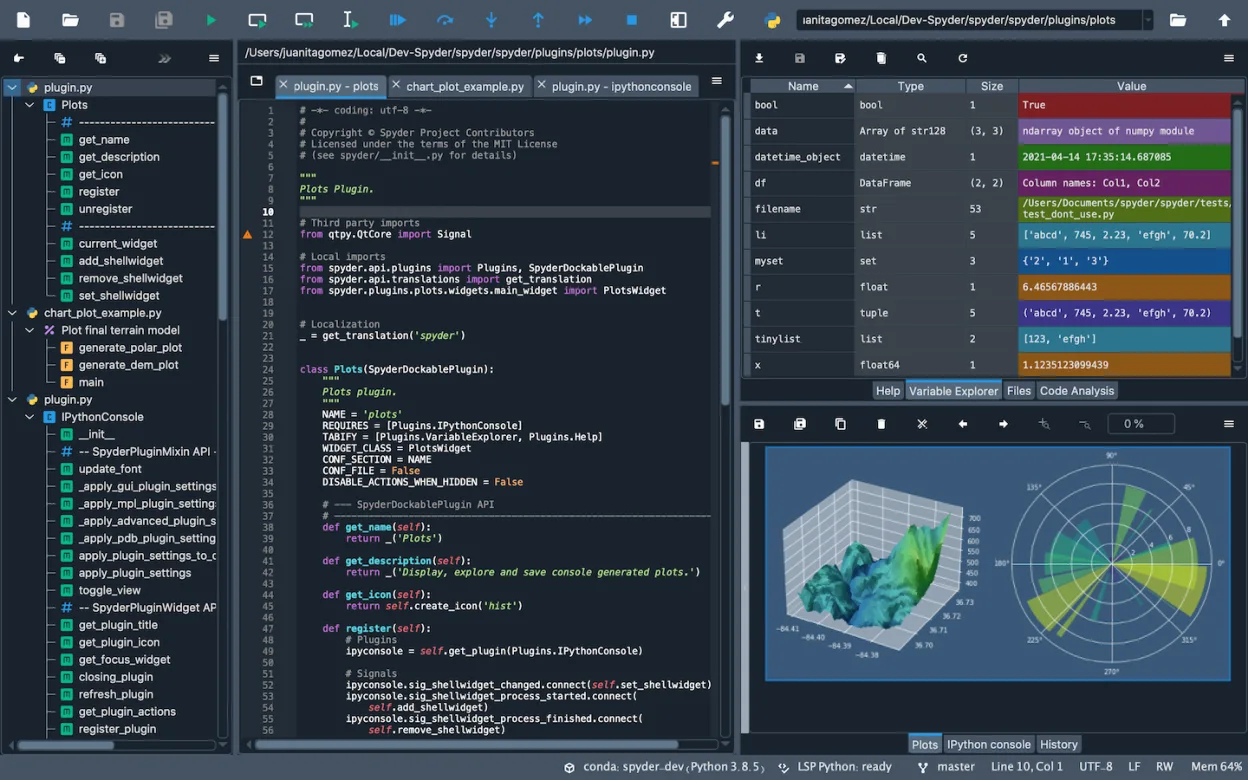
Spyder can replace PyCharm for users who focus on scientific work, data analysis, and interactive debugging. It offers solid code completion, a powerful debugger, and version‑control integration, plus a variable explorer and rich console that PyCharm lacks. However, it is not as feature‑rich for general software development: refactoring tools, advanced testing frameworks, and extensive plugin ecosystem are weaker. For researchers, data scientists, or students who need an all‑in‑one scientific IDE, Spyder is a good fit; for larger projects or teams that rely on PyCharm’s full feature set, it may fall short.
- Licença
- MIT
- Preço
- Grátis
- Versão mais recente
- v6.1.6 (28 de julho de 2026)
- Avaliação
- —
O que funciona igual
- Python syntax highlighting and autocompletion
- Integrated graphical debugger
- Unit testing framework support (pytest, unittest)
- Version control system integration (Git, Mercurial)
- Virtual environment management
O que muda
- Spyder focuses on scientific libraries; lacks advanced refactoring and code navigation features of PyCharm
- PyCharm has a richer plugin ecosystem and more mature testing UI
- Spyder’s debugging is tied to the IPython console, while PyCharm offers a more traditional IDE debugger
- PyCharm provides better support for web frameworks and multi‑language projects
- Spyder’s UI is lighter but offers less customization for complex project structures
Abrindo seus arquivos do JetBrains PyCharm
Spyder does not open PyCharm project files (.idea). You can import Python files directly, but project settings, run configurations, and VCS mappings must be recreated manually.
Trocando o JetBrains PyCharm pelo Spyder, passo a passo
- Export your virtual environment or list of packages from PyCharm (pip freeze > requirements.txt).
- Create a new Spyder project and add the same source directories.
- Install the listed packages into a new virtual environment and activate it in Spyder’s preferences.
- Re‑create VCS mappings in Spyder’s version control settings.
- Re‑implement any custom run configurations using Spyder’s run settings.
- Verify that tests run by configuring the test runner in Spyder’s preferences.
Principais recursos do Spyder
- Console IPython interativo com renderização rica de saída
- Explorador de variáveis para inspeção de grandes arrays NumPy e DataFrames Pandas
- Depuração integrada com execução passo a passo e gerenciamento de breakpoints
- Suporte embutido para visualização Matplotlib, SymPy e SciPy
- Arquitetura de plugins para estender funcionalidades com ferramentas personalizadas
- Gerenciador de projetos para organizar múltiplos arquivos e configurações
- Análise de código e linting via Pylint e integração PEP8
Como instalar o Spyder no Linux
flatpak install flathub org.spyder_ide.spydersudo apt install spydersudo apt install spydersudo dnf install spydersudo pacman -S spydersudo zypper install spyderPerguntas frequentes
Does Spyder support virtual environments?
Yes, Spyder can use any Python interpreter, including virtual environments created with venv, conda, or virtualenv. Set the interpreter in Preferences → Python interpreter.
Can I use Spyder for non‑scientific projects?
Spyder works fine for general Python development, but it lacks some advanced refactoring and multi‑language features that PyCharm offers. It’s suitable for small to medium projects.
Is Spyder free for commercial use?
Spyder is released under the MIT license, so it can be used freely in commercial environments without licensing fees.
Outras 5 alternativas ao JetBrains PyCharm
 Visual Studio CodeUm editor de código leve e extensível que oferece depuração, Git e suporte a muitas linguagens.GrátisFlatpakVisual Studio Code vs JetBrains PyCharm
 ThonnyThonny é um IDE leve para Python voltado a iniciantes, oferecendo um depurador integrado e um gerenciador de…Código abertoGrátisFlatpakThonny vs JetBrains PyCharm
 GeanyGeany é uma IDE leve e rápida que suporta muitas linguagens e plugins prontos para uso.Código abertoGrátisFlatpakGeany vs JetBrains PyCharm
 KateKate é um editor de texto rico em recursos, focado em programadores, da KDE, com suporte a mais de 300…Código abertoGrátisFlatpakKate vs JetBrains PyCharm
 VimVim é um editor de texto modal e altamente configurável, ideal para edição eficiente no Linux.Código abertoGrátisFlatpakVim vs JetBrains PyCharm