
 SylpheedLinux
vs
SylpheedLinux
vs
 EudoraWindows
Sylpheed como alternativa Linux ao Eudora
Atualizado em
Nossa avaliação
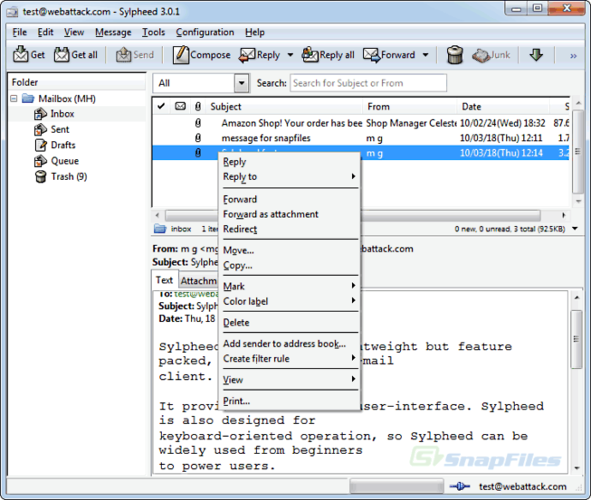
Sylpheed can replace Eudora for users who need a lightweight, open‑source mail client on Linux. It supports all core protocols (IMAP, POP3, SMTP), local storage in MH format, filtering, address book with LDAP, threading and basic HTML rendering. It is best for users comfortable with MH mailboxes and who prefer a small footprint; it may be less familiar to those who used Eudora’s MBOX storage or advanced HTML editing.
Cobertura de recursos
- Licença
- GPL-2.0-or-later
- Preço
- Grátis
- Versão mais recente
- 3.7.0
- Avaliação
- —
O que funciona igual
- Supports IMAP/POP3/SMTP for sending and receiving
- Provides address book integration and LDAP lookup
- Offers message filtering and rule‑based processing
- Includes threading and search functionality
- Renders basic HTML in messages
O que muda
- Uses MH mailbox storage instead of MBOX, which may require conversion
- Lacks a built‑in MBOX import/export tool, so migration may need manual conversion
- No native support for Eudora’s proprietary .eml or .db files
- No advanced HTML editor or rich‑text composition like Eudora’s editor
- No direct integration with Windows‑style account templates
Abrindo seus arquivos do Eudora
Sylpheed does not natively import Eudora’s .eml or .db files. Users can export Eudora mail to standard .eml files and then use a script or maildrop tool to move them into the MH format. There is no built‑in export function for Eudora data, so manual conversion is required.
Trocando o Eudora pelo Sylpheed, passo a passo
- Export Eudora mail to .eml files via Eudora’s export feature.
- Create a new folder structure in Sylpheed matching your Eudora folders.
- Use a command‑line tool (e.g., mailx or a custom script) to import the .eml files into the MH mailbox directories.
- Configure the same IMAP/POP3 accounts in Sylpheed and verify connectivity.
- Set up address book entries, either by importing vCard files or manually recreating them.
- Adjust filtering rules in Sylpheed to match your Eudora rules.
- faq
Principais recursos do Sylpheed
- Armazenamento de e-mails no formato MH
- Interface gráfica com GTK+
- Suporte a SMTP, POP3, IMAP e NNTP
- Catálogo de endereços integrado com busca LDAP
- Filtros e processamento de e-mails baseado em regras
- Múltiplas contas e hierarquia de pastas
- Verificação ortográfica via Enchant
- Arquivos de configuração portáteis
Como instalar o Sylpheed no Linux
Ubuntu / Mint
sudo apt install sylpheedDebian
sudo apt install sylpheedFedora
sudo dnf install sylpheedOutras 4 alternativas ao Eudora
 Evolution MailEvolution é o gerenciador integrado de e‑mail, calendário, contatos e tarefas do GNOME.Código abertoGrátisFlatpakEvolution Mail vs Eudora
 Claws MailClaws Mail é um cliente de e‑mail leve e rápido baseado em GTK para Linux.Código abertoGrátisFlatpakClaws Mail vs Eudora
 KMailO KMail é o cliente de e-mail completo do KDE, parte da suíte Kontact, com suporte a IMAP, POP3 e caixas…Código abertoGrátisKMail vs Eudora
 Mozilla ThunderbirdMozilla Thunderbird é um cliente de e‑mail, calendário e notícias gratuito e de código aberto para Linux e…Código abertoGrátisMozilla Thunderbird vs Eudora
Avalie o Sylpheed
Seja o primeiro a avaliar
É um bom substituto do Eudora?
0