
 System Monitoring CenterLinux
vs
Process HackerWindows
System Monitoring Center como alternativa Linux ao Process Hacker
Atualizado em
Nossa avaliação
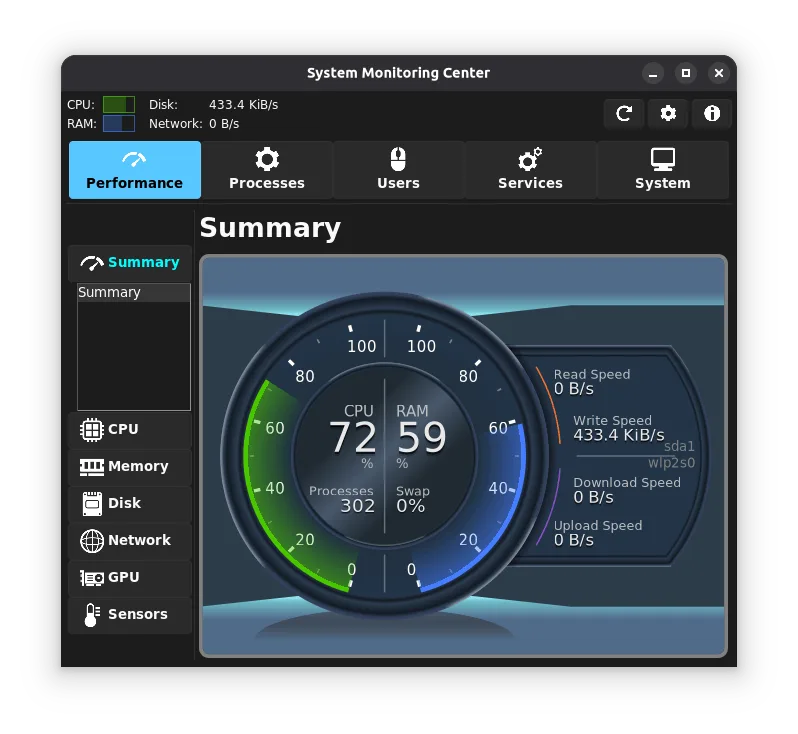
System Monitoring Center is a solid alternative for users who prioritize low resource usage and clean visuals over deep forensic inspection. It handles real-time CPU, RAM, disk, and network monitoring well, with interactive charts that make spotting spikes easy. However, it lacks the granular process internals of Process Hacker, such as detailed thread views or direct open file inspection. If you mostly need to check system health and kill runaway processes, this works. If you debug complex application behavior or need to inspect specific handles, you will find it limiting.
- Licença
- GPL-3.0
- Preço
- Grátis
- Versão mais recente
- 3.5.0 (14 de novembro de 2026)
- Avaliação
- —
O que funciona igual
- Real-time monitoring of CPU, memory, disk, and network usage
- Process list with options to view as a tree or flat list
- Ability to manage processes including killing or changing priority
- Interactive charts allowing users to query specific data points
- System service management capabilities
O que muda
- Lacks detailed thread-level inspection and per-thread CPU/memory stats
- No direct view of open files, handles, or network connections per process
- Does not provide the same depth of module or DLL information
- Focuses on system-wide hardware metrics rather than deep process internals
- Requires PolicyKit for administrative actions rather than running as root
Abrindo seus arquivos do Process Hacker
There is no file compatibility between Process Hacker and System Monitoring Center. Process Hacker does not export its core process data to standard files that System Monitoring Center can import, and System Monitoring Center does not read Process Hacker configuration or log files. You will need to reconfigure your monitoring preferences from scratch.
Trocando o Process Hacker pelo System Monitoring Center, passo a passo
- Install System Monitoring Center via Flathub or your distribution's package manager
- Launch the application and grant necessary permissions via PolicyKit if prompted
- Configure the display tabs to show CPU, RAM, Disk, and Network metrics
- Set up process view preferences (tree or list) to match your workflow
- Test process management actions like killing a dummy process to verify permissions
- Review hardware selection options to ensure all relevant devices are monitored
Principais recursos do System Monitoring Center
- Monitoramento de CPU, RAM, disco, rede, GPU
- Árvore de processos e visualização em lista
- Controle de serviços systemd
- Integração com PolicyKit (sem sudo)
- Gráficos interativos com consulta de ponto
- Seleção de hardware (núcleos, discos, NICs, GPUs)
- Baixo overhead de CPU
- Suporte a ARM
Como instalar o System Monitoring Center no Linux
flatpak install flathub io.github.hakandundar34coding.system-monitoring-centerPerguntas frequentes
Can I see which files a specific process has open?
No, System Monitoring Center does not provide a view of open files or handles for individual processes. You would need a separate tool like lsof for that specific task.
Does it work without root access?
Yes, it uses PolicyKit to request elevated privileges only when needed for actions like killing system processes. You do not need to run the entire app with sudo.
Is GPU monitoring reliable?
GPU usage tracking depends on your hardware vendor and driver support. It may not be available or accurate on all systems, especially with proprietary drivers or in virtualized environments.
Outras 4 alternativas ao Process Hacker
 GNOME System MonitorO Monitor de Sistema GNOME é o utilitário padrão do Linux para visualizar processos em execução, uso de CPU…Código abertoGrátisGNOME System Monitor vs Process HackerlsofA command-line utility that lists open files and associated processes, providing detailed system resource…Código abertoGrátislsof vs Process Hacker