
 ZimLinux
vs
Google KeepWindows
Zim como alternativa Linux ao Google Keep
Atualizado em
Nossa avaliação
Zim is a decent replacement for Google Keep if you prioritize local control, plain-text organization, and hierarchical note management over real-time sync and collaboration. It works well for users who take structured, text-heavy notes and want full offline access. However, it lacks cloud sync, mobile apps, and sharing features, making it less suitable for users who rely on reminders, cross-device availability, or team note-sharing. If your workflow centers on personal, desktop-based note-taking with tagging and linking, Zim excels. For active Google Keep users needing mobility and sync, it's not a direct substitute.
- Licença
- GPL-2.0+
- Preço
- Grátis
- Versão mais recente
- 0.77.2 (26 de julho de 2026)
- Avaliação
- —
O que funciona igual
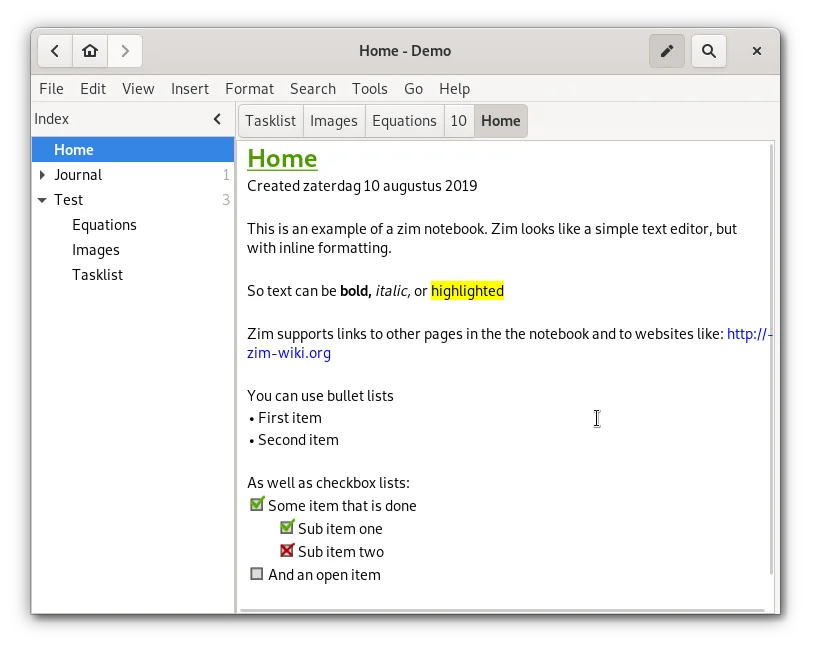
- Supports text notes and to-do lists with basic formatting
- Allows tagging and color-coding of notes for organization
- Enables attaching images to notes
- Supports pinning important pages via sidebar or naming
- Hierarchical organization through notebook structure
O que muda
- No built-in sync or encryption across devices
- No mobile app or web access, desktop-only
- No real-time collaboration or sharing
- No OCR text extraction from images
- No time-based reminders or location triggers
Abrindo seus arquivos do Google Keep
Google Keep doesn't export data in a standard plain-text or wiki format, so direct file import into Zim isn't possible. You can export Keep notes as text files manually and then import them into Zim by creating new pages. Formatting and structure must be adjusted manually. OCR-extracted text from Keep images won't transfer automatically. There’s no tool to convert Keep’s JSON exports into Zim’s wiki markup, so migration is largely manual.
Trocando o Google Keep pelo Zim, passo a passo
- Export your Google Keep notes via Google Takeout
- Extract the archive and convert notes to plain text or HTML
- Create new pages in Zim for each note or group of related notes
- Manually add tags, colors, and links using Zim's markup
- Attach exported images where needed
- Organize pages in the sidebar tree by topic or notebook
Principais recursos do Zim
- Hierarchical sidebar tree for page organization
- Automatic plain‑text file storage with wiki markup
- Linking between pages and attachments
- Plugins for tasks, equations, tray icon, and VCS
- Cross‑platform keyboard shortcuts
- Export to HTML, PDF, and plain text
Como instalar o Zim no Linux
flatpak install flathub org.zim_wiki.Zimsudo apt install zimsudo apt install zimsudo dnf install Zimsudo pacman -S zimsudo zypper install zimPerguntas frequentes
Can I sync Zim notes across devices like Google Keep?
Not directly. You can sync the Zim notebook folder using tools like Syncthing, Nextcloud, or Dropbox, but conflicts may occur. Manual syncing or version control (like Git) is possible but requires care.
Does Zim support reminders like Google Keep?
No, Zim has no built-in reminder system. You can mark tasks with tags like @due or use a separate calendar app alongside Zim.
Can I use Zim on Android?
No native Android app exists. You can access Zim files via file sync and edit them in a text editor, but the full interface and linking features are desktop-only.
Outras 5 alternativas ao Google Keep
 JoplinJoplin é um aplicativo de anotações e tarefas de código aberto e multiplataforma que armazena dados em…Código abertoGrátisFlatpakJoplin vs Google Keep
 Standard NotesO Standard Notes é um aplicativo de anotações com criptografia de ponta a ponta que funciona em várias…Código abertoGrátisFlatpakStandard Notes vs Google Keep
 CherryTreeCherryTree é um aplicativo de anotações hierárquico com suporte a texto formatado, destaque de código e…Código abertoGrátisFlatpakCherryTree vs Google Keep
 ObsidianO Obsidian é um aplicativo de base de conhecimento baseado em markdown que armazena notas como arquivos de…FlatpakObsidian vs Google KeepNotejotNotejot is a lightweight KDE sticky note application that pins notes to your desktop for quick reminders.Código abertoGrátisNotejot vs Google Keep