
 ZulipLinux
vs
Microsoft Teams ClassicWindows
ZulipLinux
vs
Microsoft Teams ClassicWindows
Zulip como alternativa Linux ao Microsoft Teams Classic
Atualizado em
Nossa avaliação
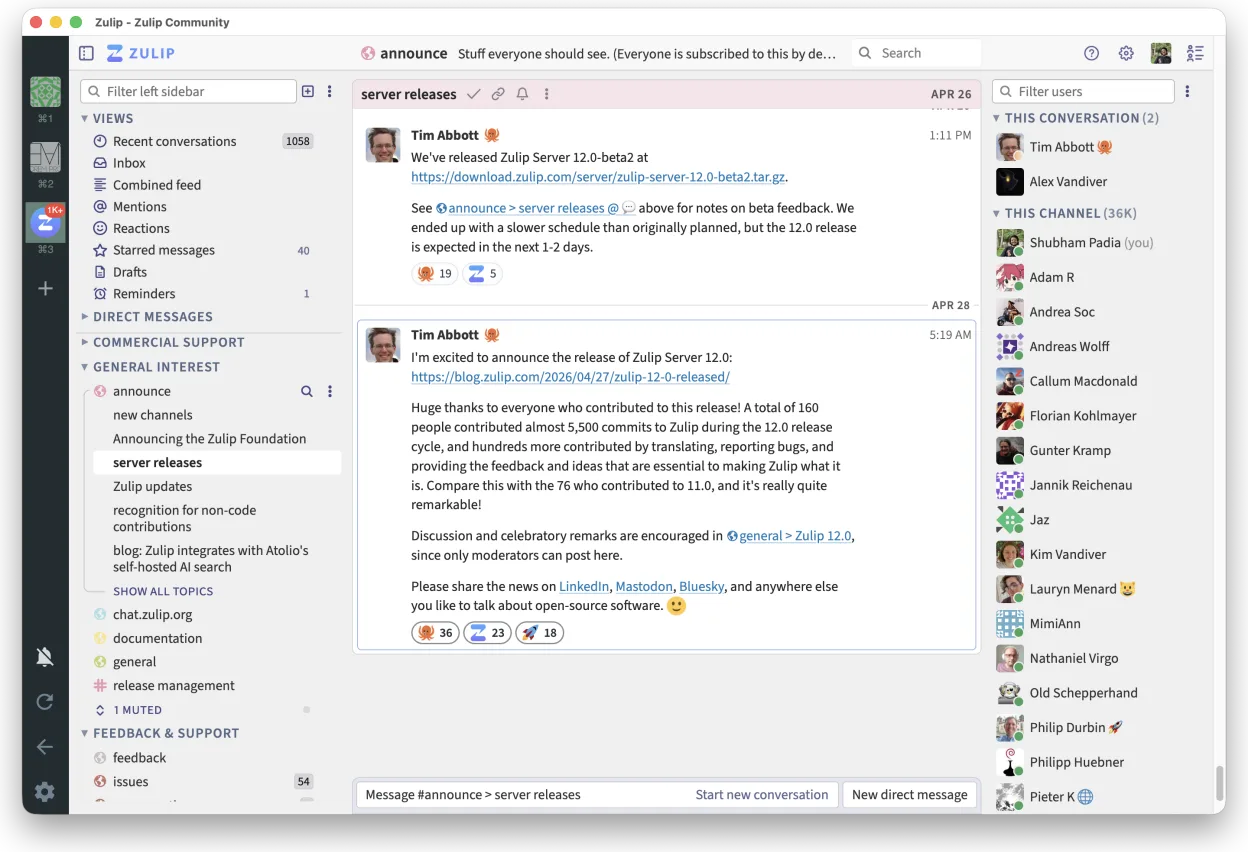
Zulip can serve as a viable replacement for Microsoft Teams Classic for teams that prioritize open‑source software, need strong message organization, and are comfortable with a less polished video‑calling experience. It covers the core collaboration needs—group chat, direct messages, searchable history, and cross‑platform clients—while offering threaded conversations that make high‑volume discussions manageable. Teams‑centric features such as deep Office 365 integration, built‑in large‑scale video meetings, and native file‑storage syncing are weaker or absent, so Zulip fits best for development‑focused or privacy‑concerned groups rather than enterprises that rely heavily on the Microsoft ecosystem.
- Licença
- Apache-2.0
- Preço
- Grátis
- Versão mais recente
- 5.13.2 (21 de setembro de 2026)
- Avaliação
- —
O que funciona igual
- Group and direct messaging","Cross‑platform clients (Linux, Windows, macOS, web)
- Persistent chat history with search
- Screen sharing support in meetings
- File sharing via attachments
O que muda
- No native deep integration with Microsoft 365 apps (Word, Excel, SharePoint)
- Video‑call capacity and quality are more limited than Teams’ built‑in meetings
- No built‑in cloud storage; files are stored per‑server or via external links
- Limited calendar and task integration
- No dedicated Teams‑style channels hierarchy; uses streams/topics instead of Teams/Channels
Abrindo seus arquivos do Microsoft Teams Classic
Zulip does not understand Microsoft Teams proprietary file formats or its SharePoint‑backed storage. You can upload and download generic files (PDF, DOCX, images) through Zulip, but there is no direct way to open or export Teams‑specific files or conversation archives without manual export from Teams first, which is outside Zulip’s scope.
Trocando o Microsoft Teams Classic pelo Zulip, passo a passo
- Export needed channels or chats from Teams using the Microsoft export tool
- Set up a Zulip server or use zulip.com and create corresponding streams/topics
- Invite all team members and share the new Zulip URL
- Upload any shared documents to Zulip or link to existing cloud storage
- Train users on the threaded conversation model
- Retire Teams access once the new workspace is stable
Principais recursos do Zulip
- Conversas em tópicos para discussões organizadas
- Código aberto e auto-hospedável
- Disponível como cliente de desktop nativo para Linux
- Suporta grupos grandes e alto volume de mensagens
- Compatibilidade multiplataforma
- Funcionalidade de busca forte em todo o histórico
Como instalar o Zulip no Linux
flatpak install flathub org.zulip.ZulipPerguntas frequentes
Can Zulip handle large video conferences?
Zulip includes basic video‑call support via integrations (e.g., Jitsi), but it does not match Teams’ native large‑scale meeting capabilities.
Is there an Office 365 integration for editing documents?
No. Zulip does not embed Office apps; you must use external services like Office Online or LibreOffice separately.
Will chat history from Teams automatically appear in Zulip?
No. You need to export Teams chat logs and import them manually, which may require custom scripts or third‑party tools.
Outras 4 alternativas ao Microsoft Teams Classic
 SlackO Slack é um aplicativo proprietário de comunicação para equipes no Linux que centraliza conversas…FlatpakSlack vs Microsoft Teams Classic
 MattermostO Mattermost é uma plataforma de colaboração de código aberto e autohospedada, criada para equipes de…Código abertoGrátisFlatpakMattermost vs Microsoft Teams Classic
 Rocket.ChatPlataforma de comunicação em equipe de código aberto para chat, vídeo e colaboração, frequentemente usada…Código abertoGrátisFlatpakRocket.Chat vs Microsoft Teams Classic
 ElementO Element é um cliente de chat e videoconferência baseado em matriz, de código aberto, para Linux.Código abertoGrátisFlatpakElement vs Microsoft Teams Classic