
 DBeaver CommunityLinux
vs
HeidiSQLWindows
DBeaver CommunityLinux
vs
HeidiSQLWindows
DBeaver Community as a Linux alternative to HeidiSQL
Updated
Our verdict
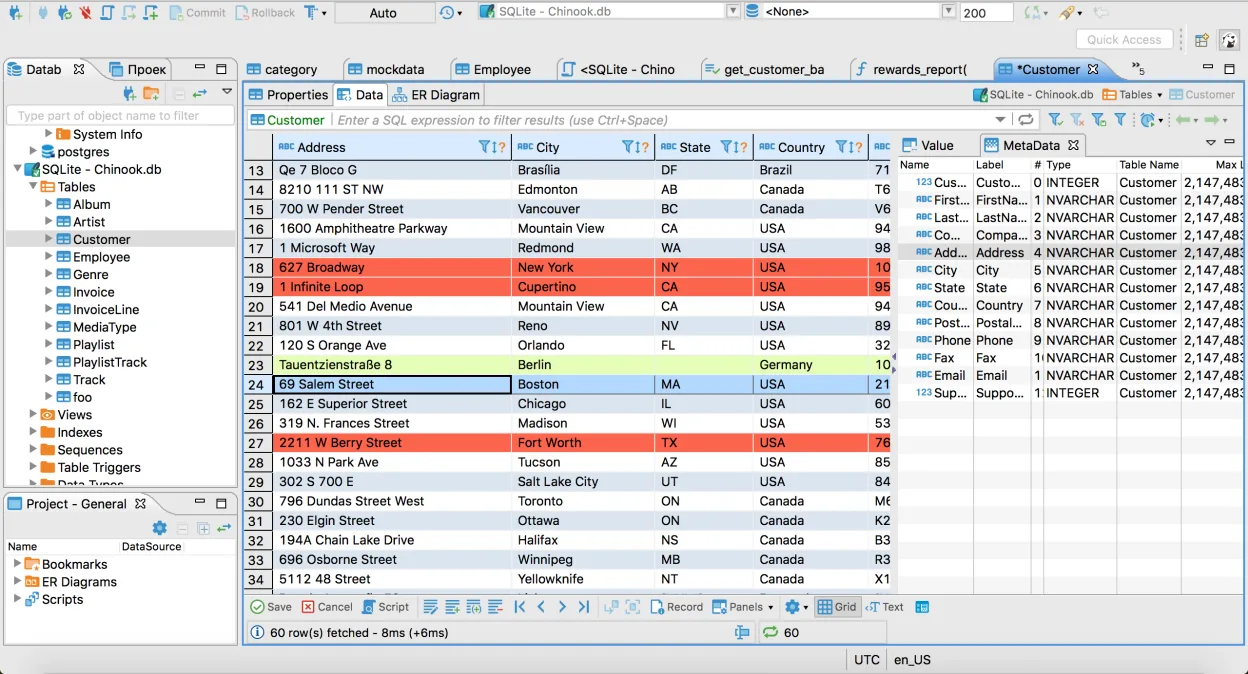
DBeaver Community is a solid replacement for HeidiSQL for users who need a cross‑platform, feature‑rich client that supports the same core databases. It offers the same basic connectivity, query editing, and data import/export functions, and adds extra tools like ER diagrams and version‑control integration. It is best suited for developers or DBAs who work with multiple database types and want a single IDE. If you only need a lightweight MySQL/MariaDB client, HeidiSQL may still be preferable.
- License
- Apache-2.0
- Price
- Free
- Latest version
- 26.2.3 (October 18, 2026)
- Rating
- —
What works the same
- Both support MySQL, MariaDB, PostgreSQL, SQL Server, and SQLite; both provide a graphical query editor with syntax highlighting; both allow data import/export to CSV and SQL; both keep multiple connections open and preserve sessions; both are free and open‑source.
What is different
- DBeaver offers database diagramming and ER modeling, HeidiSQL does not; DBeaver supports more database engines (Oracle, DB2, Sybase, etc.) and SSH tunneling, HeidiSQL has limited SSH support; DBeaver includes version‑control integration, HeidiSQL does not; HeidiSQL’s UI is lighter and faster for simple tasks, DBeaver is heavier; HeidiSQL lacks the plugin architecture that DBeaver provides.
Opening your HeidiSQL files
HeidiSQL stores session data in .hsql files and query templates in .sql files. DBeaver does not natively read .hsql files, but you can import the same database connections manually. Exported SQL dumps from HeidiSQL are plain SQL and can be opened in DBeaver without issue. For full migration, recreate connections and import any exported data files.
Switching from HeidiSQL to DBeaver Community, step by step
- Export your HeidiSQL connections to a CSV or SQL file using the built‑in export tool.
- Open DBeaver and use the "Import Connections" wizard to load the CSV, or manually create new connections matching the exported details.
- Import any exported data files (CSV, SQL) into DBeaver via the Data Transfer or Import wizards.
- Verify that queries run correctly and that data displays as expected.
- Adjust any custom query templates or scripts to match DBeaver’s syntax if needed.
- Close HeidiSQL and start using DBeaver for all database work.
Key features of DBeaver Community
- Multi‑engine support (MySQL, PostgreSQL, SQLite, Oracle, SQL Server, etc.)
- SQL editor with syntax highlighting and auto‑completion
- Database diagramming and ER modeling
- Data export/import to CSV, Excel, JSON
- Connection pooling and SSH tunneling
- Version control integration (Git, SVN)
- Extensible via plugins
How to install DBeaver Community on Linux
flatpak install flathub io.dbeaver.DBeaverCommunityFrequently asked questions
Does DBeaver support SSH tunneling like HeidiSQL?
Yes, DBeaver has built‑in SSH tunneling for all supported databases, which can be configured in the connection settings.
Can I use DBeaver on Windows as well?
Yes, DBeaver is cross‑platform and runs on Windows, macOS, and Linux.
Is DBeaver free for commercial use?
DBeaver Community is released under the Apache‑2.0 license, which allows free commercial use.
3 other alternatives to HeidiSQL
 Beekeeper StudioA cross‑platform SQL editor that replaces HeidiSQL on Linux with a modern UI and advanced features.Open sourceFreeFlatpakBeekeeper Studio vs HeidiSQL