
 EvolutionLinux
vs
Windows Live MailWindows
EvolutionLinux
vs
Windows Live MailWindows
Evolution als Linux-Alternative zu Windows Live Mail
Aktualisiert am
Unser Fazit
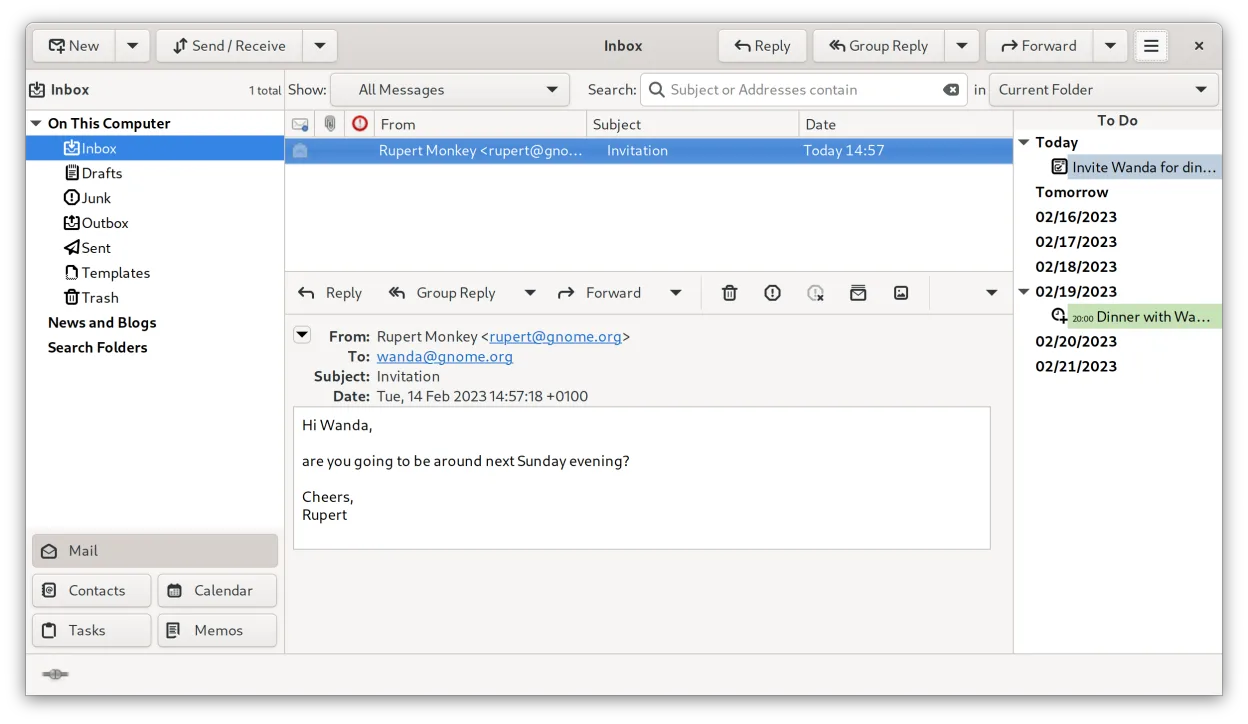
Evolution is a solid replacement for Windows Live Mail. It bundles email, calendar, contacts and tasks in a single window, supports IMAP, POP3, SMTP, CalDAV, and EWS, and offers built‑in encryption. It is best for users who need a full‑featured personal information manager on Linux and are comfortable with a slightly steeper learning curve. For casual users who only need basic email, a lighter client might be easier.
- Lizenz
- GPL-2.0+ and GFDL-1.3
- Preis
- Kostenlos
- Aktuelle Version
- 3.62.1 (9. Oktober 2026)
- Bewertung
- —
Was gleich funktioniert
- Both provide integrated email, calendar, and contact management
- Both support IMAP and POP3 protocols
- Both allow multi‑account handling
- Both offer RSS feed reading and basic newsreader features
Was anders ist
- Evolution lacks native Windows Live Mail import/export tools; migration requires manual setup
- Evolution does not include a built‑in newsreader like Windows Live Mail’s newsreader tab
- Evolution’s RSS support is limited to third‑party extensions
- Evolution does not provide a simple one‑click migration wizard
- Evolution’s UI is more complex than Windows Live Mail’s straightforward layout
Ihre Windows Live Mail-Dateien öffnen
Windows Live Mail stores data in .pst files and a proprietary database format. Evolution does not natively import .pst files; users must export mail as .eml or use a third‑party tool such as pst-utils to convert to mbox before importing into Evolution. Contacts and calendar data can be exported as vCard or iCalendar and then imported. No direct compatibility exists, so migration requires intermediate conversion steps.
Von Windows Live Mail zu Evolution wechseln – Schritt für Schritt
- Export all mail from Windows Live Mail as .eml files (or use a tool to convert .pst to mbox).
- Export contacts as vCard (.vcf) and calendar events as iCalendar (.ics).
- In Evolution, create new mail accounts and point them to the exported folders or import the mbox files via File → Import.
- Import vCard files into Evolution’s address book and iCalendar files into the calendar.
- Verify that all accounts and data appear correctly and adjust any missing settings such as server ports or SSL options.
Wichtige Funktionen von Evolution
- Integrierte E-Mail, Kalender, Kontakte und Aufgaben in einem Fenster
- Vollständige Unterstützung für IMAP, POP3, SMTP, CalDAV und EWS
- Standarddatenformate (MIME, iCalendar, vCard)
- Integrierte Verschlüsselung mit GnuPG und S/MIME
- Adressbuch mit LDAP und lokaler Speicherung
- Kalenderfreigabe und Terminplanung über CalDAV
- E-Mail-Filterregeln und Suche
- Anpassbare Tastenkürzel
Evolution unter Linux installieren
flatpak install flathub org.gnome.Evolutionsudo apt install evolutionsudo apt install evolutionsudo dnf install evolutionsudo pacman -S evolution-bogofiltersudo zypper install evolutionHäufige Fragen
Can Evolution import my Windows Live Mail .pst files directly?
No, Evolution does not support .pst import. You need to convert .pst to mbox or .eml first using tools like pst-utils.
Does Evolution support the same RSS feeds I used in Windows Live Mail?
Evolution can read RSS feeds, but it requires installing the Evolution RSS plugin or using a separate RSS reader. It does not have a built‑in feed reader like Windows Live Mail.
Will my calendar events sync with my Exchange server after migration?
Yes, if you set up the Exchange account via EWS in Evolution, your calendar events will sync. You may need to re‑import existing events into the Exchange calendar if they were stored locally.
5 weitere Alternativen zu Windows Live Mail
 ThunderbirdThunderbird ist ein kostenloser, quelloffener Client für E‑Mail, Newsfeeds, Chat und Kalender.Open SourceKostenlosFlatpakThunderbird vs. Windows Live Mail
 MailspringEin schneller, funktionsreicher Desktop-E-Mail-Client für Linux mit einer C++-Synchronisierungseinheit und…Open SourceKostenlosFlatpakMailspring vs. Windows Live Mail
 Claws MailClaws Mail ist ein schlanker, schneller E-Mail-Client für Linux auf Basis von GTK.Open SourceKostenlosFlatpakClaws Mail vs. Windows Live Mail
 KMailKMail ist der funktionsreiche E-Mail-Client von KDE und Teil der Kontact-Suite. Er unterstützt IMAP, POP3 und…Open SourceKostenlosKMail vs. Windows Live Mail
 GearyGeary ist ein auf GNOME basierender E-Mail-Client für Linux, mit dem Sie E-Mails senden, empfangen und in der…Open SourceKostenlosFlatpakGeary vs. Windows Live Mail