
 GeanyLinux
vs
Sublime TextWindows
GeanyLinux
vs
Sublime TextWindows
Geany als Linux-Alternative zu Sublime Text
Aktualisiert am
Unser Fazit
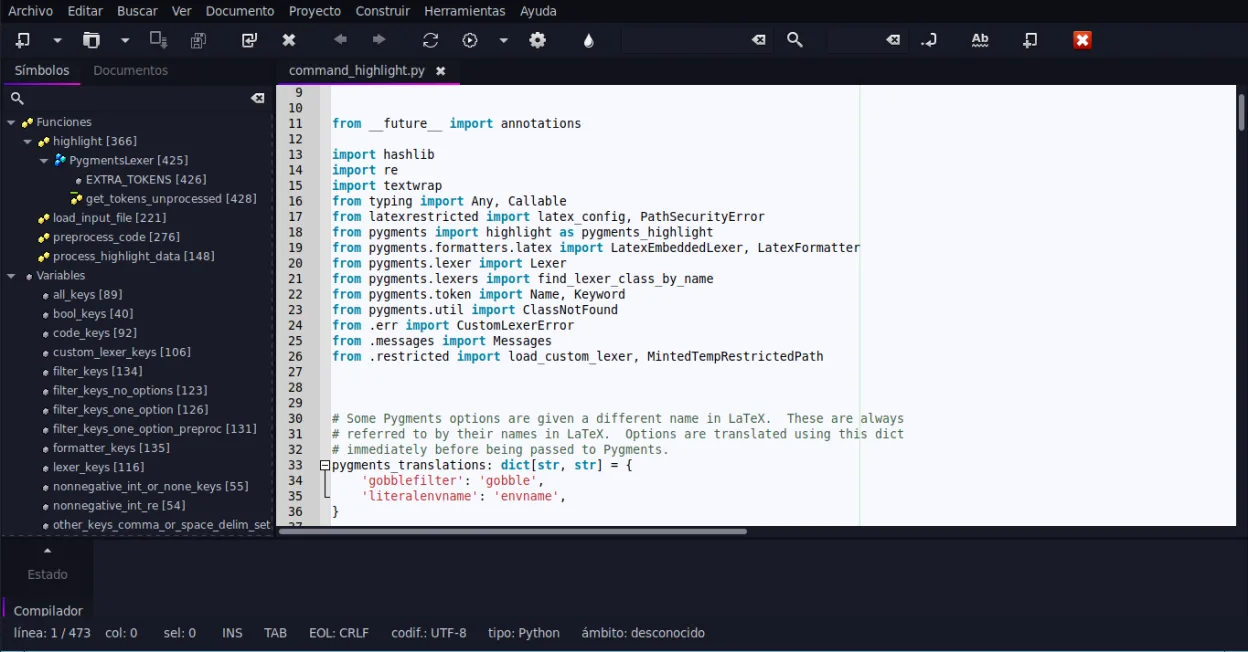
Geany can replace Sublime Text for users who need a lightweight editor with basic IDE features and prefer a free, open‑source solution. It offers syntax highlighting, code folding, regex search/replace, and a built‑in terminal, making it suitable for small to medium projects. However, it lacks the extensive package ecosystem and advanced UI customization that power users rely on in Sublime. It is best for students, hobbyists, or developers working on single‑file scripts or small projects.
- Lizenz
- GPL-2.0+
- Preis
- Kostenlos
- Aktuelle Version
- 2.1.0 (6. Juli 2025)
- Bewertung
- —
Was gleich funktioniert
- Both provide syntax highlighting for many languages
- Both support code folding and regex search/replace
- Both have plugin systems (Python API in Sublime, plugin manager in Geany)
- Both allow theme/customization
Was anders ist
- Geany bundles an IDE‑style interface with build/run buttons, while Sublime is a plain editor
- Geany has a built‑in terminal emulator; Sublime relies on external terminals or plugins
- Geany’s plugin ecosystem is smaller and less mature than Sublime’s Package Control
- Geany’s UI is more traditional; Sublime offers a minimal, distraction‑free interface
- Geany’s auto‑completion is limited to common constructs, whereas Sublime offers extensive context‑aware completion
Ihre Sublime Text-Dateien öffnen
Sublime Text files are plain text with optional .sublime‑project or .sublime‑workspace JSON files. Geany can open any plain‑text source file without issue. Exporting or converting the project/workspace files is not supported; users would need to recreate project settings manually in Geany.
Von Sublime Text zu Geany wechseln – Schritt für Schritt
- 1. Install Geany from your distribution’s package manager or Flathub.
- 2. Open your source files (.c, .py, .html, etc.) with Geany; syntax highlighting will activate automatically.
- 3. Configure the embedded terminal via Tools → Configure Terminal if you need command‑line access.
- 4. Install desired plugins through Tools → Plugins → Plugin Manager and enable them.
- 5. Set up build commands in Tools → Build System for languages that need compiling.
- 6. Adjust theme and font settings under Edit → Preferences → Interface to match your visual preferences.
Wichtige Funktionen von Geany
- Syntaxhervorhebung für über 30 Sprachen
- Codevervollständigung und automatische Vervollständigung gängiger Konstrukte
- Eingebetteter Terminal-Emulator
- Plugin-Manager mit vorinstallierten Plugins
- Code-Faltung und Symbolverzeichnisse
- Unterstützung für XML/HTML-Tag-Vervollständigung
Geany unter Linux installieren
flatpak install flathub org.geany.Geanysudo apt install geanysudo apt install geanysudo dnf install geanysudo pacman -S geanysudo zypper install geanyHäufige Fragen
Does Geany support the same regex search/replace as Sublime?
Yes, Geany’s Find/Replace dialog supports regular expressions, just like Sublime’s Find panel.
Can I use Geany for large Python projects?
Geany can open and edit large Python files, but it lacks advanced project management features such as virtual environment integration that Sublime can handle via plugins.
Is Geany free and open source?
Yes, Geany is released under the GPL‑2.0+ license and is available in major Linux distributions and Flathub.
4 weitere Alternativen zu Sublime Text
 KateKate ist ein funktionsreicher, auf Programmierer ausgerichteter Texteditor von KDE mit Unterstützung für über…Open SourceKostenlosFlatpakKate vs. Sublime Text
 geditgedit ist der leichte, universelle Texteditor von GNOME, geeignet für Notizen, Dokumente und einfaches…Open SourceKostenlosFlatpakgedit vs. Sublime Text
 NeovimNeovim ist ein moderner Vim‑Fork, der Erweiterbarkeit, fortschrittliche UI‑Unterstützung und leistungsstarke…Open SourceKostenlosFlatpakNeovim vs. Sublime Text