
 NetBeansLinux
vs
Microsoft Visual Studio 2022Windows
NetBeansLinux
vs
Microsoft Visual Studio 2022Windows
NetBeans als Linux-Alternative zu Microsoft Visual Studio 2022
Aktualisiert am
Unser Fazit
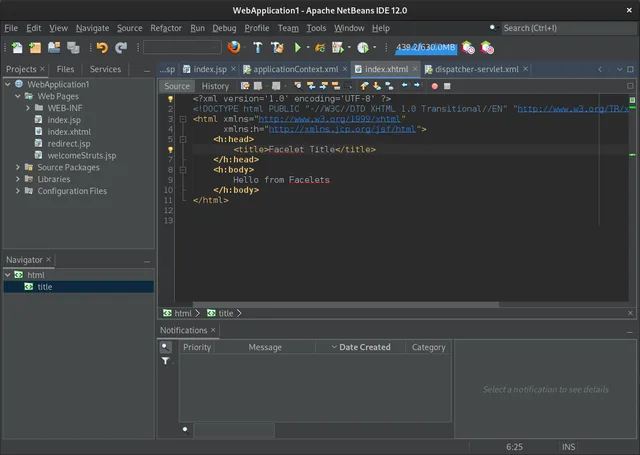
NetBeans is a solid replacement for developers focused on Java, C/C++, or web technologies, offering a robust, modular IDE with strong debugging and version control support. However, it is not a direct substitute for .NET or C# developers, as it lacks native C# and .NET Framework support. If your workflow relies heavily on Visual Studio's deep .NET integration, C# IntelliSense, or Windows-specific debugging, NetBeans will feel limiting. For cross-platform Java or C++ projects, it is a capable, free alternative, but expect a different project structure and build system configuration than what you are used to in Visual Studio.
- Lizenz
- Apache-2.0
- Preis
- Kostenlos
- Aktuelle Version
- 31 (12. August 2026)
- Bewertung
- —
Was gleich funktioniert
- Integrated debugging and profiling tools for supported languages
- Extensible architecture via a modular plugin system
- Built-in version control integration for Git, SVN, and Mercurial
- Project management and build system integration (Maven, Ant, Gradle)
- Code completion, refactoring, and static analysis features
Was anders ist
- Lacks native C# and .NET Framework/SDK support, a core pillar of Visual Studio
- No integrated Windows-specific debugging tools like WinDbg or Visual Studio's .NET debugger
- Different project file formats and build system defaults (Maven/Ant vs MSBuild)
- UI and workflow are distinct, requiring a learning curve for Visual Studio users
- Limited support for Windows-only libraries and APIs compared to Visual Studio
Ihre Microsoft Visual Studio 2022-Dateien öffnen
NetBeans cannot directly open or edit Visual Studio solution (.sln) or project (.csproj, .vcxproj) files. You must manually recreate the project structure in NetBeans, linking source files and configuring build settings. While source code files (.java, .cpp, .js, etc.) are compatible, the project metadata and build configurations are not interchangeable. There is no built-in importer for Visual Studio projects, so migration involves manual setup.
Von Microsoft Visual Studio 2022 zu NetBeans wechseln – Schritt für Schritt
- Install NetBeans via your package manager or Flathub
- Create a new project in NetBeans matching your language and build system
- Import your source code files into the new project directory
- Configure build settings (compiler, libraries, dependencies) in NetBeans
- Set up version control integration and point to your existing repository
- Test your build and debug workflow to ensure everything functions correctly
Wichtige Funktionen von NetBeans
- Modulares Plug‑in‑System für Java, JavaScript, PHP, C\/C++
- Integrierter Profiler und Debugger
- Maven, Gradle und Ant Projektunterstützung
- JavaFX‑ und Swing‑GUI‑Builder
- Versionskontroll‑Integration (Git, SVN, Mercurial)
- Code‑Vervollständigung, Refactoring und statische Analyse
- Plattformübergreifende UI
- Umfangreiche Community‑Dokumentation
NetBeans unter Linux installieren
flatpak install flathub org.apache.netbeanssudo apt install netbeanssudo apt install netbeanssudo pacman -S netbeansHäufige Fragen
Can I develop C# applications in NetBeans?
No, NetBeans does not support C# or the .NET framework. If you need C# development, consider MonoDevelop (now part of Visual Studio for Mac) or use Visual Studio Code with C# extensions on Linux.
Does NetBeans support the same build systems as Visual Studio?
NetBeans supports Maven, Ant, and Gradle, but not MSBuild. You will need to convert your build configurations to one of these supported systems if you are moving from a .NET project.
Is NetBeans suitable for web development?
Yes, NetBeans has strong support for JavaScript, HTML5, and PHP, making it a viable option for web development. However, for modern JavaScript frameworks, many developers prefer VS Code or IntelliJ IDEA with appropriate plugins.
4 weitere Alternativen zu Microsoft Visual Studio 2022
 Visual Studio CodeEin leichter, erweiterbarer Code-Editor, der Debugging, Git und viele Sprachen unterstützt.KostenlosFlatpakVisual Studio Code vs. Microsoft Visual Studio 2022
 KDevelopKDevelop ist eine kostenlose, pluginbasierte IDE für KDE, die C++, Python, PHP und weitere Sprachen mit…Open SourceKostenlosFlatpakKDevelop vs. Microsoft Visual Studio 2022Eclipse CDTEclipse CDT ist eine ausgereifte, Open-Source-IDE für C- und C++-Entwicklung, die Projektmanagement…Open SourceKostenlosEclipse CDT vs. Microsoft Visual Studio 2022
 Qt CreatorQt Creator ist eine plattformübergreifende IDE zur Entwicklung von Qt-Anwendungen unter Linux, Windows und…Open SourceKostenlosFlatpakQt Creator vs. Microsoft Visual Studio 2022