
 PiTiViLinux
vs
KdenliveWindows
PiTiVi als Linux-Alternative zu Kdenlive
Aktualisiert am
Unser Fazit
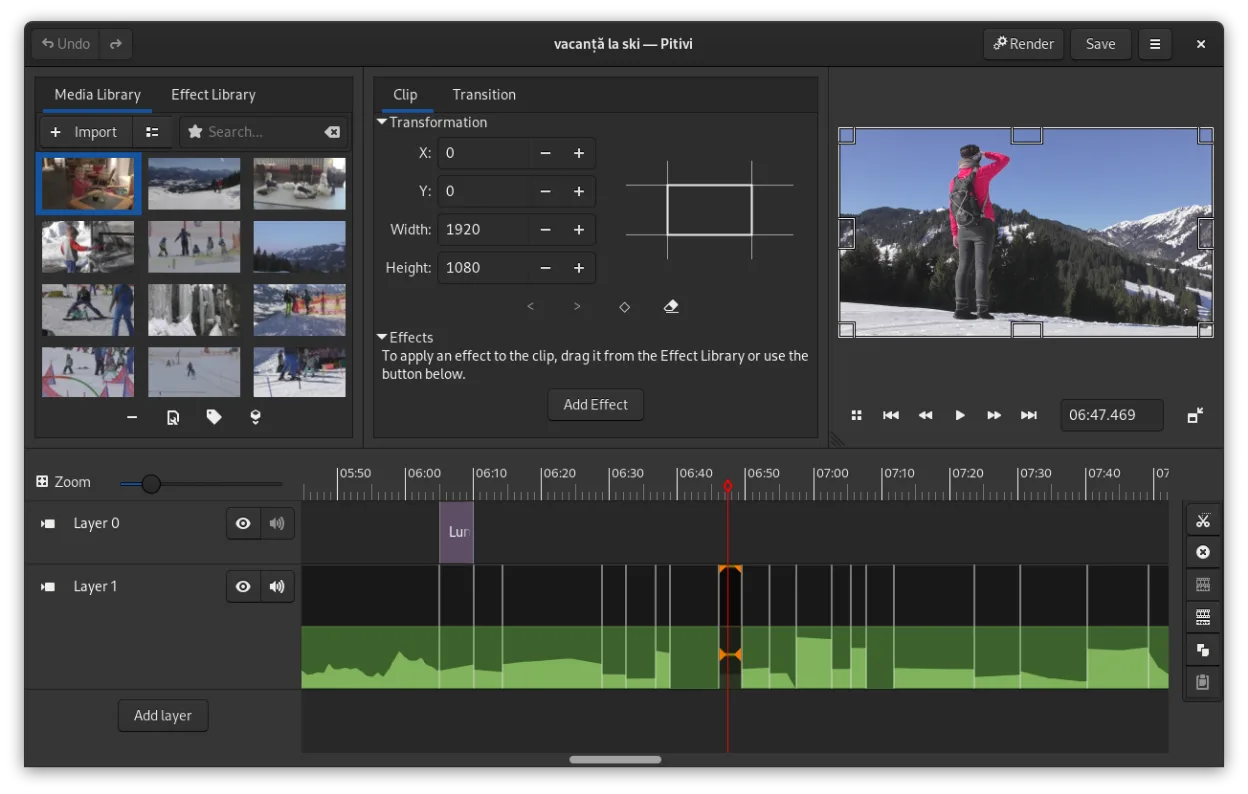
PiTiVi can serve as a replacement for Kdenlive for users who need a straightforward, GNOME‑integrated editor and are comfortable with a more modest feature set. It handles multi‑track editing, keyframes, and common formats, making it suitable for hobbyists, educators, or anyone whose workflow doesn’t rely on the deeper effects library and advanced color tools that Kdenlive provides. Power users who depend on extensive codec options, complex audio mixing, or professional‑grade color grading will likely find PiTiVi lacking, but for basic to intermediate projects it is a solid, stable choice.
- Lizenz
- LGPL-2.0+
- Preis
- Kostenlos
- Aktuelle Version
- 2023.03 (26. März 2023)
- Bewertung
- —
Was gleich funktioniert
- Non‑linear multi‑track editing
- Keyframe animation for effects and filters
- Support for any format GStreamer can decode (covers MP4, MKV, MOV, etc.)
- Crossfades and SMPTE‑style transitions
- Detachable UI panels for multi‑monitor setups
Was anders ist
- PiTiVi lacks the extensive built‑in effects library and advanced color correction tools found in Kdenlive
- Audio mixing in PiTiVi is simpler; no multi‑track audio ducking or advanced waveform editing
- Export presets are fewer and less granular than Kdenlive’s codec‑specific profiles
- Kdenlive offers proxy editing and timeline rendering optimizations that PiTiVi does not provide
- Kdenlive’s community provides more third‑party effect packs and tutorials
Ihre Kdenlive-Dateien öffnen
PiTiVi cannot directly open Kdenlive project files (.kdenlive) because the two editors use different project formats. You can import the same source media into PiTiVi and rebuild the timeline manually, but there is no built‑in conversion tool. Exporting a finished video from Kdenlive in a common container (e.g., MP4) and then reopening that file in PiTiVi works without issue.
Von Kdenlive zu PiTiVi wechseln – Schritt für Schritt
- Install PiTiVi from your distribution’s repository or Flathub.
- Gather all source clips used in your Kdenlive project and place them in a single folder.
- Open PiTiVi and create a new project with the desired resolution and frame rate.
- Import the media files, then recreate the track layout and cuts using PiTiVi’s ripple/roll editing.
- Re‑apply effects and transitions using PiTiVi’s keyframe‑able filters.
- Export the final video using the appropriate preset.
Wichtige Funktionen von PiTiVi
- Nicht-lineare Bearbeitung mit einer rahmenratenunabhängigen Zeitlinie
- Unterstützt jedes Format, das von GStreamer verarbeitet wird
- Keyframe-Animation für Effekte und Filter
- Ripple- und Roll-Bearbeitung für effiziente Zeitlinienanpassungen
- Benutzerdefinierte Seitenverhältnisse, Frameraten und Render-Voreinstellungen
- Crossfades und SMPTE-konforme Übergänge
- Abtrennbare UI-Panels für Multi-Monitor-Setups
- Nicht-modaler Bearbeitungsworkflow mit playhead-zentriertem Design
PiTiVi unter Linux installieren
flatpak install flathub org.pitivi.Pitivisudo apt install pitivisudo apt install pitivisudo dnf install pitivisudo pacman -S pitivisudo zypper install pitiviHäufige Fragen
Can I use Kdenlive’s proxy files in PiTiVi?
No. PiTiVi does not understand Kdenlive’s proxy file system, so you must work with the original media or generate new proxies within PiTiVi.
Does PiTiVi support hardware‑accelerated encoding?
PiTiVi relies on GStreamer plugins; hardware acceleration is available only if the underlying GStreamer elements and drivers are installed and configured.
Is PiTiVi suitable for 4K video editing?
It can handle 4K clips, but without proxy editing the performance may be slower than Kdenlive on the same hardware.
4 weitere Alternativen zu Kdenlive
 ShotcutShotcut ist ein kostenloser, quelloffener Videoeditor für Linux, der eine breite Palette von Formaten über…Open SourceKostenlosFlatpakShotcut vs. Kdenlive
 OpenShotOpenShot ist ein kostenloser, quelloffener, nichtlinearer Videoeditor für Linux und andere Plattformen…Open SourceKostenlosFlatpakOpenShot vs. Kdenlive
 FlowbladeFlowblade ist ein schneller, stabiler, mehrspuriger nichtlinearer Videoeditor für Linux, geeignet für…Open SourceKostenlosFlatpakFlowblade vs. Kdenlive
 OliveOlive ist ein kostenloser, quelloffener nichtlinearer Video‑Editor für Linux.Open SourceKostenlosFlatpakOlive vs. Kdenlive