
 PiTiViLinux
vs
Microsoft ClipchampWindows
PiTiVi als Linux-Alternative zu Microsoft Clipchamp
Aktualisiert am
Unser Fazit
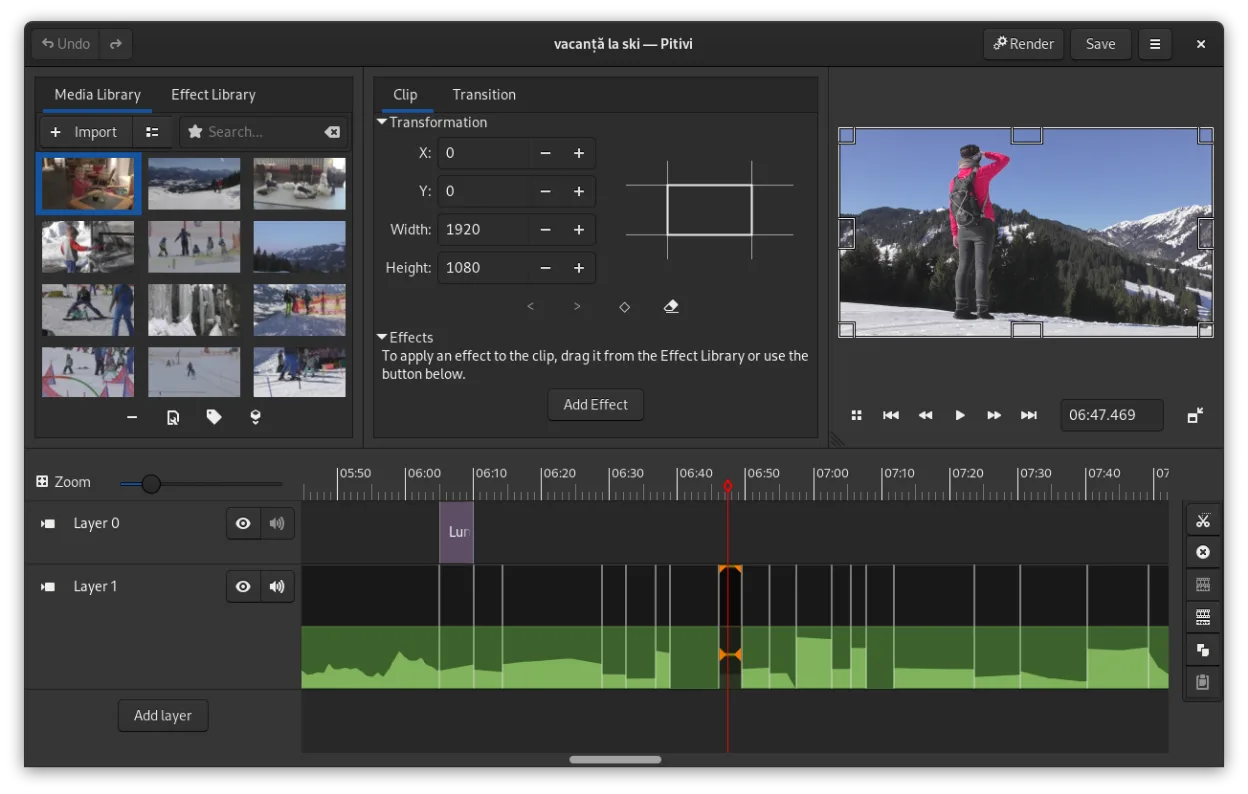
PiTiVi is a solid replacement for Microsoft Clipchamp if you're on Linux and want offline, no-watermark video editing without relying on a browser. It handles basic tasks like trimming, splitting, adding transitions, and text overlays cleanly. The interface is intuitive for beginners but also scales to more advanced use thanks to keyframing and timeline precision. However, it lacks built-in cloud export and has fewer preset effects than Clipchamp. If you value privacy, open-source software, and don't need web integration, PiTiVi works well for simple to mid-level projects.
- Lizenz
- LGPL-2.0+
- Preis
- Kostenlos
- Aktuelle Version
- 2023.03 (26. März 2023)
- Bewertung
- —
Was gleich funktioniert
- Simple drag-and-drop timeline editing with visual clarity
- Supports basic transitions including crossfades
- Text overlay and audio track editing available
- Exports to common formats like MP4 and MOV
- Free to use with no forced watermarking
Was anders ist
- PiTiVi is desktop-only and lacks Clipchamp's cloud-based workflow
- No built-in stock media library or online templates
- Fewer automated features like voice-over recording or auto-reframe
- Interface is GNOME-integrated but less flashy than Clipchamp's web UI
- No direct cloud export or rendering option
Ihre Microsoft Clipchamp-Dateien öffnen
PiTiVi supports any format GStreamer can handle, which includes MP4, MOV, AVI, and more—common formats used in Clipchamp. You can import and edit Clipchamp-exported videos without issue. However, project files aren't interchangeable since Clipchamp saves online and PiTiVi uses its own project format. If you have raw media from Clipchamp, PiTiVi will work with it. Project continuity isn't possible, but media is compatible.
Von Microsoft Clipchamp zu PiTiVi wechseln – Schritt für Schritt
- Install PiTiVi via Flathub or your distro's package manager
- Copy your video clips, audio, and images to a local folder
- Open PiTiVi and create a new project
- Drag media into the timeline and edit as needed
- Export using built-in presets for MP4 or custom settings
Wichtige Funktionen von PiTiVi
- Nicht-lineare Bearbeitung mit einer rahmenratenunabhängigen Zeitlinie
- Unterstützt jedes Format, das von GStreamer verarbeitet wird
- Keyframe-Animation für Effekte und Filter
- Ripple- und Roll-Bearbeitung für effiziente Zeitlinienanpassungen
- Benutzerdefinierte Seitenverhältnisse, Frameraten und Render-Voreinstellungen
- Crossfades und SMPTE-konforme Übergänge
- Abtrennbare UI-Panels für Multi-Monitor-Setups
- Nicht-modaler Bearbeitungsworkflow mit playhead-zentriertem Design
PiTiVi unter Linux installieren
flatpak install flathub org.pitivi.Pitivisudo apt install pitivisudo apt install pitivisudo dnf install pitivisudo pacman -S pitivisudo zypper install pitiviHäufige Fragen
Can I use PiTiVi without an internet connection?
Yes, PiTiVi runs entirely offline once installed. No internet is needed for editing or rendering.
Does PiTiVi add a watermark to exports?
No. PiTiVi is free and open-source, and does not add watermarks to any exported video.
Is PiTiVi harder to learn than Clipchamp?
It has a steeper initial curve for absolute beginners, but the layout is logical and efficient once you know basic timeline editing.
4 weitere Alternativen zu Microsoft Clipchamp
 KdenliveKdenlive ist ein kostenloser, funktionsreicher nichtlinearer Videoeditor, der auf dem MLT-Framework basiert.Open SourceKostenlosFlatpakKdenlive vs. Microsoft Clipchamp
 OliveOlive ist ein kostenloser, quelloffener nichtlinearer Video‑Editor für Linux.Open SourceKostenlosFlatpakOlive vs. Microsoft Clipchamp
 ShotcutShotcut ist ein kostenloser, quelloffener Videoeditor für Linux, der eine breite Palette von Formaten über…Open SourceKostenlosFlatpakShotcut vs. Microsoft Clipchamp
 OpenShotOpenShot ist ein kostenloser, quelloffener, nichtlinearer Videoeditor für Linux und andere Plattformen…Open SourceKostenlosFlatpakOpenShot vs. Microsoft Clipchamp