
 QtractorLinux
vs
Ableton Live SuiteWindows
Qtractor als Linux-Alternative zu Ableton Live Suite
Aktualisiert am
Unser Fazit
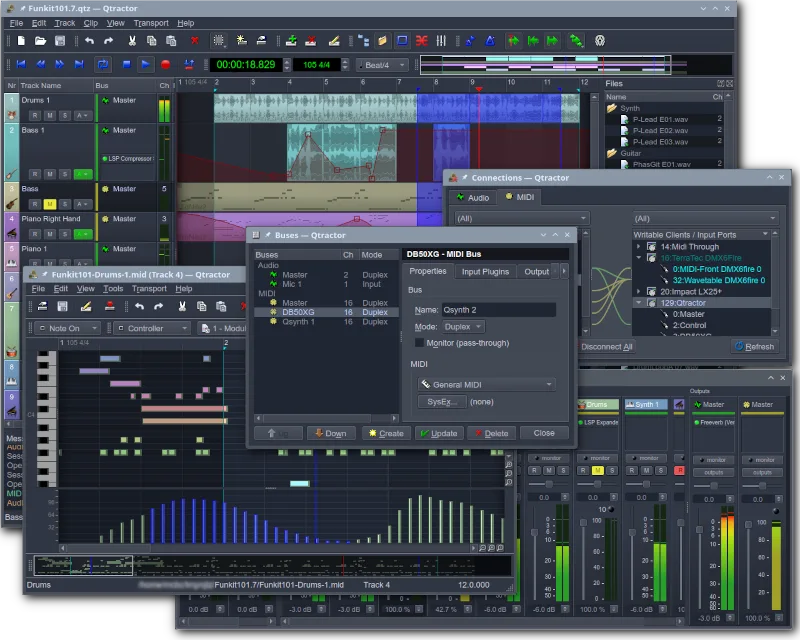
Qtractor is a capable free DAW for basic recording and mixing, but it is not a direct replacement for Ableton Live Suite. It lacks the Session View, which is central to Live’s workflow for live performance and improvisation. If you rely on VST plugins, Qtractor supports them, but the integration is less polished than Live’s. It suits users who need a lightweight, JACK-based sequencer for home studios and are willing to adapt to a different workflow. It is not suitable for those who depend on Live’s specific live performance features or complex automation capabilities.
- Lizenz
- GPL-2.0+
- Preis
- Kostenlos
- Aktuelle Version
- 1.7.0 (14. November 2026)
- Bewertung
- —
Was gleich funktioniert
- Multitrack audio and MIDI recording and editing
- Support for VST and LADSPA plugins
- Non-destructive editing and mixing capabilities
- Project saving and session management
Was anders ist
- Lacks Ableton’s Session View for live performance and grid-based workflow
- No native support for AU plugins, only VST and LADSPA
- Automation and modulation tools are less extensive than in Ableton Live
- Relies on JACK for audio, requiring additional setup compared to Live’s direct driver support
Ihre Ableton Live Suite-Dateien öffnen
Qtractor does not support opening Ableton Live project files (.als). You cannot directly import Live projects. You can export audio stems and MIDI files from Ableton Live and then import them into Qtractor to continue working, but all project-specific settings, automation, and plugin configurations will be lost and need to be recreated manually.
Von Ableton Live Suite zu Qtractor wechseln – Schritt für Schritt
- Export all audio tracks as WAV files from Ableton Live
- Export all MIDI tracks as Standard MIDI Files (SMF)
- Install Qtractor and configure JACK audio server
- Create a new project in Qtractor and import the exported audio and MIDI files
- Recreate any necessary effects, automation, and routing manually
Wichtige Funktionen von Qtractor
- Multitrack-Audio- und MIDI-Aufnahme
- Integration mit dem JACK-Audioserver
- ALSA-Unterstützung für MIDI-Geräte
- Unterstützung für VST- und LADSPA-Plugins
- Nicht-destruktives Bearbeiten und Mischen
- Integrierte Effekte und Verarbeitung
- Sitzungsverwaltung und Projekt-Speicherung
- Plattformübergreifende Kompatibilität über Qt
Qtractor unter Linux installieren
flatpak install flathub org.rncbc.qtractorsudo apt install qtractorsudo apt install qtractorsudo dnf install qtractorsudo pacman -S qtractorsudo zypper install qtractorHäufige Fragen
Can I use VST plugins in Qtractor?
Yes, Qtractor supports VST plugins. You may need to install additional libraries or configure paths to ensure your VSTs are detected, but it is a core feature.
Is Qtractor suitable for live performance?
It is not ideal for live performance in the same way Ableton Live is. It lacks a dedicated session view for triggering clips and improvising in a grid format. It is better suited for studio recording and mixing.
Does Qtractor work on Windows or macOS?
Qtractor is primarily designed for Linux. While it uses Qt which is cross-platform, the main audio and MIDI backends (JACK and ALSA) are Linux-specific. It is not a practical choice for Windows or macOS users.
5 weitere Alternativen zu Ableton Live Suite
 ArdourArdour ist ein professionelles, quelloffenes digitales Audio-Workstation-Programm zum Aufnehmen, Bearbeiten…Open SourceKostenlosFlatpakArdour vs. Ableton Live Suite
 Bitwig StudioBitwig Studio is a modern, cross‑platform DAW that blends production, performance, and sound design in one…FlatpakBitwig Studio vs. Ableton Live Suite
 ReaperREAPER is a full-featured digital audio workstation for Linux, offering multitrack recording, editing…FlatpakReaper vs. Ableton Live Suite
 LMMSLMMS ist ein kostenloses digitales Audio-Workstation-Programm zum Komponieren, Sequenzieren und Mischen von…Open SourceKostenlosFlatpakLMMS vs. Ableton Live Suite
 RosegardenRosegarden ist ein kostenloser MIDI-Sequenzer und Notationseditor für Linux, der DAW- und Notationsfunktionen…Open SourceKostenlosFlatpakRosegarden vs. Ableton Live Suite