
 Quod LibetLinux
vs
MediaMonkeyWindows
Quod LibetLinux
vs
MediaMonkeyWindows
Quod Libet als Linux-Alternative zu MediaMonkey
Aktualisiert am
Unser Fazit
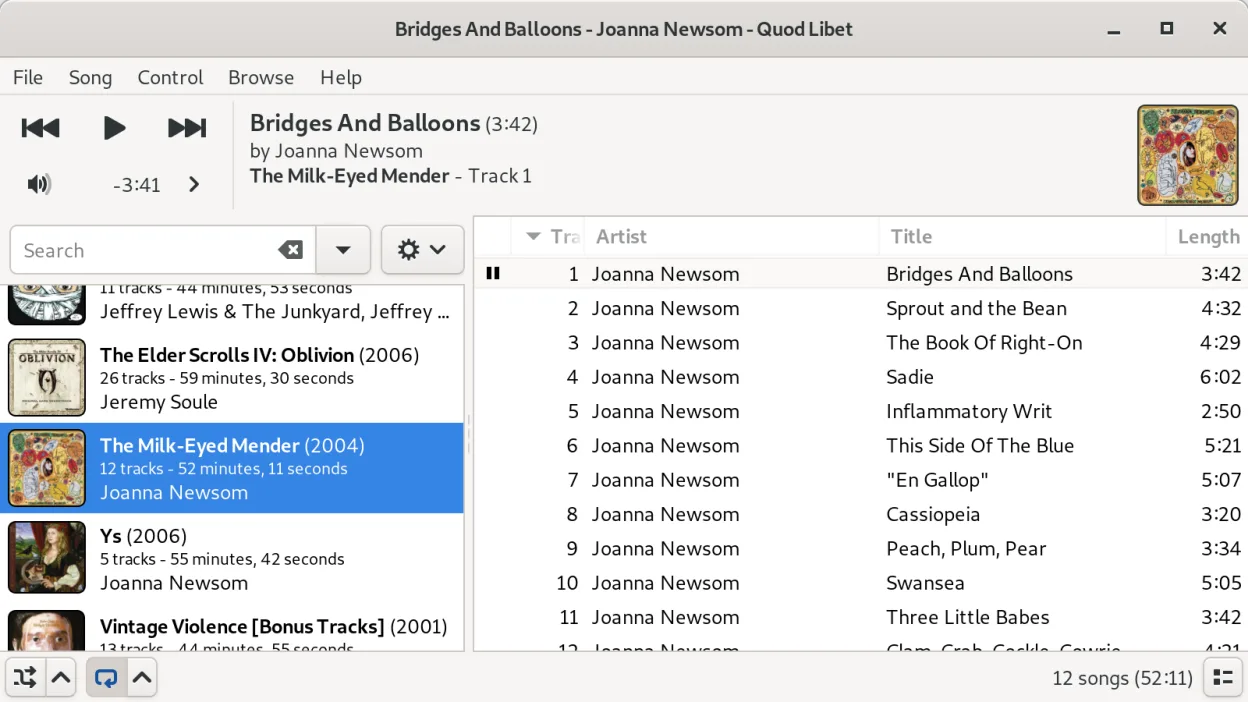
Quod Libet can replace MediaMonkey for most users who need a Linux‑native solution. It handles large libraries, offers powerful tag editing, supports the same wide range of audio formats, and can sync to devices via standard protocols. The interface is more minimal than MediaMonkey’s but still user‑friendly, especially for those who prefer a lightweight, open‑source stack. It is best suited for Linux users who want full control over metadata and library organization without relying on proprietary software.
- Lizenz
- GPL-2.0-or-later
- Preis
- Kostenlos
- Aktuelle Version
- 4.7.1 (31. Mai 2025)
- Bewertung
- —
Was gleich funktioniert
- Both manage large audio libraries and support multiple formats (MP3, FLAC, AAC, etc.)
- Both provide advanced tag editing and the ability to create custom playlists
- Both can play audio files directly from the library
- Both offer a clean interface with multiple view modes (list, album, tree)
Was anders ist
- Quod Libet lacks a built‑in media sync tool for specific devices (e.g., iPod) – you need external tools like gpodder or pydroid
- It does not include a built‑in audio conversion feature; format conversion must be done with separate utilities
- Quod Libet’s interface is more minimal and may feel sparse compared to MediaMonkey’s rich UI
- It does not support some Windows‑specific features like automatic backup to cloud services out of the box
Ihre MediaMonkey-Dateien öffnen
Quod Libet can import most common audio files directly, but it does not read MediaMonkey’s proprietary library database or playlist files. To migrate, export playlists from MediaMonkey as M3U or CSV, then import them into Quod Libet. For metadata, you can use a tool like MediaMonkey’s export feature to generate a CSV of tags, then use Quod Libet’s bulk tag editor to import the data.
Von MediaMonkey zu Quod Libet wechseln – Schritt für Schritt
- Export MediaMonkey playlists to M3U or CSV.
- Export the library’s tag data to a CSV file (MediaMonkey’s export function).
- Open Quod Libet and use the “Import Library” feature to add the audio files to the new library.
- Use Quod Libet’s bulk tag editor to import the CSV tag data.
- Import the M3U playlists into Quod Libet.
- Verify that all files play and tags are correct.
Wichtige Funktionen von Quod Libet
- Mehrere Bibliotheksansichten (Liste, Album, Baum, intelligente Wiedergabelisten)
- Erweiterte Tag-Bearbeitung mit Regex-Unterstützung
- Suche über Tags, Dateinamen und Songtexte
- Internetradio und Podcast-Feeds
- Breite Codec-Unterstützung einschließlich Ogg, FLAC, MP3, AAC, MOD, MIDI
- Anpassbare Tastaturkürzel
- Plugin-System für Erweiterungen
- Plattformübergreifend (Linux, macOS, Windows über Quellcode)
Quod Libet unter Linux installieren
flatpak install flathub io.github.quodlibet.QuodLibetsudo apt install quodlibetsudo apt install quodlibetsudo dnf install quodlibetsudo pacman -S quodlibetHäufige Fragen
Does Quod Libet support device sync?
It does not have a dedicated sync tool; you need external utilities like gpodder for iPods or simple file copying for other devices.
Can I use Quod Libet on Windows?
The source is available for Windows, but there is no official Windows build; the primary target is Linux.
Is there a way to convert audio formats within Quod Libet?
No built‑in converter; use external tools such as ffmpeg or soundconverter before adding files to the library.
2 weitere Alternativen zu MediaMonkey
 RhythmboxRhythmbox ist der Standard‑Musik‑Player von GNOME, entwickelt, um lokale und gestreamte Audiodateien mit…Open SourceKostenlosFlatpakRhythmbox vs. MediaMonkey
 Clementine Music PlayerClementine ist ein plattformübergreifender Musik‑Player, der lokale Dateien, Internetradio abspielt und…Open SourceKostenlosFlatpakClementine Music Player vs. MediaMonkey