
 Quod LibetLinux
vs
MusicBeeWindows
Quod LibetLinux
vs
MusicBeeWindows
Quod Libet als Linux-Alternative zu MusicBee
Aktualisiert am
Unser Fazit
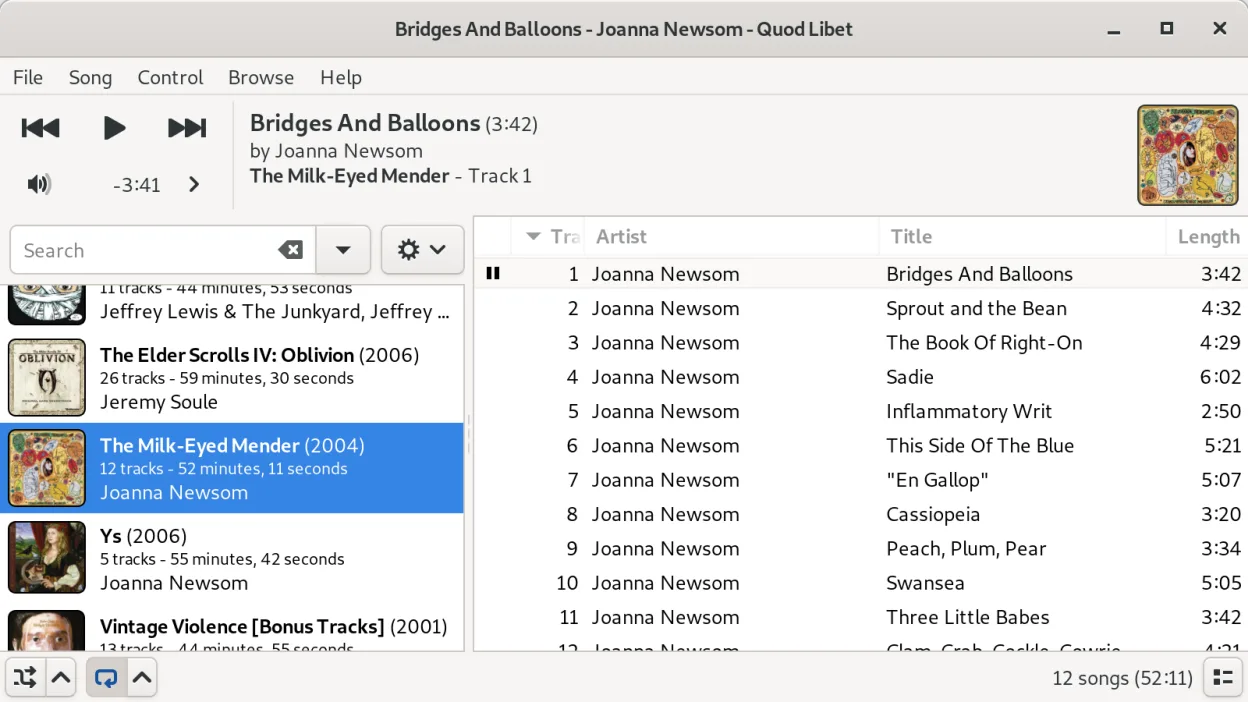
Quod Libet is a strong, if not perfect, replacement for MusicBee. It handles library organization, tag editing, and playback with equal or better flexibility for Linux users. The main gap is podcast management; while it supports RSS feeds, it lacks the dedicated, integrated podcast player experience MusicBee offers. If you rely heavily on podcasts, you might need a separate app. For pure music management, tag editing, and listening, Quod Libet covers the core needs effectively and is actively maintained.
- Lizenz
- GPL-2.0-or-later
- Preis
- Kostenlos
- Aktuelle Version
- 4.7.1 (31. Mai 2025)
- Bewertung
- —
Was gleich funktioniert
- Comprehensive audio library organization with multiple view modes (list, album, tree).
- Advanced tag editing capabilities, including bulk editing and regex support.
- Support for a wide range of audio codecs including MP3, FLAC, AAC, and Ogg formats.
- Plugin system to extend functionality and customize the interface.
- Smart playlists and flexible search across tags, filenames, and lyrics.
Was anders ist
- Podcast support is limited to RSS feed playback rather than a full-featured podcast manager with episode tracking.
- Quod Libet is primarily a Linux application (with source for other OS), whereas MusicBee is Windows-native.
- MusicBee has a more polished, modern UI out of the box; Quod Libet requires more configuration to look personal.
- Quod Libet does not have the same level of built-in gapless playback controls as MusicBee, though it supports the feature via codecs.
- MusicBee offers deeper integration with Windows desktop audio controls and system tray behaviors.
Ihre MusicBee-Dateien öffnen
Quod Libet does not natively import MusicBee's library files directly. You will need to export your MusicBee library to a standard format like CSV or M3U. Quod Libet can import M3U playlists easily. For tags, since both use standard ID3, Vorbis Comment, and FLAC metadata, your existing audio files will work immediately without conversion. You may need to re-scan your library in Quod Libet to build its internal database.
Von MusicBee zu Quod Libet wechseln – Schritt für Schritt
- Export your MusicBee library to a CSV file for backup and reference.
- Install Quod Libet via your package manager or Flathub.
- Point Quod Libet to your existing music directory and let it scan the files.
- Import any M3U playlists you created in MusicBee into Quod Libet.
- Configure your preferred view settings and tag editing rules in Quod Libet.
- Test playback of various file types to ensure codec support is working.
Wichtige Funktionen von Quod Libet
- Mehrere Bibliotheksansichten (Liste, Album, Baum, intelligente Wiedergabelisten)
- Erweiterte Tag-Bearbeitung mit Regex-Unterstützung
- Suche über Tags, Dateinamen und Songtexte
- Internetradio und Podcast-Feeds
- Breite Codec-Unterstützung einschließlich Ogg, FLAC, MP3, AAC, MOD, MIDI
- Anpassbare Tastaturkürzel
- Plugin-System für Erweiterungen
- Plattformübergreifend (Linux, macOS, Windows über Quellcode)
Quod Libet unter Linux installieren
flatpak install flathub io.github.quodlibet.QuodLibetsudo apt install quodlibetsudo apt install quodlibetsudo dnf install quodlibetsudo pacman -S quodlibetHäufige Fragen
Can Quod Libet replace MusicBee's podcast functionality?
Partially. It can subscribe to and play RSS audio feeds, but it lacks the dedicated podcast interface for managing episodes, syncing, and downloading that MusicBee provides. You may need a separate podcast app for full functionality.
Does Quod Libet support gapless playback?
Yes, Quod Libet supports gapless playback for formats like FLAC and MP3, though the configuration might differ slightly from MusicBee. It is a core feature for audiophiles.
Is Quod Libet easy to set up for a Windows user?
It has a steeper learning curve than MusicBee. The interface is functional but less polished out of the box. You will spend time configuring views and shortcuts, but the result is highly customizable.
4 weitere Alternativen zu MusicBee
 Clementine Music PlayerClementine ist ein plattformübergreifender Musik‑Player, der lokale Dateien, Internetradio abspielt und…Open SourceKostenlosFlatpakClementine Music Player vs. MusicBee
 RhythmboxRhythmbox ist der Standard‑Musik‑Player von GNOME, entwickelt, um lokale und gestreamte Audiodateien mit…Open SourceKostenlosFlatpakRhythmbox vs. MusicBee
 DeadBeefDeadBeef ist ein leichter, pluginbasierter Audio-Player für Linux.Open SourceKostenlosDeadBeef vs. MusicBee
 LollypopLollypop ist ein leichtgewichtiger, moderner Musikspieler für GNOME, mit dem Sie Ihre Musiksammlung…Open SourceKostenlosFlatpakLollypop vs. MusicBee