
 ShotwellLinux
vs
Adobe Lightroom MobileWindows
ShotwellLinux
vs
Adobe Lightroom MobileWindows
Shotwell als Linux-Alternative zu Adobe Lightroom Mobile
Aktualisiert am
Unser Fazit
Shotwell is a reasonable replacement for casual users who need basic organization and non-destructive tweaks, but it is not a direct substitute for Adobe Lightroom Mobile. It lacks the advanced color grading, exposure controls, and batch processing power that Lightroom users rely on. If your workflow involves heavy RAW editing or professional-grade color correction, Shotwell will feel limiting. However, for managing a personal photo library with simple fixes like cropping and red-eye removal, it is a solid, lightweight GNOME-native option that handles the core job of organizing and lightly editing images without the complexity of full desktop Lightroom.
- Lizenz
- LGPL-2.1+
- Preis
- Kostenlos
- Aktuelle Version
- 33.0 (13. September 2026)
- Bewertung
- —
Was gleich funktioniert
- Non-destructive editing workflow that preserves original files
- Support for RAW, JPEG, PNG, and TIFF file formats
- Photo organization using dates, tags, and ratings
- Basic color and exposure adjustments available in the editor
Was anders ist
- Lacks advanced color grading and fine-grained exposure tools found in Lightroom
- No dedicated batch processing capabilities for applying edits to multiple photos
- Missing professional print export options and web-specific optimization presets
- Interface is simpler and less feature-dense than Lightroom's mobile UI
Ihre Adobe Lightroom Mobile-Dateien öffnen
Shotwell supports standard RAW formats, JPEG, PNG, and TIFF, so it can open most photos exported from Lightroom Mobile. However, it does not import Lightroom Catalog files (.lrcat) or XMP sidecar files directly for metadata management. You will need to export your photos as standard image files from Lightroom Mobile first. Since Lightroom Mobile edits are non-destructive, the underlying image data remains intact, but any specific Lightroom adjustments or metadata tags will not transfer to Shotwell automatically.
Von Adobe Lightroom Mobile zu Shotwell wechseln – Schritt für Schritt
- Export your edited photos from Lightroom Mobile as JPEG or TIFF files
- Transfer the exported files to your Linux machine via USB or cloud sync
- Open Shotwell and import the folder containing your exported images
- Re-apply any essential tags or ratings within Shotwell's interface
- Review your library to ensure all RAW files are recognized correctly
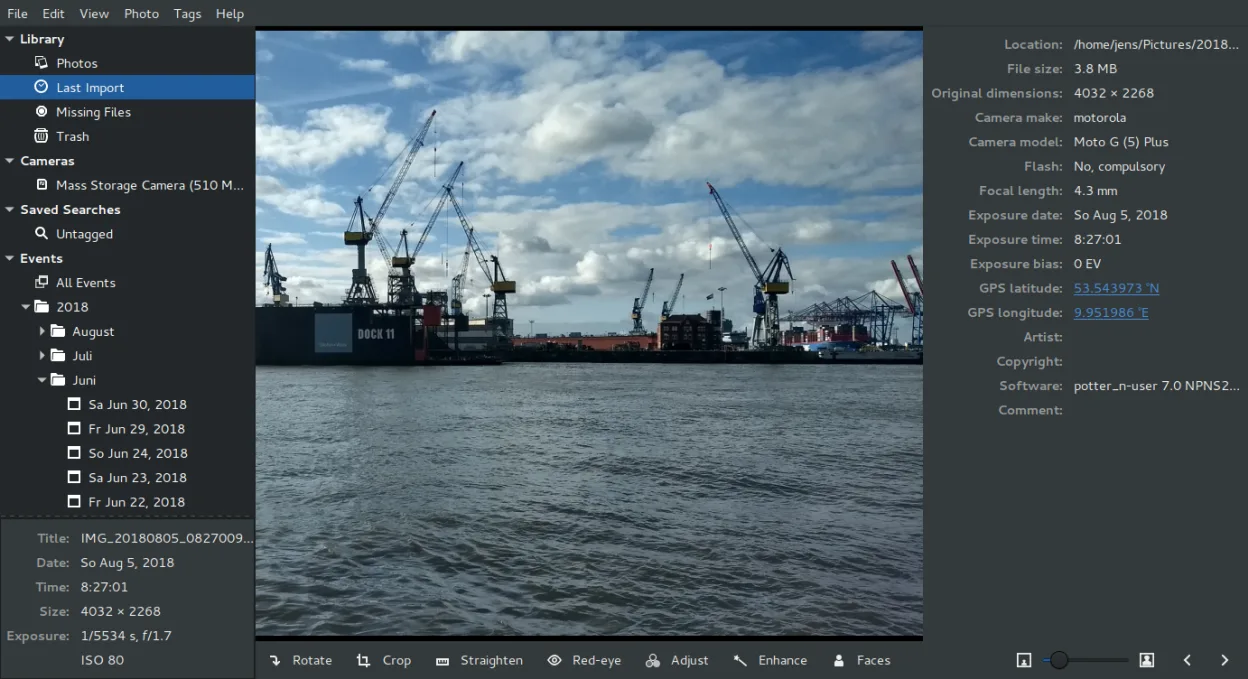
Wichtige Funktionen von Shotwell
- Fotos von Kamera oder Festplatte importieren
- Nach Datum, Tags und Bewertungen organisieren
- Nicht destruktives Zuschneiden, Rote-Augen-Korrektur, Farbe, Ausrichten
- Unterstützung für RAW, JPEG, PNG, TIFF
- Hochladen zu Flickr, Google Photos usw.
- Schnelle, leichte Benutzeroberfläche
- Integration in den GNOME-Dateimanager
Shotwell unter Linux installieren
flatpak install flathub org.gnome.Shotwellsudo apt install shotwellsudo apt install shotwellsudo dnf install shotwellsudo pacman -S shotwellsudo zypper install shotwellHäufige Fragen
Can Shotwell handle complex RAW editing like Lightroom?
No, Shotwell offers basic color and exposure adjustments but lacks the advanced tone curves, HSL sliders, and local adjustments that Lightroom provides.
Does Shotwell support batch editing?
Shotwell does not have a dedicated batch processing tool for applying edits to multiple images at once, which is a significant limitation for large libraries.
Is Shotwell available on all Linux distributions?
Yes, it is packaged in major distributions like Fedora, Ubuntu, Debian, and Arch, and is also available via Flathub for broader compatibility.
4 weitere Alternativen zu Adobe Lightroom Mobile
 darktabledarktable ist ein kostenloser, quelloffener Bildbearbeitungsprogrammier, der Rohdateien verwaltet und einen…Open SourceKostenlosFlatpakdarktable vs. Adobe Lightroom Mobile
 RawTherapeeRawTherapee ist ein quelloffenes, plattformübergreifendes Programm zur Entwicklung von Raw-Fotos.Open SourceKostenlosFlatpakRawTherapee vs. Adobe Lightroom Mobile
 GIMPGIMP ist ein kostenloser, quelloffener Rastergrafik‑Editor für Fotobearbeitung, digitale Malerei und…Open SourceKostenlosFlatpakGIMP vs. Adobe Lightroom Mobile
 digiKamdigiKam ist ein umfassender KDE-Fotomanager zum Organisieren, Taggen und Bearbeiten digitaler Fotos mit…Open SourceKostenlosFlatpakdigiKam vs. Adobe Lightroom Mobile