
 ThonnyLinux
vs
JetBrains PyCharmWindows
Thonny als Linux-Alternative zu JetBrains PyCharm
Aktualisiert am
Unser Fazit
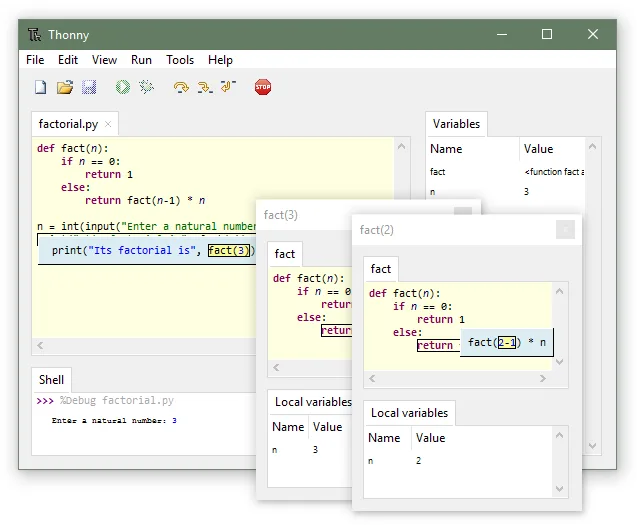
Thonny is not a full replacement for JetBrains PyCharm. It works well for beginners and small scripts, offering syntax highlighting, autocompletion, a visual debugger, and a simple package manager. Advanced users who need sophisticated refactoring, multi‑project management, or deep VCS integration will find it lacking. PyCharm remains the better choice for medium‑to‑large projects or professional development.
- Lizenz
- MIT
- Preis
- Kostenlos
- Aktuelle Version
- 5.0.1 (26. Oktober 2026)
- Bewertung
- —
Was gleich funktioniert
- Python syntax highlighting and autocompletion
- Integrated graphical debugger
- Support for virtual environments
- Cross‑platform packaging (deb, rpm, Flatpak)
- Basic REPL console
Was anders ist
- Thonny lacks advanced refactoring tools (e.g., rename, extract method)
- No built‑in unit test runner or test explorer
- Limited VCS integration (no Git GUI, only basic commands)
- No support for multi‑project workspaces
- No advanced profiling or performance tools
Ihre JetBrains PyCharm-Dateien öffnen
Thonny does not open PyCharm project files (.idea) or settings. To migrate, you would need to recreate the project structure manually in Thonny, importing any external modules via its package manager.
Von JetBrains PyCharm zu Thonny wechseln – Schritt für Schritt
- Create a new Thonny project folder
- Copy your Python scripts into the folder
- Use Thonny's package manager to install any required third‑party modules
- Reconfigure virtual environments via Thonny's settings
- Set up any needed test scripts manually
Wichtige Funktionen von Thonny
- Integrierter Debugger mit schrittweiser Visualisierung
- GUI‑Paketinstaller
- Spezial‑Referenzmodus zum Lernen des Speicher‑Managements
- Einfaches, ein‑Fenster‑Layout
- Python 3.10+ Unterstützung
- Plattformübergreifend (Linux, Windows, macOS)
- Open source (MIT)
Thonny unter Linux installieren
flatpak install flathub org.thonny.Thonnysudo apt install thonnysudo apt install thonnysudo dnf install thonnysudo zypper install thonnyHäufige Fragen
Can I use Thonny with a virtual environment created by PyCharm?
Yes, point Thonny to the same virtual environment by selecting it in the interpreter settings.
Does Thonny support Git?
It has basic Git command integration via the terminal, but no graphical Git interface.
Is Thonny suitable for large codebases?
It can open large files, but features like code navigation, refactoring, and performance profiling are limited, making it less suitable for large projects.
5 weitere Alternativen zu JetBrains PyCharm
 Visual Studio CodeEin leichter, erweiterbarer Code-Editor, der Debugging, Git und viele Sprachen unterstützt.KostenlosFlatpakVisual Studio Code vs. JetBrains PyCharm
 SpyderSpyder ist eine kostenlose, quelloffene Python‑IDE, die speziell für wissenschaftliches Rechnen, Datenanalyse…Open SourceKostenlosFlatpakSpyder vs. JetBrains PyCharm
 GeanyGeany ist eine leichte, schnelle IDE, die von Haus aus viele Sprachen und Plugins unterstützt.Open SourceKostenlosFlatpakGeany vs. JetBrains PyCharm
 KateKate ist ein funktionsreicher, auf Programmierer ausgerichteter Texteditor von KDE mit Unterstützung für über…Open SourceKostenlosFlatpakKate vs. JetBrains PyCharm
 VimVim ist ein hochgradig konfigurierbarer, modaler Texteditor für effizientes Bearbeiten unter Linux.Open SourceKostenlosFlatpakVim vs. JetBrains PyCharm