
 Xournal++Linux
vs
SketchBookWindows
Xournal++ als Linux-Alternative zu SketchBook
Aktualisiert am
Unser Fazit
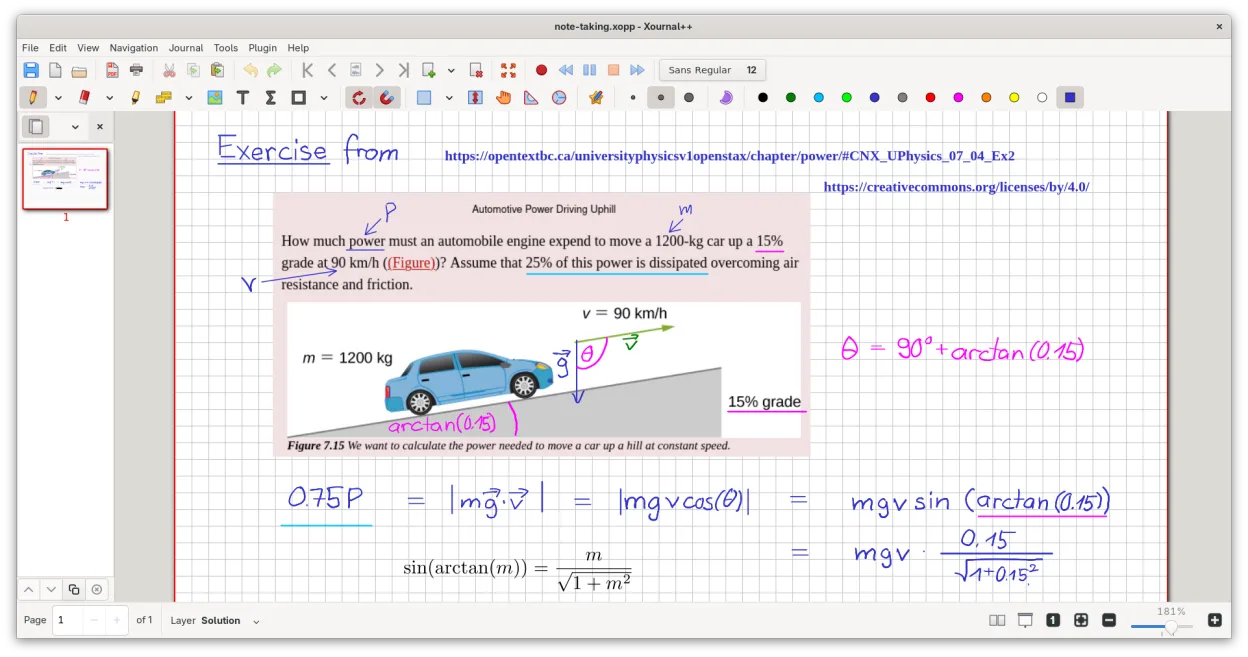
Xournal++ is a solid replacement for SketchBook if your workflow centers on vector-like sketching, annotation, or technical drawing. It handles pressure-sensitive input well and offers a clean, minimal interface. However, it is not a raster painting engine. If you rely on complex brush dynamics, blending modes, or heavy digital painting, you will hit a wall. For concept artists needing layers and PDF export, it works. For illustrators needing wet-in-wet effects, it does not. Choose it for notes and line art, not for full digital painting.
- Lizenz
- GPL-2.0
- Preis
- Kostenlos
- Aktuelle Version
- 1.3.8 (25. September 2026)
- Bewertung
- —
Was gleich funktioniert
- Supports pressure-sensitive styluses from major brands like Wacom, Huion, and XP-Pen
- Provides a clean, minimal interface focused on the canvas
- Includes layer management for organizing different parts of a drawing
- Offers basic drawing tools like pens, highlighters, and shape tools
- Exports to common formats like PNG and PDF
Was anders ist
- Xournal++ is vector-based for strokes, while SketchBook is a raster engine
- Lacks advanced raster brush dynamics, blending modes, and alpha channel manipulation
- No support for complex image editing filters or color management typical in raster apps
- Focused on annotation and note-taking rather than pure artistic painting
- Does not support loading proprietary SketchBook .skb files directly
Ihre SketchBook-Dateien öffnen
Xournal++ cannot open SketchBook's native .sfb or .sfbx files. You must export your work from SketchBook as a raster image (PNG or JPG) or vector format (SVG) if available. Once exported to a standard image format, you can import it into Xournal++ as a background image to annotate or trace over. Direct file compatibility does not exist between the two formats.
Von SketchBook zu Xournal++ wechseln – Schritt für Schritt
- Export your current SketchBook projects as high-resolution PNG or JPG files
- Install Xournal++ via your package manager or Flathub
- Create a new document in Xournal++ and set the page size to match your original
- Insert the exported image as a background layer in Xournal++
- Lock the background layer to prevent accidental editing
- Begin tracing or annotating on top of the imported image using the pen tool
Wichtige Funktionen von Xournal++
- Drucksensitive Stiftunterstützung für Wacom-, Huion- und XP-Pen-Tablets
- Annotieren, Hervorheben und Durchstreichen von Text auf PDF-Dateien
- Exportieren von Notizen nach PDF, PNG und SVG über die grafische Oberfläche oder die Kommandozeile
- Zeichenwerkzeuge wie Stift, Textmarker, Formen und LaTeX-Unterstützung
- Eingabestabilisierung für gleichmäßigere Handschrift
- Anpassbare Symbolleiste und Zuweisung von Werkzeugen zu Stifttasten
- Seitenleiste mit Seitenvorschauen, PDF-Lesezeichen und Ebenenverwaltung
Xournal++ unter Linux installieren
flatpak install flathub com.github.xournalpp.xournalppsudo apt install xournalppsudo apt install xournalppsudo dnf install xournalppsudo pacman -S xournalppsudo zypper install xournalppHäufige Fragen
Can I use Xournal++ for digital painting?
It is not ideal for traditional digital painting. It lacks raster brush dynamics and blending modes. It excels at line art, sketching, and annotation, but not for creating textured, painted artworks.
Does it support custom brushes?
Xournal++ does not support custom raster brush files. You can adjust stroke width, color, and opacity, and use different tool types like pen or highlighter, but you cannot import .abr or similar brush packs.
Is the interface similar to SketchBook?
Both are minimal, but Xournal++ is more utility-focused. It has a sidebar for pages and PDFs, which SketchBook lacks. The tool palette is simpler in Xournal++, reflecting its focus on writing and basic drawing rather than complex art tools.
4 weitere Alternativen zu SketchBook
 KritaKrita ist ein vollwertiges Open‑Source-Programm für digitales Malen und Illustration.Open SourceKostenlosFlatpakKrita vs. SketchBook
 MyPaintMyPaint ist ein schnelles, kostenloses Open-Source-Rasterprogramm, das sich auf Pinseldynamik und die Nutzung…Open SourceKostenlosFlatpakMyPaint vs. SketchBook
 GIMPGIMP ist ein kostenloser, quelloffener Rastergrafik‑Editor für Fotobearbeitung, digitale Malerei und…Open SourceKostenlosFlatpakGIMP vs. SketchBook
 PintaPinta ist ein kostenloser, quelloffener Bitmap‑Editor, der Paint.NET mit einer einfachen Oberfläche und…Open SourceKostenlosFlatpakPinta vs. SketchBook