
 darktableLinux
vs
Adobe Lightroom CCWindows
darktable como alternativa Linux a Adobe Lightroom CC
Actualizado el
Nuestra opinión
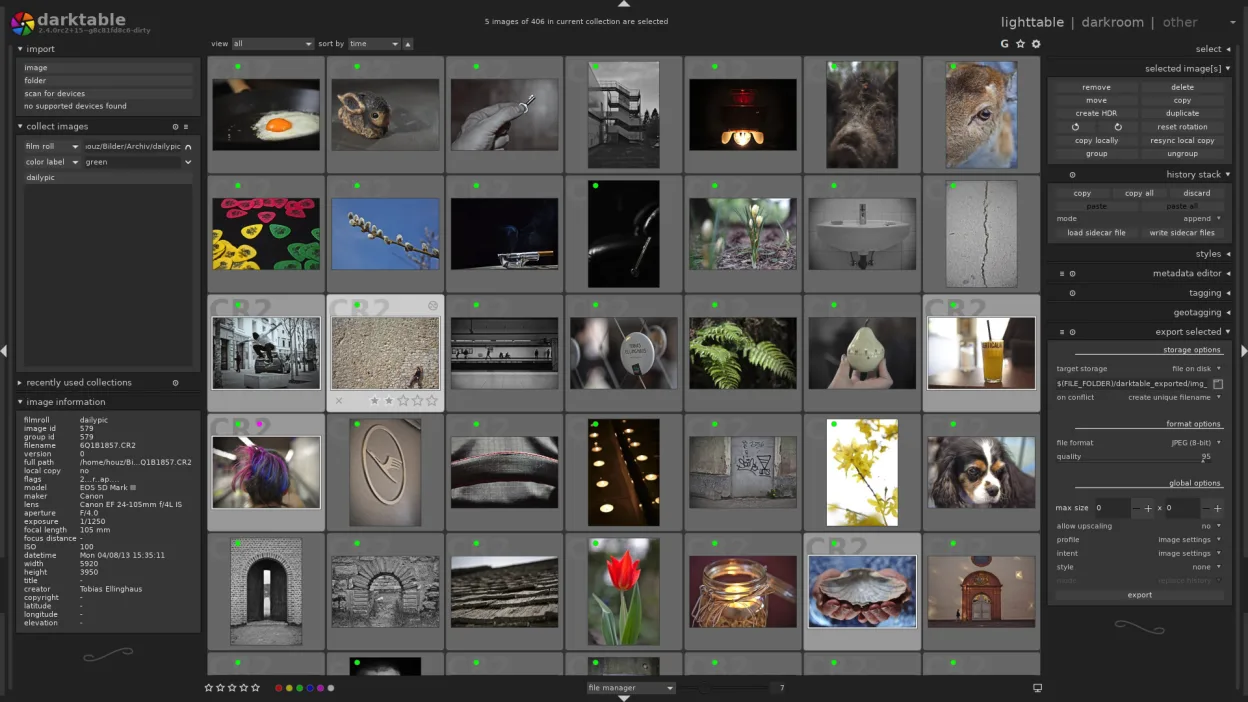
darktable is a solid, free alternative to Adobe Lightroom CC for photographers who need non‑destructive RAW editing and cataloging. It covers most of the core workflow: import, develop, batch export, keyword tagging, rating, and presets. It is best suited for users who prefer open source, Linux‑native software and are comfortable with a slightly steeper learning curve compared to Lightroom’s polished UI.
- Licencia
- GPL-3.0+
- Precio
- Gratis
- Última versión
- 5.6.2 (4 de octubre de 2026)
- Valoración
- —
Lo que funciona igual
- Non‑destructive RAW processing with a history stack
- Central database for image cataloging
- Batch export and keyword/rating system
- Support for presets and profiles
- High‑precision color grading and tone controls
Lo que cambia
- No native support for Lightroom’s cloud sync or mobile app integration
- Tethering requires a separate setup and may not be as streamlined
- Export presets for Lightroom’s specific file formats (XMP sidecar) are not automatically compatible
- User interface is more utilitarian and less polished
- No built‑in Lightroom‑style mobile app
Abrir tus archivos de Adobe Lightroom CC
darktable can open RAW files that Lightroom CC supports, but it does not read Lightroom catalog (.lrcat) or XMP sidecar files directly. Exporting to common formats (JPEG, TIFF, DNG) works, but Lightroom‑specific presets or metadata may need to be recreated manually.
Pasar de Adobe Lightroom CC a darktable, paso a paso
- Export your Lightroom catalog images to a folder as DNG or TIFF, preserving metadata if possible.
- Open the exported folder in darktable and let it index the images into its database.
- Recreate keyword tags and ratings in darktable using its keyword panel.
- Reapply any custom presets by creating or importing them into darktable’s preset library.
- Adjust any color profiles or LUTs manually, as they may not transfer automatically.
- Verify batch export settings to match your previous Lightroom workflow.
Funciones clave de darktable
- Edición no destructiva con historial
- Modos mesa de luz y cuarto oscuro
- Procesamiento raw de alta precisión
- Vista de mapa con geolocalización
- Soporte de tethering
- Modos de impresión y presentación
- Extensible mediante scripts Python
Cómo instalar darktable en Linux
flatpak install flathub org.darktable.Darktablesudo apt install darktablesudo apt install darktablesudo dnf install darktablesudo pacman -S darktablesudo zypper install darktablePreguntas frecuentes
Can I import my Lightroom presets into darktable?
darktable can import some Lightroom XMP presets if they are compatible, but many will need to be recreated manually. Use the preset import tool or convert them to darktable’s own format.
Does darktable support tethering like Lightroom?
Yes, darktable has a tethering module, but it requires a separate configuration and may not support all camera models as seamlessly as Lightroom’s built‑in tethering.
Will my Lightroom catalog data be lost when switching to darktable?
The catalog (.lrcat) itself is not readable by darktable, so you’ll need to re‑create tags, ratings, and collections manually. Exporting images with metadata preserved helps retain most of the information.
Otras 3 alternativas a Adobe Lightroom CC
 RawTherapeeRawTherapee es un programa de desarrollo fotográfico raw de código abierto y multiplataforma.Código abiertoGratisFlatpakRawTherapee vs Adobe Lightroom CC
 digiKamdigiKam es un gestor de fotos de KDE integral para organizar, etiquetar y editar fotos digitales con un…Código abiertoGratisFlatpakdigiKam vs Adobe Lightroom CC
 ShotwellShotwell es un gestor de fotos de GNOME para importar, organizar y editar ligeramente imágenes.Código abiertoGratisFlatpakShotwell vs Adobe Lightroom CC