
 darktableLinux
vs
Corel PaintShop Pro 2022Windows
darktable como alternativa Linux a Corel PaintShop Pro 2022
Actualizado el
Nuestra opinión
darktable is not a direct replacement for Corel PaintShop Pro 2022 if you need digital painting or general raster editing. It is a specialized raw photo processor. For users whose workflow is strictly organizing, developing, and retouching raw camera files, it is an excellent, powerful alternative. However, if you rely on layers for compositing, use it for digital art, or need a general-purpose image editor for non-raw formats, you will find darktable lacking. It serves the 'photo lab' role, not the 'paint shop' role.
- Licencia
- GPL-3.0+
- Precio
- Gratis
- Última versión
- 5.6.2 (4 de octubre de 2026)
- Valoración
- —
Lo que funciona igual
- Both handle high-resolution raster images for photo enhancement.
- Both offer non-destructive editing workflows (history stack vs. layers).
- Both include tools for color correction, exposure adjustment, and retouching (healing/clone).
- Both support batch processing for large sets of photos.
- Both provide extensive libraries of filters and effects for image manipulation.
Lo que cambia
- darktable lacks a true layer-based compositing engine; it uses a module stack instead.
- darktable has no digital painting or drawing tools (no brushes for art, only for retouching).
- Corel PaintShop Pro is a general-purpose raster editor; darktable is specialized for raw photo development.
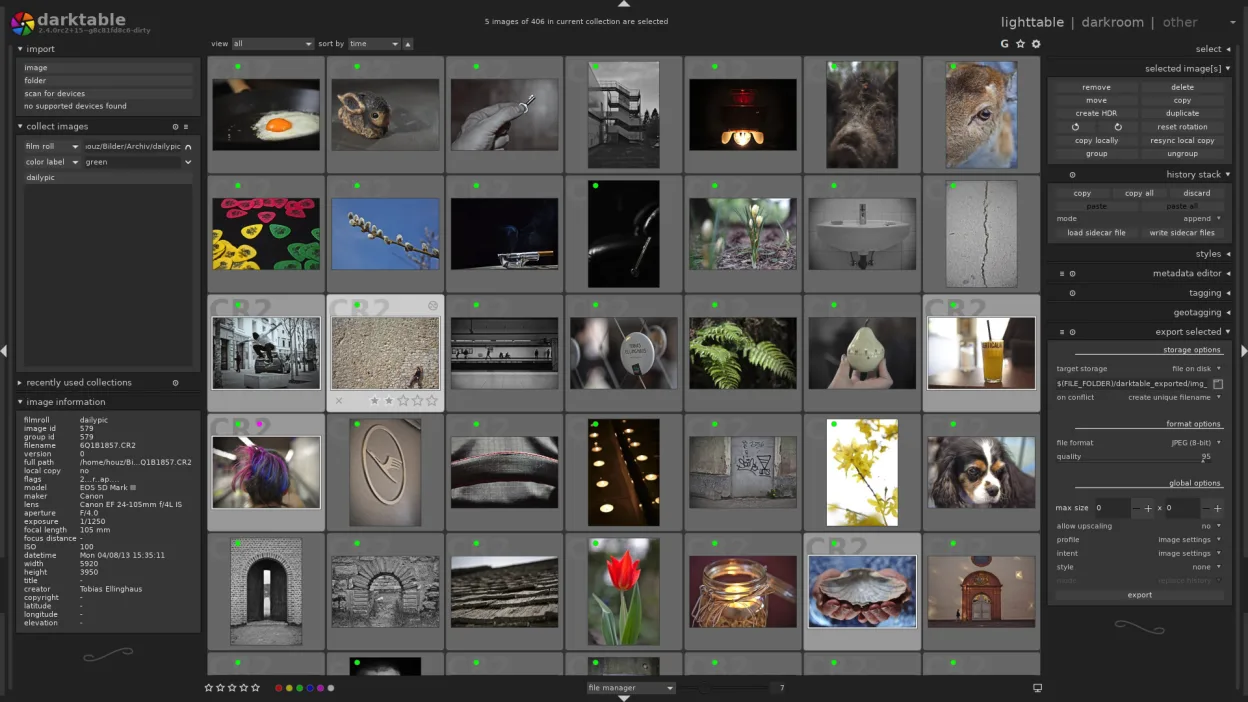
- darktable’s interface is organized around workflow modes (lighttable, darkroom) rather than a single canvas view.
- darktable does not support PSD files for editing, only for import in limited contexts.
Abrir tus archivos de Corel PaintShop Pro 2022
darktable is primarily designed for raw files (CR2, NEF, ARW, etc.) and DNG. It can open and export common formats like JPEG, PNG, and TIFF. It does not natively open or edit .PSD files from PaintShop Pro as a primary workflow; while it may import some PSDs for viewing, you cannot perform layer-based edits on them. If your PaintShop Pro files are flattened JPEGs or TIFFs, they will open fine. If they are complex layered PSDs, you will lose the layer structure.
Pasar de Corel PaintShop Pro 2022 a darktable, paso a paso
- Install darktable via your package manager or Flathub.
- Import your raw photo folders into the darktable library.
- Set up your preferred color profile and output settings.
- Learn the difference between lighttable (culling) and darkroom (editing) modes.
- Export your processed images to JPEG or TIFF for final use or sharing.
- Keep GIMP or Krita installed for any tasks requiring layers or digital painting.
Funciones clave de darktable
- Edición no destructiva con historial
- Modos mesa de luz y cuarto oscuro
- Procesamiento raw de alta precisión
- Vista de mapa con geolocalización
- Soporte de tethering
- Modos de impresión y presentación
- Extensible mediante scripts Python
Cómo instalar darktable en Linux
flatpak install flathub org.darktable.Darktablesudo apt install darktablesudo apt install darktablesudo dnf install darktablesudo pacman -S darktablesudo zypper install darktablePreguntas frecuentes
Can I use darktable for digital painting?
No. darktable is a photo editor, not a painting program. It has retouching brushes, but no tools for creating digital art from scratch. Use Krita or GIMP for that.
Does darktable support layers like PaintShop Pro?
No. darktable uses a non-destructive module stack. You cannot composite multiple images together using layers. For compositing, use GIMP.
Will my PaintShop Pro presets work in darktable?
No. Presets and filters are not compatible between the two applications. You will need to recreate your adjustments using darktable’s modules.
Otras 3 alternativas a Corel PaintShop Pro 2022
 GIMPGIMP es un editor de gráficos rasterizados gratuito y de código abierto para edición fotográfica, pintura…Código abiertoGratisFlatpakGIMP vs Corel PaintShop Pro 2022
 KritaKrita es un programa de pintura digital e ilustración de código abierto con todas las funciones.Código abiertoGratisFlatpakKrita vs Corel PaintShop Pro 2022
 RawTherapeeRawTherapee es un programa de desarrollo fotográfico raw de código abierto y multiplataforma.Código abiertoGratisFlatpakRawTherapee vs Corel PaintShop Pro 2022