
 darktableLinux
vs
Lightroom MobileWindows
darktable como alternativa Linux a Lightroom Mobile
Actualizado el
Nuestra opinión
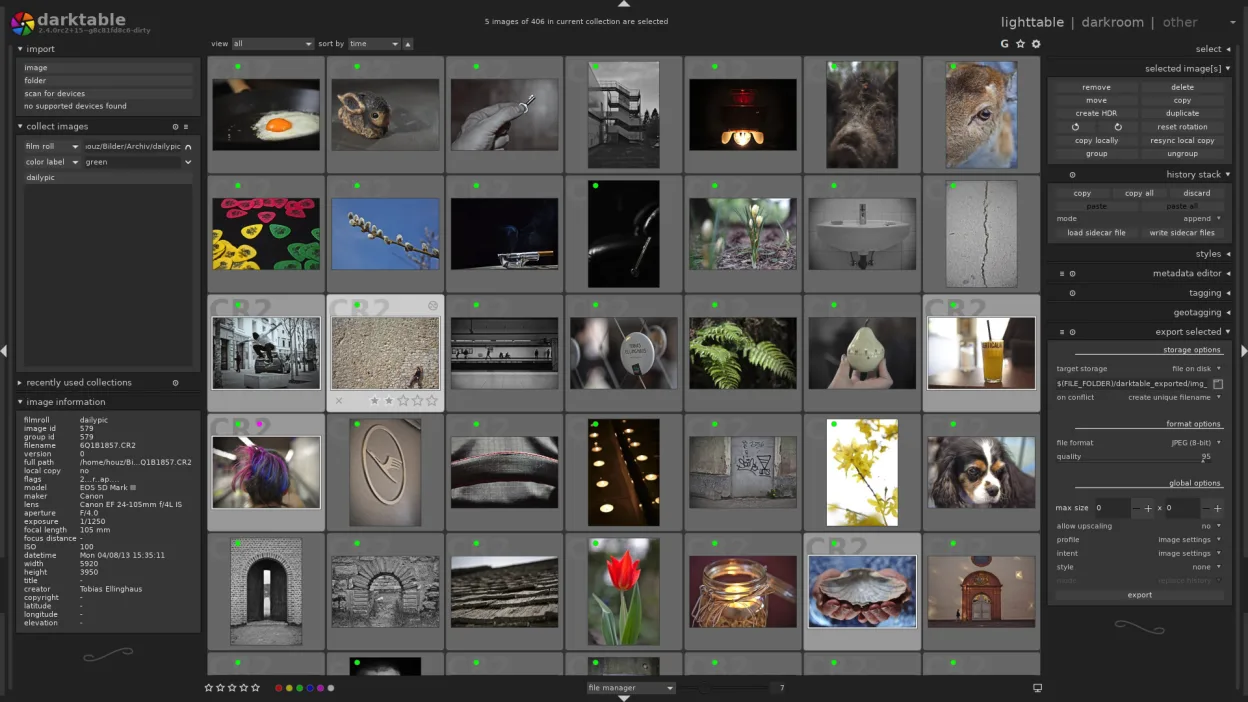
darktable is a solid replacement for Lightroom Mobile for users who need a free, open‑source, non‑destructive RAW editor on Linux. It handles RAW import, editing, metadata tagging, and batch export, and offers a mobile‑friendly workflow through its lighttable and darkroom modes. It is best suited for photographers who prefer a desktop workflow and are comfortable with a steeper learning curve compared to the streamlined mobile app.
- Licencia
- GPL-3.0+
- Precio
- Gratis
- Última versión
- 5.6.2 (4 de octubre de 2026)
- Valoración
- —
Lo que funciona igual
- Non‑destructive RAW editing with a history stack
- Metadata tagging and geotagging support
- Batch export of images
- Cloud‑style organization via a database
- Availability of presets (darktable’s presets vs Lightroom Mobile’s filters)
Lo que cambia
- darktable is a desktop application, not a mobile app – it lacks native touch gestures and on‑screen camera controls
- No built‑in cloud sync; users must set up external sync solutions
- No direct integration with Adobe Creative Cloud or Lightroom catalog
- No mobile‑specific UI optimizations such as quick‑capture workflow
- Requires manual installation of Python scripts for extended functionality
Abrir tus archivos de Lightroom Mobile
darktable can open most RAW formats used by Lightroom Mobile, but it cannot directly import Lightroom Mobile catalog files (.lrcat) or sync edits from the cloud. Exporting from darktable to JPEG/PNG works fine, and users can then upload those files to Lightroom Mobile if needed.
Pasar de Lightroom Mobile a darktable, paso a paso
- Export all images from Lightroom Mobile to a folder in JPEG or RAW format.
- Install darktable from your distribution’s package manager or Flathub.
- Import the exported folder into darktable’s lighttable mode.
- Create a new darktable preset that mimics your Lightroom Mobile presets if desired.
- Use the map view to re‑apply geotags if they were lost during export.
- Export edited images and, if needed, re‑upload them to Lightroom Mobile for cloud backup.
Funciones clave de darktable
- Edición no destructiva con historial
- Modos mesa de luz y cuarto oscuro
- Procesamiento raw de alta precisión
- Vista de mapa con geolocalización
- Soporte de tethering
- Modos de impresión y presentación
- Extensible mediante scripts Python
Cómo instalar darktable en Linux
flatpak install flathub org.darktable.Darktablesudo apt install darktablesudo apt install darktablesudo dnf install darktablesudo pacman -S darktablesudo zypper install darktablePreguntas frecuentes
Can I use darktable on my phone?
No, darktable is a desktop application. For mobile editing you would need a different app.
Does darktable sync with Lightroom Mobile?
No, there is no direct sync. You must manually export/import files between the two.
Is darktable free?
Yes, darktable is free and open source under the GPL‑3.0+ license.
Otras 4 alternativas a Lightroom Mobile
 RawTherapeeRawTherapee es un programa de desarrollo fotográfico raw de código abierto y multiplataforma.Código abiertoGratisFlatpakRawTherapee vs Lightroom Mobile
 digiKamdigiKam es un gestor de fotos de KDE integral para organizar, etiquetar y editar fotos digitales con un…Código abiertoGratisFlatpakdigiKam vs Lightroom Mobile
 GIMPGIMP es un editor de gráficos rasterizados gratuito y de código abierto para edición fotográfica, pintura…Código abiertoGratisFlatpakGIMP vs Lightroom Mobile
 ShotwellShotwell es un gestor de fotos de GNOME para importar, organizar y editar ligeramente imágenes.Código abiertoGratisFlatpakShotwell vs Lightroom Mobile