
 darktableLinux
vs
Luminar AIWindows
darktable como alternativa Linux a Luminar AI
Actualizado el
Nuestra opinión
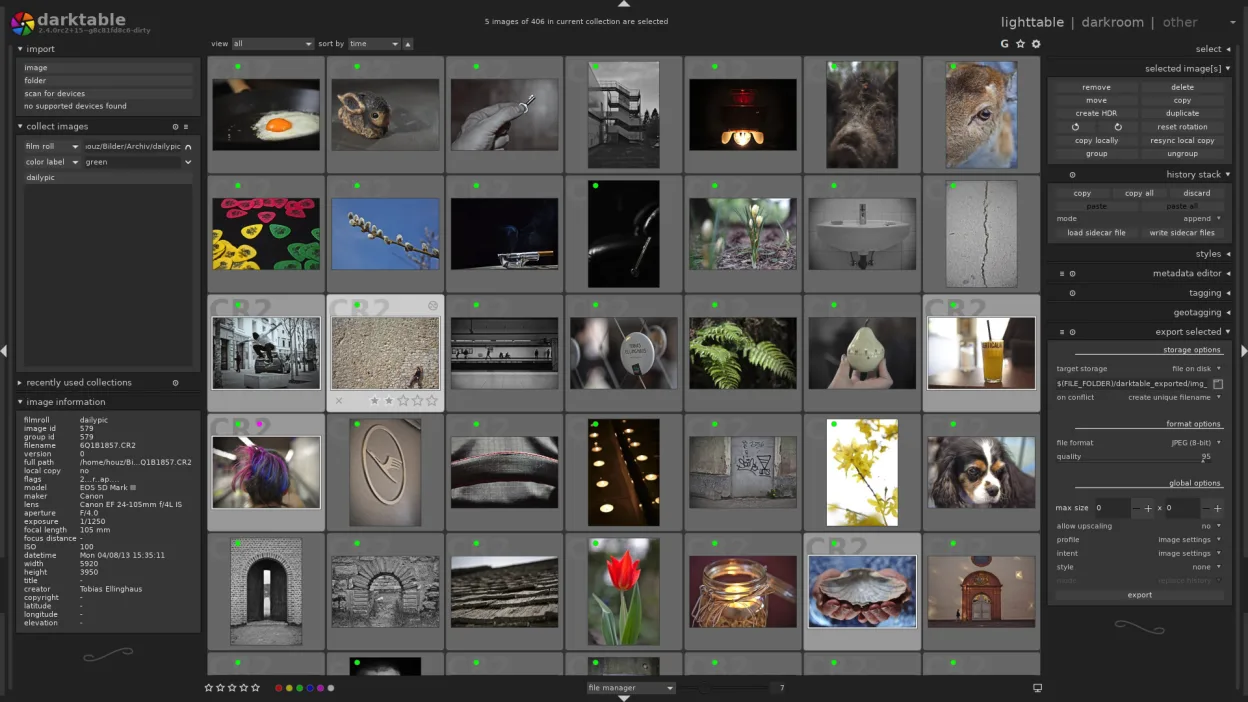
darktable can replace Luminar AI for users who need a free, open‑source, non‑destructive raw workflow and are comfortable with a more hands‑on editing process. It lacks the AI‑driven sky and portrait enhancement presets that Luminar AI offers, but it covers most core tasks like raw processing, batch editing, noise reduction, sharpening, and layer‑style adjustments. It is ideal for photographers who prefer manual control and scripting over automated AI tools.
- Licencia
- GPL-3.0+
- Precio
- Gratis
- Última versión
- 5.6.2 (4 de octubre de 2026)
- Valoración
- —
Lo que funciona igual
- Both support non‑destructive raw editing
- Both provide batch processing
- Both offer sharpening and noise reduction
- Both include layer‑based adjustments
- Both allow export to common image formats
Lo que cambia
- darktable has no AI‑powered sky replacement or portrait enhancement presets
- darktable lacks a single‑click style automation panel
- darktable does not provide a dedicated AI portrait enhancement tool
- darktable’s interface is split into lighttable/darkroom rather than a single workspace
- darktable does not include a built‑in AI noise reduction module
- darktable requires manual adjustment of many parameters that Luminar AI automates
Abrir tus archivos de Luminar AI
darktable does not open Luminar AI project files directly. Exporting from Luminar AI to a common format (e.g., JPEG, TIFF, or DNG) and then importing into darktable is the only reliable method. The reverse—importing darktable edits into Luminar AI—is not supported.
Pasar de Luminar AI a darktable, paso a paso
- Export all Luminar AI projects to TIFF or DNG with all adjustments applied.
- Create a new darktable database and import the exported files via the lighttable mode.
- Use darktable’s preset or develop modules to replicate any desired adjustments manually.
- Apply batch processing in darktable to process multiple images at once.
- Export final images from darktable to the desired format for sharing or printing.
Funciones clave de darktable
- Edición no destructiva con historial
- Modos mesa de luz y cuarto oscuro
- Procesamiento raw de alta precisión
- Vista de mapa con geolocalización
- Soporte de tethering
- Modos de impresión y presentación
- Extensible mediante scripts Python
Cómo instalar darktable en Linux
flatpak install flathub org.darktable.Darktablesudo apt install darktablesudo apt install darktablesudo dnf install darktablesudo pacman -S darktablesudo zypper install darktablePreguntas frecuentes
Does darktable support AI sky replacement?
No, darktable does not have built‑in AI sky replacement. You would need to use external tools or manual compositing.
Can I use darktable for portrait enhancement like Luminar AI?
darktable offers portrait tools such as skin smoothing and detail enhancement, but they are manual and not AI‑driven.
Is darktable suitable for beginners?
It has a steeper learning curve than Luminar AI, but plenty of tutorials exist. It is best for users who want full control over every parameter.
Otras 4 alternativas a Luminar AI
 RawTherapeeRawTherapee es un programa de desarrollo fotográfico raw de código abierto y multiplataforma.Código abiertoGratisFlatpakRawTherapee vs Luminar AI
 GIMPGIMP es un editor de gráficos rasterizados gratuito y de código abierto para edición fotográfica, pintura…Código abiertoGratisFlatpakGIMP vs Luminar AI
 digiKamdigiKam es un gestor de fotos de KDE integral para organizar, etiquetar y editar fotos digitales con un…Código abiertoGratisFlatpakdigiKam vs Luminar AI
 LightZoneLightZone es un editor de fotos RAW gratuito y de código abierto con un flujo de trabajo no destructivo…Código abiertoGratisFlatpakLightZone vs Luminar AI