
 DBeaver CommunityLinux
vs
Oracle SQL DeveloperWindows
DBeaver CommunityLinux
vs
Oracle SQL DeveloperWindows
DBeaver Community como alternativa Linux a Oracle SQL Developer
Actualizado el
Nuestra opinión
DBeaver Community can replace Oracle SQL Developer for most everyday tasks: connecting to Oracle databases, writing and running SQL/PLSQL, browsing schemas, and editing data. It works on Linux, is free, and supports multiple database types, making it useful for developers who work with several DBMSs. It is best suited for users who need a single tool for many databases and are comfortable using a more generic IDE; it may not be ideal for those who rely heavily on Oracle‑specific debugging or advanced migration features.
- Licencia
- Apache-2.0
- Precio
- Gratis
- Última versión
- 26.2.3 (18 de octubre de 2026)
- Valoración
- —
Lo que funciona igual
- Both are Java‑based, cross‑platform IDEs that support Oracle database connections and allow SQL query editing with syntax highlighting.
- Both provide a metadata browser to view tables, views, procedures, and other schema objects.
- Both support running SQL scripts and viewing result sets in a grid.
- Both allow multiple database connections in a single workspace.
- Both are free to use for the community edition.
Lo que cambia
- DBeaver is a general multi‑database tool, while Oracle SQL Developer is Oracle‑centric and includes Oracle‑specific features such as PL/SQL debugging, migration wizards, and Oracle Enterprise Manager integration.
- Oracle SQL Developer has built‑in migration tools for moving data and schemas from other databases into Oracle; DBeaver does not provide these specialized migration wizards.
- Oracle SQL Developer supports Oracle Application Express (APEX) development; DBeaver does not.
- DBeaver’s ER diagram generation is generic, whereas Oracle SQL Developer offers more detailed Oracle‑specific diagramming options.
- Oracle SQL Developer is tightly integrated with Oracle’s Java SDK and may require specific Java versions; DBeaver is bundled with its own Java runtime, simplifying installation on Linux.
Abrir tus archivos de Oracle SQL Developer
Oracle SQL Developer uses proprietary .xml and .sql files for projects and wizards. DBeaver does not natively import these files. You can export SQL scripts and schema objects from Oracle SQL Developer as plain SQL or CSV and then import them into DBeaver, but project‑level settings and migration scripts cannot be transferred directly.
Pasar de Oracle SQL Developer a DBeaver Community, paso a paso
- Install DBeaver Community from your distribution’s package manager or Flathub.
- Launch DBeaver and add a new Oracle connection: choose JDBC driver, enter host, port, SID/Service Name, username, and password.
- Test the connection; if it fails, install the Oracle Instant Client libraries required by the JDBC driver.
- Use the Data Transfer wizard to export tables or schemas from Oracle SQL Developer as SQL or CSV, then import them into DBeaver using the Import Data feature.
- Recreate any PL/SQL procedures or triggers by copying the source code from Oracle SQL Developer and executing it in DBeaver’s SQL editor.
Funciones clave de DBeaver Community
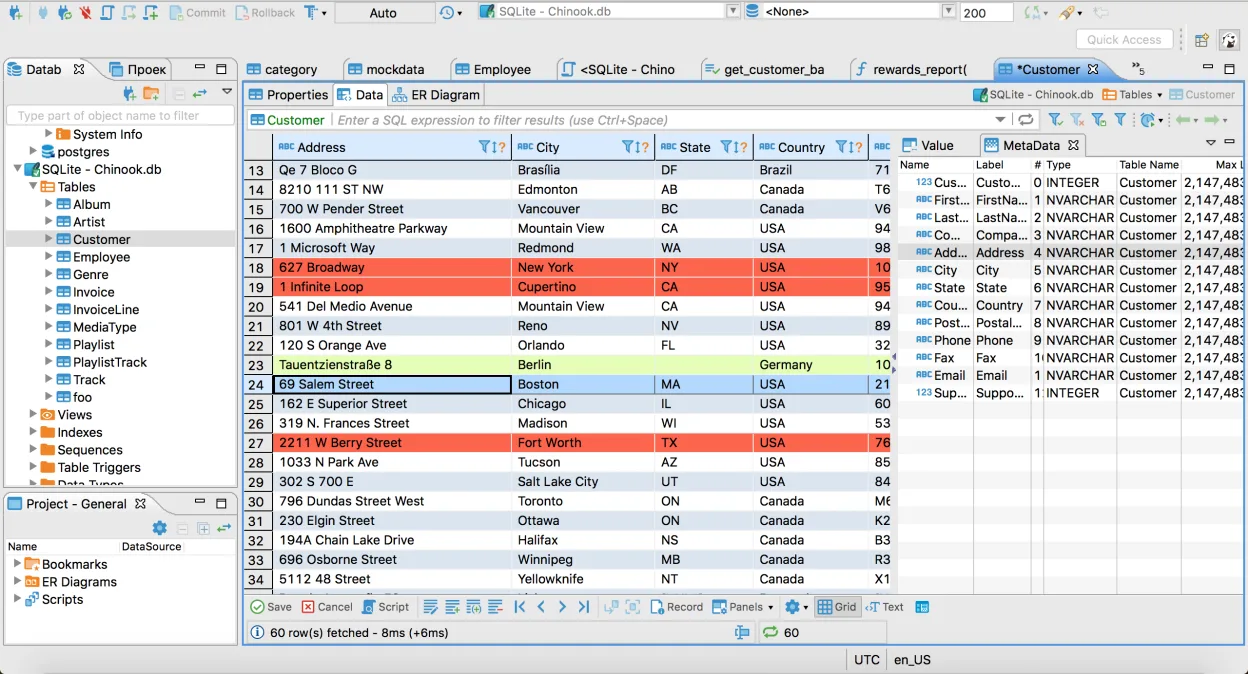
- Soporta MySQL, PostgreSQL, Oracle, SQL Server, SQLite y muchas otras bases de datos
- Editor SQL universal con resaltado de sintaxis y autocompletado
- Cuadrícula visual para ver y editar contenidos de tablas
- Generación de diagramas ER para visualizar esquemas de bases de datos
- Herramientas de importación y exportación que soportan CSV, XML y JSON
- Navegador integrado de metadatos de bases de datos para tablas, vistas y procedimientos
- Soporte para múltiples conexiones a bases de datos en un mismo espacio de trabajo
- Arquitectura de plugins para ampliar funcionalidades con controladores adicionales
Cómo instalar DBeaver Community en Linux
flatpak install flathub io.dbeaver.DBeaverCommunitysudo pacman -S dbeaverPreguntas frecuentes
Does DBeaver support PL/SQL debugging like Oracle SQL Developer?
No, DBeaver does not provide a PL/SQL debugger. You can execute PL/SQL blocks and view results, but debugging with breakpoints and step execution is only available in Oracle SQL Developer.
Can I use DBeaver to migrate data from MySQL to Oracle?
DBeaver can transfer data between databases via the Data Transfer wizard, but it lacks the specialized Oracle migration wizards that handle schema conversion and data type mapping found in Oracle SQL Developer.
Is DBeaver suitable for large Oracle databases?
Yes, DBeaver can connect to large Oracle databases, but performance may depend on the JDBC driver and network latency. For very large data sets, consider using Oracle SQL Developer or dedicated ETL tools.
Otras 2 alternativas a Oracle SQL Developer
 SQuirreL SQL ClientSQuirreL SQL Client es un cliente gráfico basado en Java para cualquier base de datos compatible con JDBC.Código abiertoGratisFlatpakSQuirreL SQL Client vs Oracle SQL Developer
 DataGripIDE multi-bases de datos de JetBrains para desarrolladores de SQL, con soporte para conexiones JDBC a los…FlatpakDataGrip vs Oracle SQL Developer