
 DBeaver CommunityLinux
vs
Oracle SQL DeveloperWindows
DBeaver CommunityLinux
vs
Oracle SQL DeveloperWindows
DBeaver Community as a Linux alternative to Oracle SQL Developer
Updated
Our verdict
DBeaver Community can replace Oracle SQL Developer for most everyday tasks: connecting to Oracle databases, writing and running SQL/PLSQL, browsing schemas, and editing data. It works on Linux, is free, and supports multiple database types, making it useful for developers who work with several DBMSs. It is best suited for users who need a single tool for many databases and are comfortable using a more generic IDE; it may not be ideal for those who rely heavily on Oracle‑specific debugging or advanced migration features.
- License
- Apache-2.0
- Price
- Free
- Latest version
- 26.2.3 (October 18, 2026)
- Rating
- —
What works the same
- Both are Java‑based, cross‑platform IDEs that support Oracle database connections and allow SQL query editing with syntax highlighting.
- Both provide a metadata browser to view tables, views, procedures, and other schema objects.
- Both support running SQL scripts and viewing result sets in a grid.
- Both allow multiple database connections in a single workspace.
- Both are free to use for the community edition.
What is different
- DBeaver is a general multi‑database tool, while Oracle SQL Developer is Oracle‑centric and includes Oracle‑specific features such as PL/SQL debugging, migration wizards, and Oracle Enterprise Manager integration.
- Oracle SQL Developer has built‑in migration tools for moving data and schemas from other databases into Oracle; DBeaver does not provide these specialized migration wizards.
- Oracle SQL Developer supports Oracle Application Express (APEX) development; DBeaver does not.
- DBeaver’s ER diagram generation is generic, whereas Oracle SQL Developer offers more detailed Oracle‑specific diagramming options.
- Oracle SQL Developer is tightly integrated with Oracle’s Java SDK and may require specific Java versions; DBeaver is bundled with its own Java runtime, simplifying installation on Linux.
Opening your Oracle SQL Developer files
Oracle SQL Developer uses proprietary .xml and .sql files for projects and wizards. DBeaver does not natively import these files. You can export SQL scripts and schema objects from Oracle SQL Developer as plain SQL or CSV and then import them into DBeaver, but project‑level settings and migration scripts cannot be transferred directly.
Switching from Oracle SQL Developer to DBeaver Community, step by step
- Install DBeaver Community from your distribution’s package manager or Flathub.
- Launch DBeaver and add a new Oracle connection: choose JDBC driver, enter host, port, SID/Service Name, username, and password.
- Test the connection; if it fails, install the Oracle Instant Client libraries required by the JDBC driver.
- Use the Data Transfer wizard to export tables or schemas from Oracle SQL Developer as SQL or CSV, then import them into DBeaver using the Import Data feature.
- Recreate any PL/SQL procedures or triggers by copying the source code from Oracle SQL Developer and executing it in DBeaver’s SQL editor.
Key features of DBeaver Community
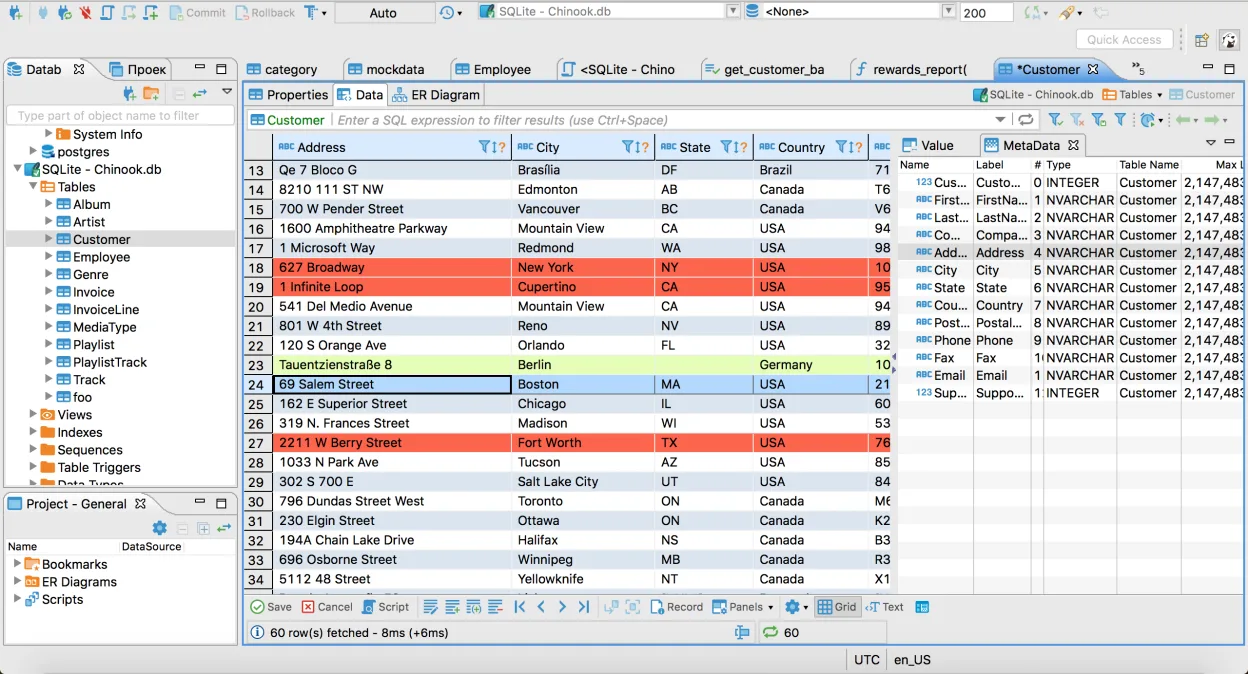
- Supports MySQL, PostgreSQL, Oracle, SQL Server, SQLite, and many other databases
- Universal SQL editor with syntax highlighting and autocompletion
- Visual data grid for viewing and editing table contents
- ER diagram generation for database schema visualization
- Data import and export tools supporting CSV, XML, and JSON
- Built-in database metadata browser for tables, views, and procedures
- Support for multiple database connections in a single workspace
- Plugin architecture for extending functionality with additional drivers
How to install DBeaver Community on Linux
flatpak install flathub io.dbeaver.DBeaverCommunitysudo pacman -S dbeaverFrequently asked questions
Does DBeaver support PL/SQL debugging like Oracle SQL Developer?
No, DBeaver does not provide a PL/SQL debugger. You can execute PL/SQL blocks and view results, but debugging with breakpoints and step execution is only available in Oracle SQL Developer.
Can I use DBeaver to migrate data from MySQL to Oracle?
DBeaver can transfer data between databases via the Data Transfer wizard, but it lacks the specialized Oracle migration wizards that handle schema conversion and data type mapping found in Oracle SQL Developer.
Is DBeaver suitable for large Oracle databases?
Yes, DBeaver can connect to large Oracle databases, but performance may depend on the JDBC driver and network latency. For very large data sets, consider using Oracle SQL Developer or dedicated ETL tools.
2 other alternatives to Oracle SQL Developer
 SQuirreL SQL ClientSQuirreL SQL Client is a Java‑based graphical client for any JDBC‑compliant database.Open sourceFreeFlatpakSQuirreL SQL Client vs Oracle SQL Developer
 DataGripJetBrains' multi-database IDE for SQL developers, supporting JDBC connections to major DBMS with smart…FlatpakDataGrip vs Oracle SQL Developer