
 EvolutionLinux
vs
CalendarWindows
EvolutionLinux
vs
CalendarWindows
Evolution como alternativa Linux a Calendar
Actualizado el
Nuestra opinión
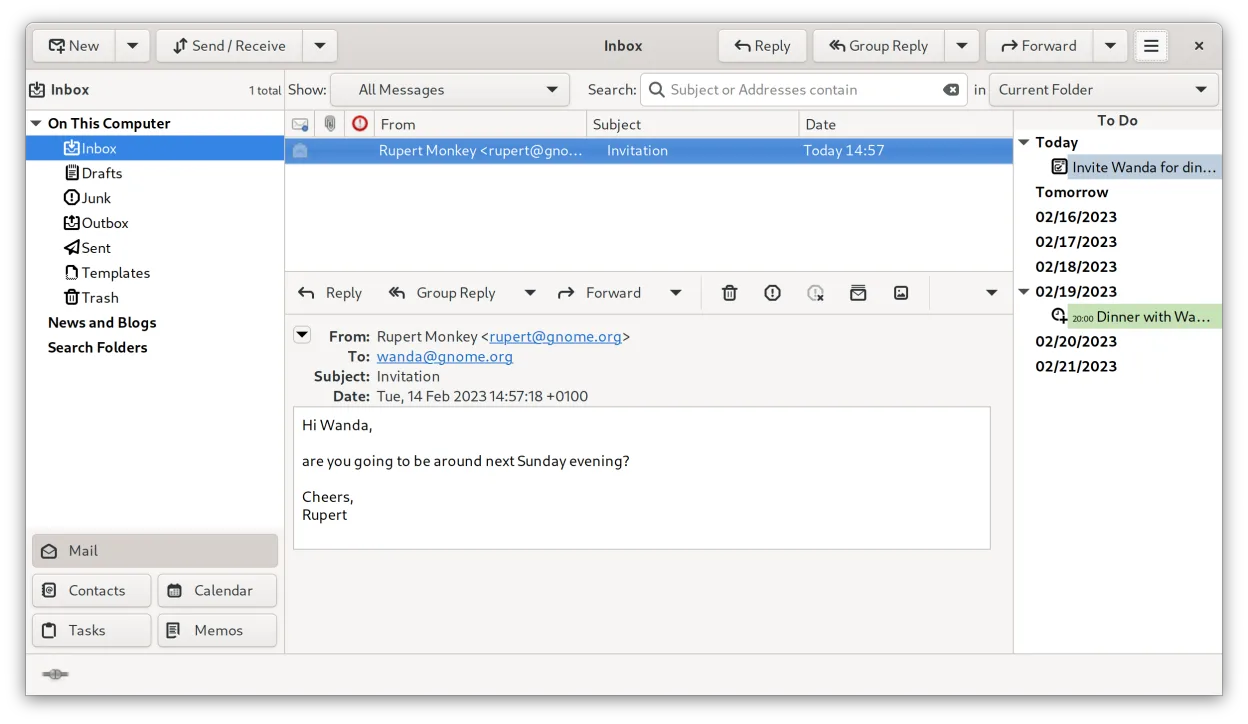
Evolution is a heavier, more complex replacement for GNOME Calendar. It covers all basic scheduling needs—viewing events, setting alarms, and managing multiple calendars—while adding email and contacts. If you only need a simple interface to view dates and set reminders, Evolution feels cluttered. However, if you want to sync with CalDAV servers, manage tasks, or handle email without switching apps, it is the better choice. It is not a lightweight drop-in replacement but a full PIM suite that requires more configuration to feel right.
- Licencia
- GPL-2.0+ and GFDL-1.3
- Precio
- Gratis
- Última versión
- 3.62.1 (9 de octubre de 2026)
- Valoración
- —
Lo que funciona igual
- Supports month, week, and day calendar views
- Allows creating, editing, and deleting personal appointments
- Sets reminders and alarms for events
- Displays multiple calendars with distinct colors
- Integrates with system notifications for upcoming events
Lo que cambia
- Evolution includes full email, contacts, and task management, which GNOME Calendar lacks
- Evolution supports CalDAV, EWS, and IMAP/POP3/SMTP protocols for server sync
- Evolution has a steeper learning curve and more complex interface
- GNOME Calendar is strictly local or simple feed-based, while Evolution handles complex network protocols
- Evolution includes built-in encryption and advanced filtering rules
Abrir tus archivos de Calendar
Evolution uses the standard iCalendar (.ics) format, which is the same format used by GNOME Calendar. You can import .ics files directly into Evolution. If you have local calendar data stored in GNOME’s internal format, you may need to export them as .ics files first before importing them into Evolution. Direct file sharing between the two apps’ internal storage directories is not standard practice, so exporting to a common standard is the reliable method.
Pasar de Calendar a Evolution, paso a paso
- Export your existing calendars from GNOME Calendar as .ics files
- Install Evolution via your package manager or Flathub
- Launch Evolution and set up any necessary CalDAV or local accounts
- Use the 'Import/Export' function in Evolution to load the .ics files
- Verify that events appear correctly in the desired calendar views
- Configure system notifications if they do not appear automatically
Funciones clave de Evolution
- Correo, calendario, contactos y tareas integrados en una ventana
- Soporte completo para IMAP, POP3, SMTP, CalDAV y EWS
- Formatos de datos estándar (MIME, iCalendar, vCard)
- Cifrado incorporado con GnuPG y S/MIME
- Libreta de direcciones con LDAP y almacenamiento local
- Compartir calendario y programación vía CalDAV
- Reglas de filtrado de correo y búsqueda
- Atajos de teclado personalizables
Cómo instalar Evolution en Linux
flatpak install flathub org.gnome.Evolutionsudo apt install evolutionsudo apt install evolutionsudo dnf install evolutionsudo pacman -S evolution-bogofiltersudo zypper install evolutionPreguntas frecuentes
Is Evolution too heavy for just checking my schedule?
Yes, if you only need to view dates. Evolution loads email and contacts modules, which can feel slow and cluttered. If simplicity is your priority, stick with GNOME Calendar or try a lighter alternative like KOrganizer if you are on KDE.
Can I sync Evolution with my phone’s calendar?
Yes, via CalDAV. Most modern phones support CalDAV. You need to enable CalDAV in Evolution’s account settings and provide the server URL, username, and password. This allows two-way sync of events.
Does Evolution replace the need for a separate email client?
Yes, it is a full email client supporting IMAP, POP3, and SMTP. If you currently use Thunderbird or another email client, you can consolidate everything into Evolution, though you will need to migrate your email accounts and data.
Otras 4 alternativas a Calendar
 ThunderbirdThunderbird es un cliente gratuito y de código abierto para correo electrónico, noticias, chat y calendario.Código abiertoGratisFlatpakThunderbird vs CalendarOrageA lightweight, KDE-based calendar application for managing events, reminders, and to-do lists with a simple…Código abiertoGratisOrage vs CalendarCalcurseCalcurse is a lightweight, text-based calendar and task manager for the terminal, designed for users who…Código abiertoGratisCalcurse vs Calendar