
 KRDCLinux
vs
Microsoft Remote DesktopWindows
KRDCLinux
vs
Microsoft Remote DesktopWindows
KRDC como alternativa Linux a Microsoft Remote Desktop
Actualizado el
Nuestra opinión
KRDC is a solid replacement for Microsoft Remote Desktop for Linux users who need to connect to Windows machines via RDP. It covers most everyday tasks: connecting, full‑screen mode, keyboard/mouse integration, and encryption. It is ideal for KDE users who want a native, open‑source client. However, it lacks some advanced features that Windows users might expect, such as multi‑session handling and built‑in file transfer. Overall, KRDC works well for standard remote‑desktop use cases.
- Licencia
- GPL-2.0+
- Precio
- Gratis
- Última versión
- 26.04.3 (2 de julio de 2026)
- Valoración
- —
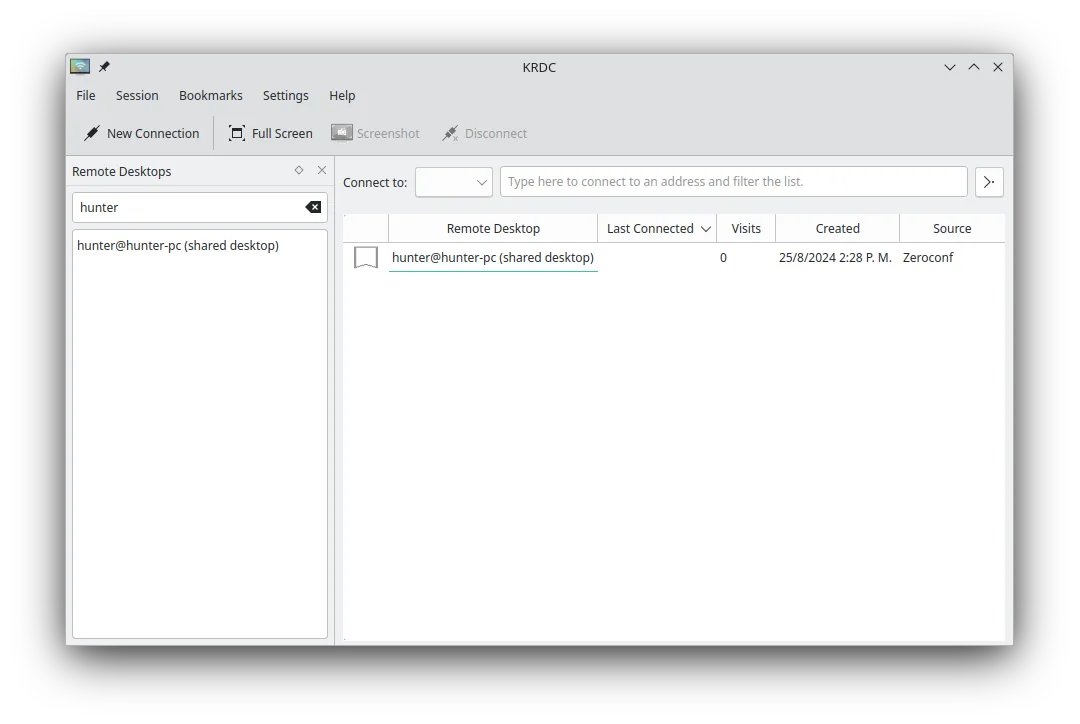
Lo que funciona igual
- Both use the RDP protocol to connect to Windows machines
- Support full‑screen and windowed display modes
- Provide keyboard and mouse integration
- Encrypt connections (TLS for KRDC, optional in Microsoft Remote Desktop)
- Allow remote control of the desktop
Lo que cambia
- KRDC does not support simultaneous multiple RDP sessions from a single client
- No native file‑transfer feature (VNC can be used but requires separate setup)
- KRDC lacks the Windows‑specific authentication options like NTLM/kerberos integration out of the box
- No built‑in clipboard sync between local and remote
- KRDC is KDE‑centric and may not integrate with non‑KDE desktop environments as tightly as Microsoft Remote Desktop does in Windows
Abrir tus archivos de Microsoft Remote Desktop
Microsoft Remote Desktop does not use a standard file format that KRDC can import or export. Users cannot directly open or export connection files from the Windows client into KRDC. Connection details must be entered manually or saved as bookmarks within KRDC.
Pasar de Microsoft Remote Desktop a KRDC, paso a paso
- Open KRDC from the application menu.
- Select "New Connection" and choose "Remote Desktop (RDP)".
- Enter the Windows machine’s IP address or hostname, and provide credentials (use KDE Wallet if desired).
- Click "Connect" to establish the session. If needed, enable full‑screen or adjust scaling from the view menu.
Funciones clave de KRDC
- Soporta los protocolos RDP y VNC
- Interfaz gráfica con estilo KDE
- Gestión de marcadores para conexiones frecuentes
- Modos pantalla completa y ventana
- Soporte de atajos de teclado (Ctrl+Alt+Shift para entrada remota)
- Escalado dinámico de la pantalla remota
- Cifrado TLS para sesiones RDP
- Integración con KDE Wallet para almacenamiento de contraseñas
Cómo instalar KRDC en Linux
flatpak install flathub org.kde.krdcsudo apt install krdcsudo apt install krdcsudo dnf install krdcsudo pacman -S krdcsudo zypper install krdcPreguntas frecuentes
Does KRDC support file transfer?
KRDC itself does not provide a built‑in file‑transfer feature. You can use a separate tool like WinSCP or an SFTP client to transfer files to/from the remote Windows machine.
Can I use KRDC on a non‑KDE desktop?
Yes. KRDC runs on any Linux desktop that has the required dependencies, but its appearance and some integration features are optimized for KDE.
Is KRDC free?
KRDC is released under the GPL‑2.0+ license and is available in major Linux distributions free of charge.
Otras 4 alternativas a Microsoft Remote Desktop
 RemminaRemmina es un cliente de escritorio remoto para Linux que soporta RDP, VNC, SSH y X2Go para conectarse a…Código abiertoGratisFlatpakRemmina vs Microsoft Remote DesktopFreeRDPFreeRDP es una implementación de código abierto del Protocolo de Escritorio Remoto, que te permite conectarte…Código abiertoGratisFreeRDP vs Microsoft Remote Desktoprdesktoprdesktop es un cliente gratuito y de código abierto que permite a los usuarios de Linux conectarse a sesiones…rdesktop vs Microsoft Remote Desktop
 VinagreVinagre es un visor de escritorio remoto para GNOME que soporta VNC, RDP, SSH y SPICE, y que ahora está…Código abiertoGratisAbandonadoVinagre vs Microsoft Remote Desktop