
 Mission CenterLinux
vs
Process ExplorerWindows
Mission CenterLinux
vs
Process ExplorerWindows
Mission Center como alternativa Linux a Process Explorer
Actualizado el
Nuestra opinión
Mission Center can replace Process Explorer for users who need a Linux‑native monitor that shows per‑process CPU, memory, threads, handles, and network usage. It covers most of the same data, but it lacks a direct DLL/shared‑library view and the ability to inspect individual handles in the same detail. It is best suited for system administrators or power users who want real‑time resource tracking on Linux, not for casual users who only need a simple task manager.
- Licencia
- GPL-3.0-or-later
- Precio
- Gratis
- Última versión
- 1.2.0 (24 de julio de 2026)
- Valoración
- —
Lo que funciona igual
- Per‑process CPU and memory usage
- Thread and handle counts
- Network connection details
- Process tree with parent/child relationships
- Real‑time updates
Lo que cambia
- No DLL/shared‑library list for each process
- Handles are not shown as individual file/socket entries
- No built‑in search/filter UI for processes
- No support for exporting data to a file format compatible with Process Explorer
- Limited Intel GPU monitoring
Abrir tus archivos de Process Explorer
Process Explorer produces proprietary .txt or .csv logs that are not directly readable by Mission Center. Mission Center can export its own CSV or JSON reports, but it cannot import Process Explorer files. Users would need to re‑collect data within Mission Center.
Pasar de Process Explorer a Mission Center, paso a paso
- Install Mission Center from Flathub or your distro’s package manager.
- Open the application and enable the per‑process view.
- Use the search box to locate specific processes by name or PID.
- Configure the graph refresh rate to match your monitoring needs.
- Export data to CSV if you need to share reports.
- Close Process Explorer and rely on Mission Center for future monitoring.
Funciones clave de Mission Center
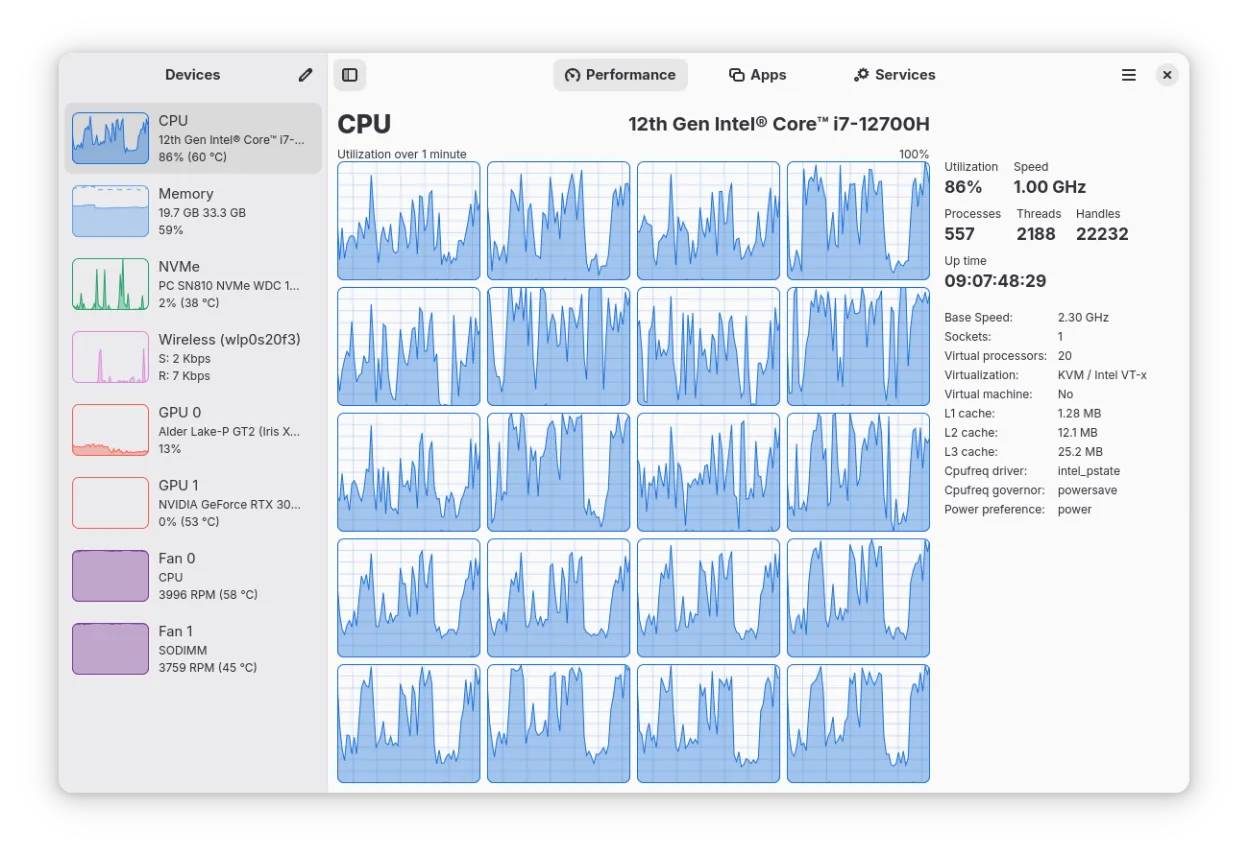
- Monitorea el uso de CPU, RAM, Swap, Disco, Red y GPU
- Proporciona desgloses de recursos por aplicación y proceso
- Muestra información detallada de interfaces de red, incluidas estadísticas Wi‑Fi
- Muestra uso y potencia de codificador/decodificador GPU vía NVTOP
- Rastrea ventiladores del sistema, tiempo de actividad y velocidades de reloj
- Renderizado de gráficos acelerado por hardware para reducir carga de CPU
- Soporta una vista de resumen minimizada para verificaciones rápidas
- Construido con Rust, GTK4 y Libadwaita
Cómo instalar Mission Center en Linux
flatpak install flathub io.missioncenter.MissionCentersudo pacman -S mission-centerPreguntas frecuentes
Does Mission Center show DLLs or shared libraries loaded by a process?
No, it does not provide a DLL or shared‑library list. It focuses on resource usage statistics rather than detailed module inspection.
Can I see individual file or socket handles for a process?
Mission Center shows the total handle count per process but does not list each handle individually.
Is Mission Center suitable for monitoring GPU usage on Intel cards?
Intel GPU monitoring is limited to Broadwell and newer GPUs and does not include VRAM, power, or temperature data.
Otras 3 alternativas a Process Explorer
 GNOME System MonitorGNOME System Monitor es la utilidad estándar de Linux para ver procesos en ejecución, CPU, memoria y uso de…Código abiertoGratisGNOME System Monitor vs Process Explorer