
 ShotwellLinux
vs
Lightroom MobileWindows
Shotwell como alternativa Linux a Lightroom Mobile
Actualizado el
Nuestra opinión
Shotwell can replace Lightroom Mobile for basic photo organization and light RAW editing on Linux, especially for users who need a quick, local solution without cloud sync. It works well for photographers who prefer a desktop workflow and already use GNOME. However, it lacks the full cloud integration, advanced RAW processing, and preset ecosystem that Lightroom Mobile offers, so it is best suited for casual or semi‑professional users who are comfortable with manual backups.
- Licencia
- LGPL-2.1+
- Precio
- Gratis
- Última versión
- 33.2 (5 de noviembre de 2026)
- Valoración
- —
Lo que funciona igual
- Both import RAW files and allow non‑destructive editing (crop, color adjustments, straighten).
- Both support tagging and rating for organizing photos.
- Both can export images in common formats (JPEG, PNG).
- Both provide a lightweight, user‑friendly interface.
- Both can upload to online services (Shotwell to Flickr/Google Photos; Lightroom Mobile syncs to cloud).
Lo que cambia
- Shotwell has no built‑in cloud sync across devices; Lightroom Mobile syncs edits via Adobe cloud.
- Shotwell lacks advanced RAW processing tools (tone curve, selective adjustments, advanced color grading).
- Shotwell does not support Lightroom presets or filter packs.
- Shotwell does not offer mobile‑friendly touch editing or a dedicated mobile app.
- Shotwell’s export options are limited to file formats; Lightroom Mobile can export to multiple destinations and formats with more presets.
Abrir tus archivos de Lightroom Mobile
Shotwell can open most RAW formats that Lightroom Mobile supports (e.g., DNG, CR2, NEF) because it uses libraw. It cannot open Lightroom Mobile’s proprietary .lrdata or cloud‑only metadata files; exported JPEGs or DNGs from Lightroom Mobile will open fine.
Pasar de Lightroom Mobile a Shotwell, paso a paso
- Export all photos from Lightroom Mobile as DNG or JPEG.
- Transfer the exported files to your Linux machine via USB, cloud, or network.
- Launch Shotwell and use the Import feature to add the transferred photos.
- Tag, rate, and organize the photos in Shotwell as needed.
- If you had Lightroom presets, recreate similar adjustments manually in Shotwell or use third‑party tools for batch editing.
Funciones clave de Shotwell
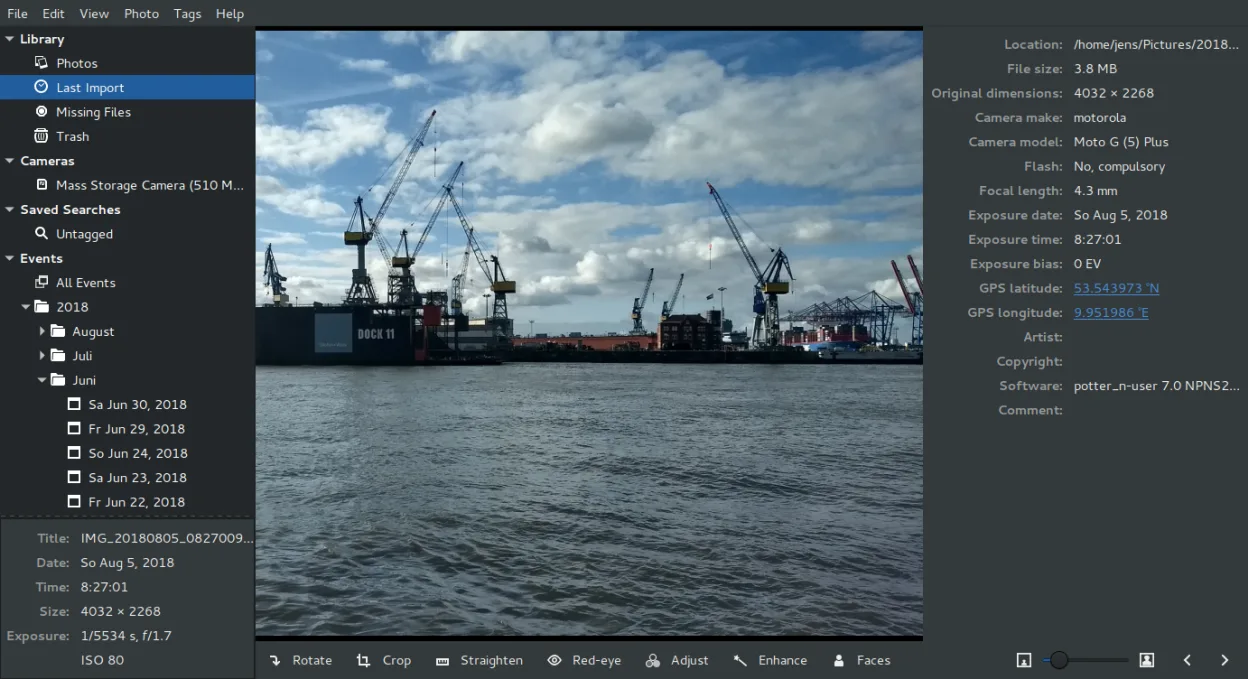
- Importar fotos desde cámara o disco
- Organizar por fecha, etiquetas, valoraciones
- Recorte, eliminación de ojos rojos, color, enderezado no destructivos
- Soporte para RAW, JPEG, PNG, TIFF
- Subir a Flickr, Google Photos, etc.
- Interfaz rápida y ligera
- Integrado con el gestor de archivos de GNOME
Cómo instalar Shotwell en Linux
flatpak install flathub org.gnome.Shotwellsudo apt install shotwellsudo apt install shotwellsudo dnf install shotwellsudo pacman -S shotwellsudo zypper install shotwellPreguntas frecuentes
Can I keep my Lightroom Mobile presets in Shotwell?
No, Shotwell does not support Lightroom presets. You would need to reapply similar adjustments manually or use external batch tools.
Will Shotwell sync my edits across devices?
Shotwell does not provide cloud sync. You would need to use a separate cloud service or manual backup to keep files in sync.
Does Shotwell support the same RAW formats as Lightroom Mobile?
Shotwell supports most common RAW formats via libraw, so it can open DNG, CR2, NEF, and others that Lightroom Mobile can import.
Otras 4 alternativas a Lightroom Mobile
 darktabledarktable es un editor de fotos gratuito y de código abierto que gestiona archivos raw y ofrece un flujo de…Código abiertoGratisFlatpakdarktable vs Lightroom Mobile
 RawTherapeeRawTherapee es un programa de desarrollo fotográfico raw de código abierto y multiplataforma.Código abiertoGratisFlatpakRawTherapee vs Lightroom Mobile
 digiKamdigiKam es un gestor de fotos de KDE integral para organizar, etiquetar y editar fotos digitales con un…Código abiertoGratisFlatpakdigiKam vs Lightroom Mobile
 GIMPGIMP es un editor de gráficos rasterizados gratuito y de código abierto para edición fotográfica, pintura…Código abiertoGratisFlatpakGIMP vs Lightroom Mobile