
 ShotwellLinux
vs
Lightroom MobileWindows
Shotwell as a Linux alternative to Lightroom Mobile
Updated
Our verdict
Shotwell can replace Lightroom Mobile for basic photo organization and light RAW editing on Linux, especially for users who need a quick, local solution without cloud sync. It works well for photographers who prefer a desktop workflow and already use GNOME. However, it lacks the full cloud integration, advanced RAW processing, and preset ecosystem that Lightroom Mobile offers, so it is best suited for casual or semi‑professional users who are comfortable with manual backups.
- License
- LGPL-2.1+
- Price
- Free
- Latest version
- 33.2 (November 5, 2026)
- Rating
- —
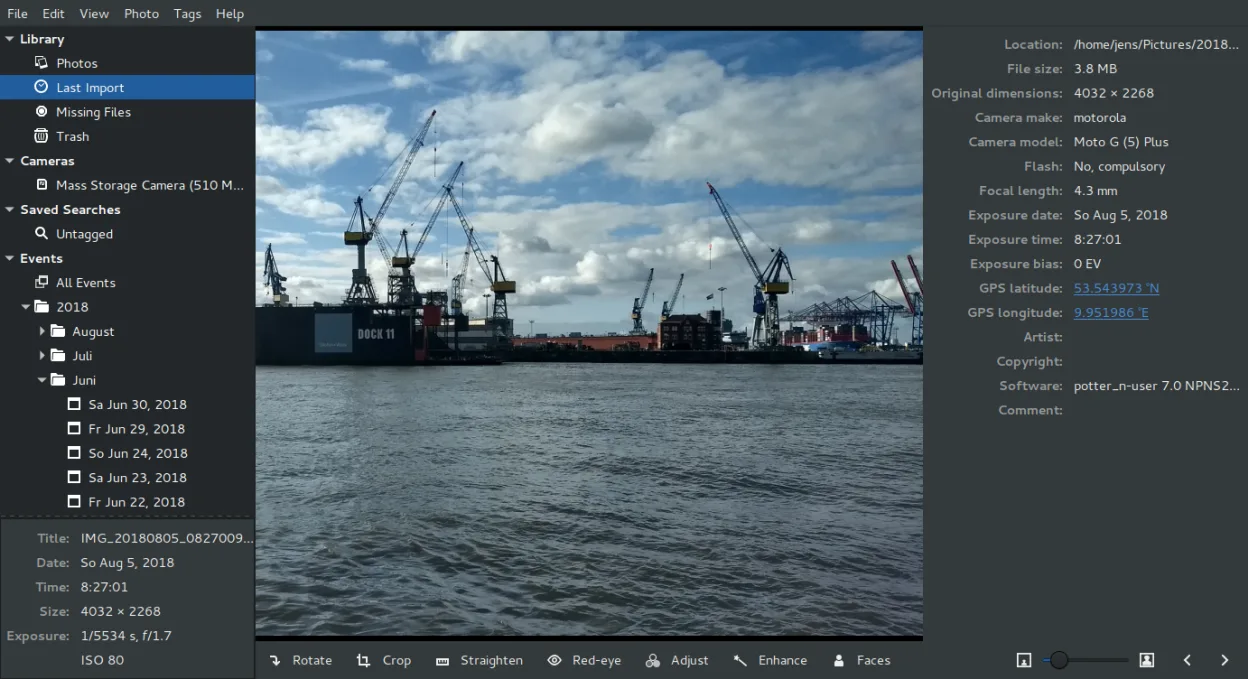
What works the same
- Both import RAW files and allow non‑destructive editing (crop, color adjustments, straighten).
- Both support tagging and rating for organizing photos.
- Both can export images in common formats (JPEG, PNG).
- Both provide a lightweight, user‑friendly interface.
- Both can upload to online services (Shotwell to Flickr/Google Photos; Lightroom Mobile syncs to cloud).
What is different
- Shotwell has no built‑in cloud sync across devices; Lightroom Mobile syncs edits via Adobe cloud.
- Shotwell lacks advanced RAW processing tools (tone curve, selective adjustments, advanced color grading).
- Shotwell does not support Lightroom presets or filter packs.
- Shotwell does not offer mobile‑friendly touch editing or a dedicated mobile app.
- Shotwell’s export options are limited to file formats; Lightroom Mobile can export to multiple destinations and formats with more presets.
Opening your Lightroom Mobile files
Shotwell can open most RAW formats that Lightroom Mobile supports (e.g., DNG, CR2, NEF) because it uses libraw. It cannot open Lightroom Mobile’s proprietary .lrdata or cloud‑only metadata files; exported JPEGs or DNGs from Lightroom Mobile will open fine.
Switching from Lightroom Mobile to Shotwell, step by step
- Export all photos from Lightroom Mobile as DNG or JPEG.
- Transfer the exported files to your Linux machine via USB, cloud, or network.
- Launch Shotwell and use the Import feature to add the transferred photos.
- Tag, rate, and organize the photos in Shotwell as needed.
- If you had Lightroom presets, recreate similar adjustments manually in Shotwell or use third‑party tools for batch editing.
Key features of Shotwell
- Import photos from camera or disk
- Organize by date, tags, ratings
- Non‑destructive crop, red‑eye, color, straighten
- Support for RAW, JPEG, PNG, TIFF
- Upload to Flickr, Google Photos, etc.
- Fast, lightweight UI
- Integrated with GNOME file manager
How to install Shotwell on Linux
flatpak install flathub org.gnome.Shotwellsudo apt install shotwellsudo apt install shotwellsudo dnf install shotwellsudo pacman -S shotwellsudo zypper install shotwellFrequently asked questions
Can I keep my Lightroom Mobile presets in Shotwell?
No, Shotwell does not support Lightroom presets. You would need to reapply similar adjustments manually or use external batch tools.
Will Shotwell sync my edits across devices?
Shotwell does not provide cloud sync. You would need to use a separate cloud service or manual backup to keep files in sync.
Does Shotwell support the same RAW formats as Lightroom Mobile?
Shotwell supports most common RAW formats via libraw, so it can open DNG, CR2, NEF, and others that Lightroom Mobile can import.
4 other alternatives to Lightroom Mobile
 darktabledarktable is a free, open‑source photo editor that manages raw files and offers a full non‑destructive…Open sourceFreeFlatpakdarktable vs Lightroom Mobile
 RawTherapeeRawTherapee is an open‑source, cross‑platform raw photo development program.Open sourceFreeFlatpakRawTherapee vs Lightroom Mobile
 digiKamdigiKam is a comprehensive KDE photo manager for organizing, tagging, and editing digital photos with strong…Open sourceFreeFlatpakdigiKam vs Lightroom Mobile
 GIMPGIMP is a free, open-source raster graphics editor for photo editing, digital painting, and image composition.Open sourceFreeFlatpakGIMP vs Lightroom Mobile