
 Xournal++Linux
vs
SnipasteWindows
Xournal++ como alternativa Linux a Snipaste
Actualizado el
Nuestra opinión
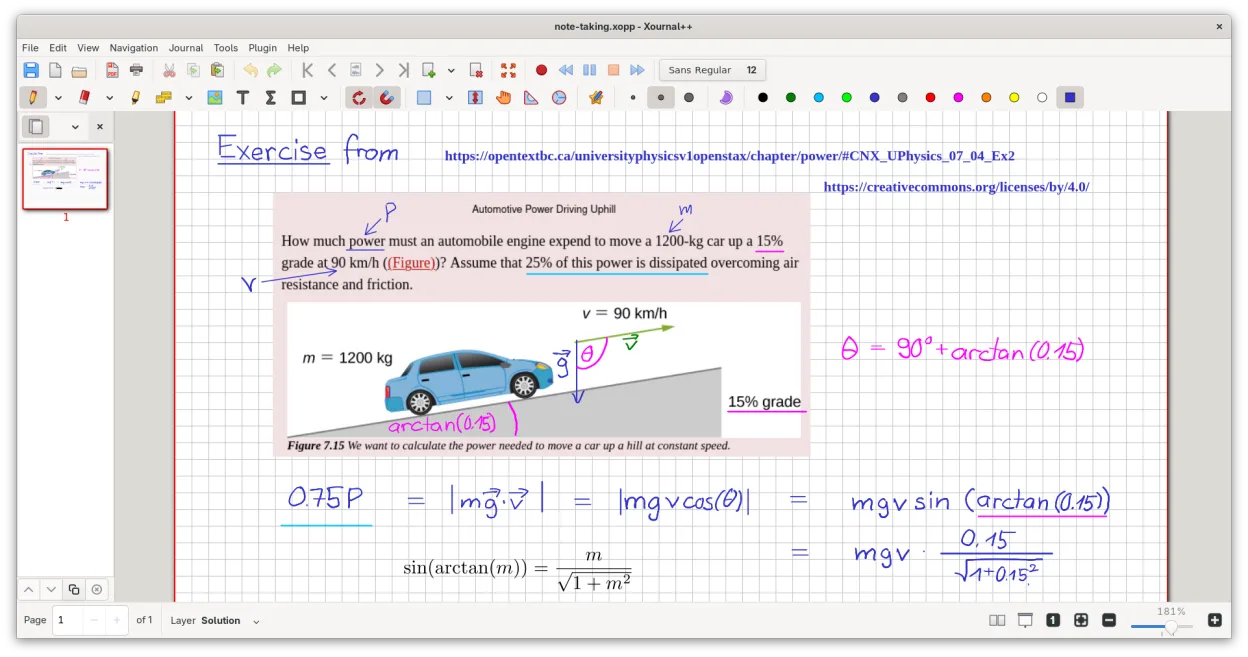
Xournal++ is not a direct replacement for Snipaste. While Snipaste is a lightweight utility for capturing and pinning screen regions as floating overlays, Xournal++ is a heavy, full-featured note-taking application designed for stylus input and PDF annotation. If your primary need is quickly pinning screenshots for reference, Xournal++ will feel clunky and resource-intensive. It is suitable only if you also need robust handwriting, LaTeX support, or PDF editing, and are willing to sacrifice the simplicity and low footprint of a dedicated screen pinning tool.
- Licencia
- GPL-2.0
- Precio
- Gratis
- Última versión
- 1.3.8 (25 de septiembre de 2026)
- Valoración
- —
Lo que funciona igual
- Both can capture or insert images into a workspace
- Both allow basic annotation like drawing lines or shapes
- Both are available on Linux and Windows
- Both support exporting images to common formats like PNG
Lo que cambia
- Xournal++ lacks a 'pin to desktop' feature; it opens in a standard window manager frame
- Xournal++ is significantly heavier and uses more RAM than Snipaste
- Xournal++ does not have a global keyboard shortcut for instant screen capture and pinning
- Xournal++ is designed for stylus and pressure sensitivity, not mouse-only quick reference
- Xournal++ requires a full document structure, whereas Snipaste works with isolated floating images
Abrir tus archivos de Snipaste
Xournal++ cannot open Snipaste files directly because Snipaste does not use a proprietary document format; it typically saves pinned images as standard PNG or JPG files. You can import these standard image files into Xournal++ as background images or insert them into a new Xournal++ document, but you will lose any specific pinning metadata or overlay settings from Snipaste.
Pasar de Snipaste a Xournal++, paso a paso
- Install Xournal++ via your package manager or Flathub
- Export any important pinned screenshots from Snipaste as PNG files
- Create a new Xournal++ document and insert the PNG files as backgrounds
- Configure your window manager to keep Xournal++ windows on top if needed
- Set up a global shortcut in your desktop environment to launch Xournal++ quickly
Funciones clave de Xournal++
- Soporte de lápiz óptico sensible a la presión para tablets Wacom, Huion y XP-Pen
- Anotar, resaltar y tachar texto sobre archivos PDF
- Exportar notas a PDF, PNG y SVG vía GUI o línea de comandos
- Herramientas de dibujo que incluyen bolígrafo, resaltador, formas y soporte LaTeX
- Estabilización de entrada para escritura más fluida
- Barra de herramientas personalizable y asignación de botones del lápiz
- Barra lateral con vistas previas de página, marcadores PDF y gestión de capas
Cómo instalar Xournal++ en Linux
flatpak install flathub com.github.xournalpp.xournalppsudo apt install xournalppsudo apt install xournalppsudo dnf install xournalppsudo pacman -S xournalppsudo zypper install xournalppPreguntas frecuentes
Can I pin Xournal++ windows to the desktop like Snipaste?
No, Xournal++ does not have a built-in 'always on top' or 'pin to desktop' mode. You must use your window manager's features to keep the window on top, which is less convenient than Snipaste's dedicated overlay.
Is Xournal++ lightweight enough for quick reference?
It is heavier than Snipaste. It is a full C++ application with complex rendering for stylus input. For quick, frequent pinning, it may feel slower to launch and consume more resources.
Does Xournal++ support screen capture?
Xournal++ does not have a native screen capture tool. You must use an external tool like Scrot or Flameshot to capture the screen, save the image, and then import it into Xournal++.
Otras 3 alternativas a Snipaste
 FlameshotFlameshot es una herramienta ligera para capturas de pantalla con funciones integradas de anotación y subida.Código abiertoGratisFlatpakFlameshot vs SnipasteGNOME ScreenshotGNOME Screenshot es una herramienta ligera para capturar y guardar imágenes de pantalla en sistemas Linux…Código abiertoGratisGNOME Screenshot vs Snipaste
 ShutterShutter es una potente herramienta de código abierto para capturas de pantalla en Linux, con edición…Código abiertoGratisShutter vs Snipaste