
 ZulipLinux
vs
Microsoft Teams (legacy)Windows
ZulipLinux
vs
Microsoft Teams (legacy)Windows
Zulip como alternativa Linux a Microsoft Teams (legacy)
Actualizado el
Nuestra opinión
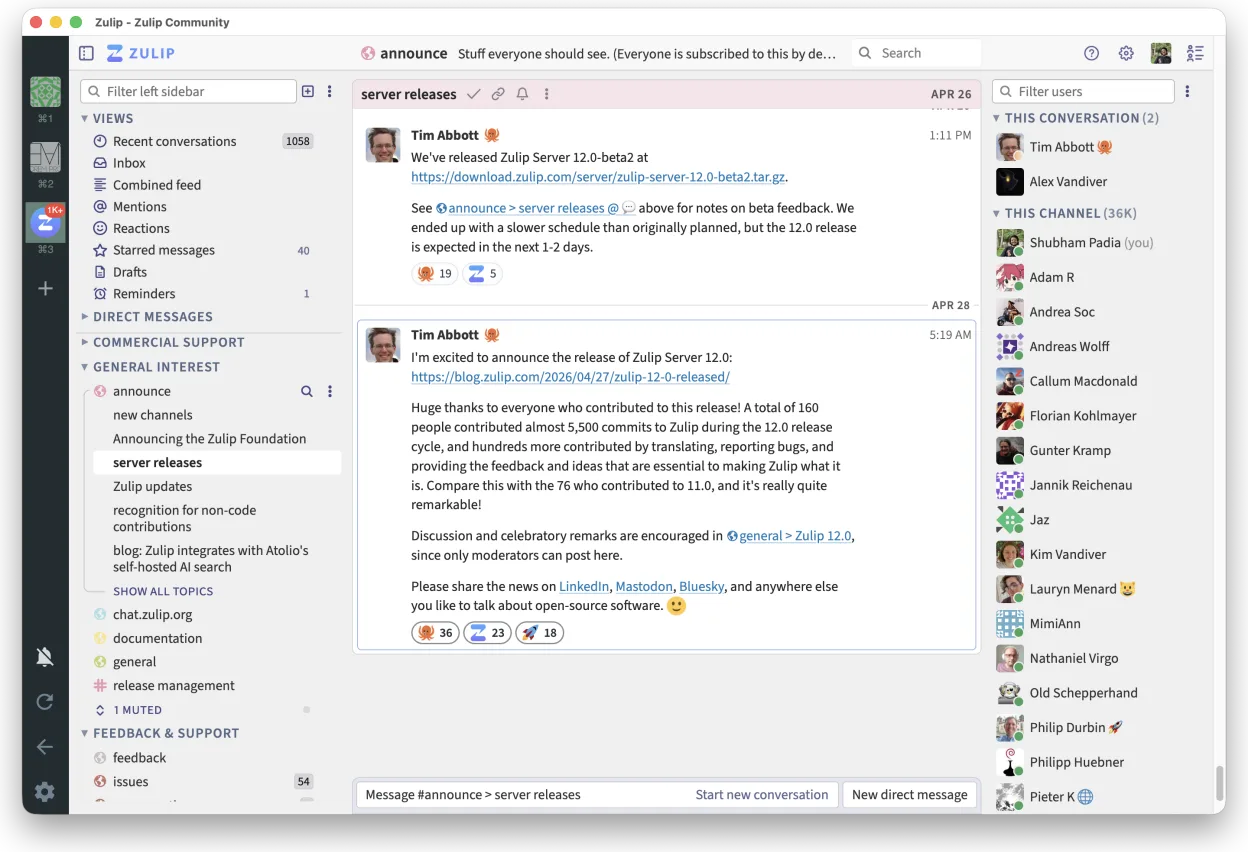
Zulip is a solid replacement for Microsoft Teams (legacy) for teams that prioritize organized, high-volume communication and self-hosting. Its threaded conversation model excels in clarity over time, making it ideal for technical or open-source teams. Audio and video conferencing are supported via integrations like Jitsi, but native calling is limited. It covers core chat, file sharing, and team organization well, but lacks deep calendar and contact list integration. Best for organizations valuing transparency, control, and structured discussion over out-of-the-box enterprise tooling.
- Licencia
- Apache-2.0
- Precio
- Gratis
- Última versión
- 5.13.2 (21 de septiembre de 2026)
- Valoración
- —
Lo que funciona igual
- Persistent, topic-based chat channels for team collaboration
- Real-time messaging with support for large groups
- File sharing with version tracking and history
- Cross-platform clients including Linux, Windows, and mobile
- Strong search and message filtering across chat history
Lo que cambia
- Zulip uses threaded conversations by default, unlike Teams' linear flow
- No native calendar integration; relies on external tools
- Video conferencing requires third-party services like Jitsi
- Contact list sync with corporate directories is limited
- Self-hosting is possible, unlike Microsoft Teams
Abrir tus archivos de Microsoft Teams (legacy)
Zulip supports file uploads and preserves version history, but cannot directly open Microsoft Teams-specific formats or exported chat logs. Files shared in Teams (e.g., Word, PDF) can be re-uploaded to Zulip without issue. Migration of historical content requires custom scripting; there is no built-in import tool for Teams data. File compatibility depends on the application used to open them, not Zulip itself.
Pasar de Microsoft Teams (legacy) a Zulip, paso a paso
- Set up a self-hosted Zulip server or sign up for hosted service
- Import users via CSV or LDAP if supported by your setup
- Create organization structure using realms, streams, and topics
- Migrate important files manually or via script from Teams exports
- Train team on Zulip's threading model and search features
Funciones clave de Zulip
- Conversaciones en hilos para discusiones organizadas
- Código abierto y autoalojable
- Disponible como cliente de escritorio nativo para Linux
- Soporta grupos grandes y altos volúmenes de mensajes
- Compatibilidad multiplataforma
- Fuerte funcionalidad de búsqueda en el historial
Cómo instalar Zulip en Linux
flatpak install flathub org.zulip.ZulipPreguntas frecuentes
Can Zulip do video meetings like Microsoft Teams?
Zulip supports video conferencing through integrations with Jitsi and other external tools, but does not have built-in calling. Meetings are initiated via links in chat, not native UI controls.
Is Zulip available on mobile and desktop?
Yes, Zulip offers native Linux, Windows, macOS, iOS, and Android apps. The Linux desktop client is available via Flathub and supports full functionality.
Can I self-host Zulip for more control?
Yes, Zulip is open-source and designed to be self-hosted. It's actively maintained and provides detailed documentation for deployment on your own infrastructure.
Otras 5 alternativas a Microsoft Teams (legacy)
 SlackSlack es una aplicación propietaria de comunicación para equipos en Linux que centraliza conversaciones…FlatpakSlack vs Microsoft Teams (legacy)
 MattermostMattermost es una plataforma de colaboración de código abierto y autoalojada para equipos de desarrolladores…Código abiertoGratisFlatpakMattermost vs Microsoft Teams (legacy)
 Rocket.ChatPlataforma de comunicación de equipo de código abierto para chat, video y colaboración, a menudo usada para…Código abiertoGratisFlatpakRocket.Chat vs Microsoft Teams (legacy)
 ElementElement es un cliente de chat y videoconferencia basado en matrices, de código abierto, para Linux.Código abiertoGratisFlatpakElement vs Microsoft Teams (legacy)
 Jitsi MeetJitsi Meet es un cliente de videoconferencias de código abierto que se conecta a cualquier servidor Jitsi…Código abiertoGratisFlatpakJitsi Meet vs Microsoft Teams (legacy)