
 Evolution MailLinux
vs
 The Bat!Windows
Evolution Mail as a Linux alternative to The Bat!
Updated
Our verdict
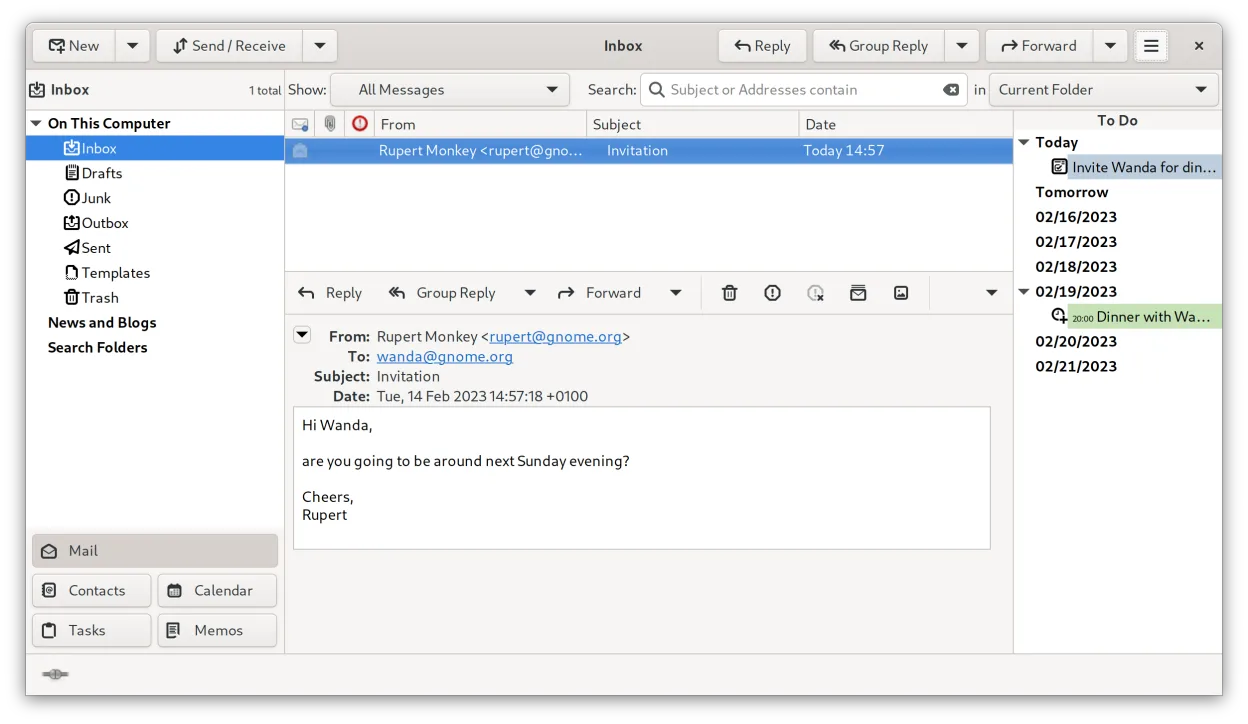
Evolution is a solid, free replacement for The Bat! if you value integrated PIM features and open standards. It handles multi-account IMAP/POP3, PGP, and S/MIME well. However, it lacks The Bat!'s granular per-account filtering rules and dedicated virus scanning integration. If you rely heavily on complex rule-based automation or specific Windows-centric workflows, you may find Evolution restrictive. For users wanting a unified mail, calendar, and contact manager with strong encryption support on Linux, Evolution is the standard choice.
- License
- GPL-2.0+ and GFDL-1.3
- Price
- Free
- Latest version
- 3.62.1 (October 9, 2026)
- Rating
- —
What works the same
- Supports multiple email accounts via IMAP, POP3, and SMTP protocols.
- Provides robust PGP/GPG and S/MIME encryption for secure communication.
- Includes integrated address book and calendar management.
- Allows local storage of mail for offline access.
- Supports filtering and rule-based message handling.
What is different
- Lacks built-in virus scanning integration; requires external tools.
- Filtering rules are less granular and flexible than The Bat!'s system.
- Interface is GNOME-centric and may feel less customizable for power users.
- No direct equivalent to The Bat!'s proprietary security features or hardware key integration depth.
- Commercial support is absent; relies on community forums and documentation.
Opening your The Bat! files
The Bat! uses a proprietary folder structure and database format that Evolution cannot import directly. You will not be able to open The Bat! mail files (.mbx or proprietary folders) in Evolution. You must export mail from The Bat! into a standard format like mbox or EML before importing it into Evolution. Contacts can be exported from The Bat! as vCard (.vcf) files, which Evolution can import natively.
Switching from The Bat! to Evolution Mail, step by step
- Export all email accounts from The Bat! as mbox or EML files.
- Export your address book from The Bat! as a vCard (.vcf) file.
- Install Evolution on your Linux system via package manager or Flathub.
- Configure your IMAP/POP3/SMTP accounts in Evolution with correct server settings.
- Import the exported vCard file into Evolution's address book.
- Import the mbox/EML files into the appropriate local folders in Evolution.
Key features of Evolution Mail
- IMAP, POP3 and SMTP email support
- Microsoft Exchange integration via EWS
- Integrated calendar with iCal and CalDAV support
- Address book with LDAP and CardDAV sync
- Task and note management
- PGP/GPG encryption and S/MIME signing
- Search across mail, contacts and events
- Extensible via plugins
How to install Evolution Mail on Linux
flatpak install flathub org.gnome.EvolutionFrequently asked questions
Does Evolution support Microsoft Exchange?
Yes, Evolution supports Microsoft Exchange via the Exchange Web Services (EWS) extension, allowing you to sync mail, calendar, and contacts with Exchange servers.
Can I use PGP with Evolution?
Yes, Evolution has built-in support for PGP/GPG encryption and signing. You can manage your keys and encrypt/decrypt messages directly within the client.
Is Evolution free?
Yes, Evolution is free and open-source software, licensed under the GPL-2.0+ and GFDL-1.3. There are no license fees or subscription costs.
4 other alternatives to The Bat!
 Mozilla ThunderbirdMozilla Thunderbird is a free, open‑source email, calendar and news client for Linux and other platforms.Open sourceFreeMozilla Thunderbird vs The Bat!
 Claws MailClaws Mail is a lightweight, fast GTK‑based email client for Linux.Open sourceFreeFlatpakClaws Mail vs The Bat!
 SylpheedSylpheed is a lightweight, GTK‑based email and news client for Linux, Windows and macOS.Open sourceFreeSylpheed vs The Bat!
 KMailKMail is KDE's full-featured email client, part of the Kontact suite, supporting IMAP, POP3, and local…Open sourceFreeKMail vs The Bat!