
 darktableLinux
vs
Corel PaintShop Pro 2022Windows
darktable, alternative Linux à Corel PaintShop Pro 2022
Mis à jour le
Notre avis
darktable is not a direct replacement for Corel PaintShop Pro 2022 if you need digital painting or general raster editing. It is a specialized raw photo processor. For users whose workflow is strictly organizing, developing, and retouching raw camera files, it is an excellent, powerful alternative. However, if you rely on layers for compositing, use it for digital art, or need a general-purpose image editor for non-raw formats, you will find darktable lacking. It serves the 'photo lab' role, not the 'paint shop' role.
- Licence
- GPL-3.0+
- Prix
- Gratuit
- Dernière version
- 5.6.2 (4 octobre 2026)
- Note
- —
Ce qui fonctionne pareil
- Both handle high-resolution raster images for photo enhancement.
- Both offer non-destructive editing workflows (history stack vs. layers).
- Both include tools for color correction, exposure adjustment, and retouching (healing/clone).
- Both support batch processing for large sets of photos.
- Both provide extensive libraries of filters and effects for image manipulation.
Ce qui change
- darktable lacks a true layer-based compositing engine; it uses a module stack instead.
- darktable has no digital painting or drawing tools (no brushes for art, only for retouching).
- Corel PaintShop Pro is a general-purpose raster editor; darktable is specialized for raw photo development.
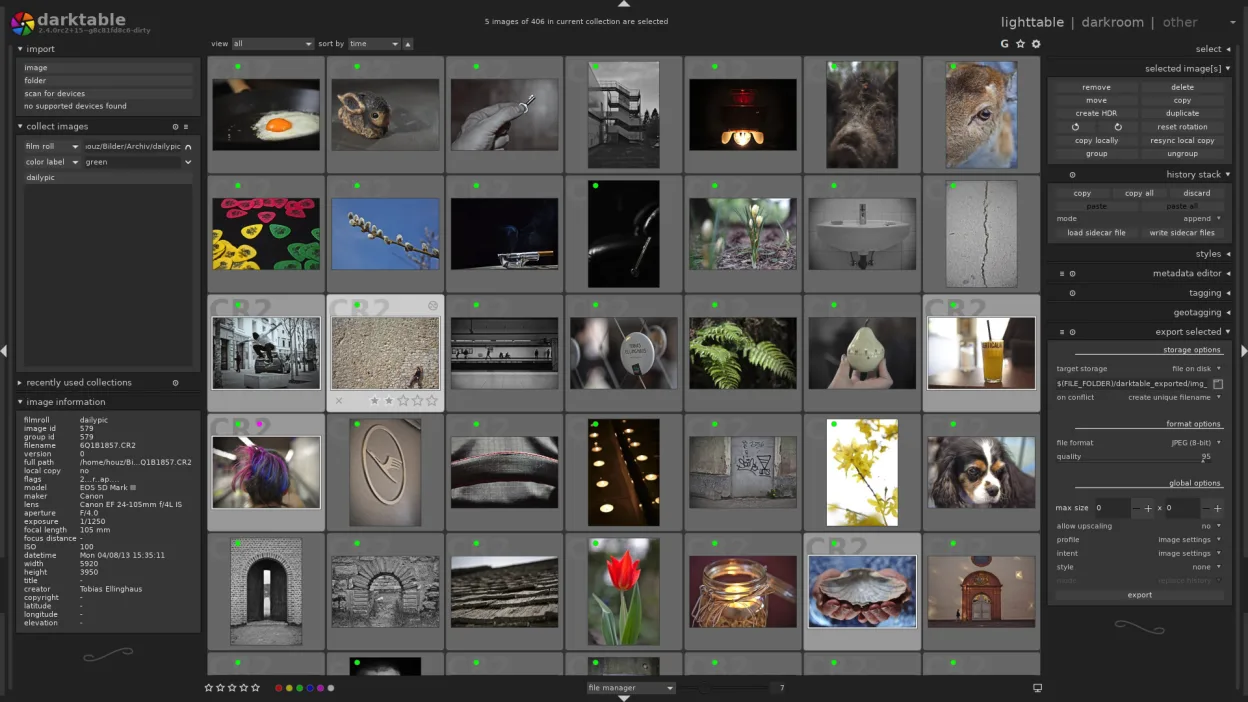
- darktable’s interface is organized around workflow modes (lighttable, darkroom) rather than a single canvas view.
- darktable does not support PSD files for editing, only for import in limited contexts.
Ouvrir vos fichiers Corel PaintShop Pro 2022
darktable is primarily designed for raw files (CR2, NEF, ARW, etc.) and DNG. It can open and export common formats like JPEG, PNG, and TIFF. It does not natively open or edit .PSD files from PaintShop Pro as a primary workflow; while it may import some PSDs for viewing, you cannot perform layer-based edits on them. If your PaintShop Pro files are flattened JPEGs or TIFFs, they will open fine. If they are complex layered PSDs, you will lose the layer structure.
Passer de Corel PaintShop Pro 2022 à darktable, étape par étape
- Install darktable via your package manager or Flathub.
- Import your raw photo folders into the darktable library.
- Set up your preferred color profile and output settings.
- Learn the difference between lighttable (culling) and darkroom (editing) modes.
- Export your processed images to JPEG or TIFF for final use or sharing.
- Keep GIMP or Krita installed for any tasks requiring layers or digital painting.
Fonctionnalités clés de darktable
- Édition non destructif avec pile d’historique
- Modes table de lumière et chambre noire
- Traitement RAW haute précision
- Vue carte de géolocalisation
- Support de tethering
- Modes impression et diaporama
- Extensible via scripts Python
Installer darktable sous Linux
flatpak install flathub org.darktable.Darktablesudo apt install darktablesudo apt install darktablesudo dnf install darktablesudo pacman -S darktablesudo zypper install darktableQuestions fréquentes
Can I use darktable for digital painting?
No. darktable is a photo editor, not a painting program. It has retouching brushes, but no tools for creating digital art from scratch. Use Krita or GIMP for that.
Does darktable support layers like PaintShop Pro?
No. darktable uses a non-destructive module stack. You cannot composite multiple images together using layers. For compositing, use GIMP.
Will my PaintShop Pro presets work in darktable?
No. Presets and filters are not compatible between the two applications. You will need to recreate your adjustments using darktable’s modules.
3 autres alternatives à Corel PaintShop Pro 2022
 GIMPGIMP est un éditeur de graphiques raster gratuit et open source, conçu pour la retouche photo, la peinture…Open sourceGratuitFlatpakGIMP ou Corel PaintShop Pro 2022
 KritaKrita est un programme de peinture numérique et d'illustration open‑source complet.Open sourceGratuitFlatpakKrita ou Corel PaintShop Pro 2022
 RawTherapeeRawTherapee est un programme de développement de photos raw open‑source et multiplateforme.Open sourceGratuitFlatpakRawTherapee ou Corel PaintShop Pro 2022