
 ShotwellLinux
vs
Adobe Lightroom CCWindows
Shotwell, alternative Linux à Adobe Lightroom CC
Mis à jour le
Notre avis
Shotwell is not a good replacement for Adobe Lightroom CC for professional photographers or serious enthusiasts who rely on advanced RAW editing, presets, and fine color grading. It works well for casual users who want basic organization, simple tagging, and light non-destructive edits like cropping or red-eye correction. Shotwell handles RAW files but lacks the depth of tone controls, profile support, and batch export options that Lightroom users expect. If your workflow is minimal and centered on GNOME, Shotwell is functional. For anything beyond basic use, consider Darktable or RawTherapee instead.
- Licence
- LGPL-2.1+
- Prix
- Gratuit
- Dernière version
- 33.2 (5 novembre 2026)
- Note
- —
Ce qui fonctionne pareil
- Both support non-destructive editing of RAW and common image formats
- Organize photos by date, tags, and ratings
- Support for basic color adjustments and straightening
- Import directly from camera or disk
- Non-destructive editing preserves original files
Ce qui change
- Shotwell lacks advanced color grading, tone curves, and local adjustments
- No support for Lightroom-style presets or profile management
- No batch export with custom naming, sizing, or watermarking
- No centralized database with smart collections or search filters
- Limited support for keyword hierarchies and metadata editing
Ouvrir vos fichiers Adobe Lightroom CC
Shotwell does not import Adobe Lightroom CC catalogs or .xmp sidecar files. It reads RAW, JPEG, PNG, and TIFF files directly but won't recognize Lightroom edits stored externally. If you've used Lightroom to generate exported JPEGs or TIFFs, Shotwell can import those, but RAW files edited in Lightroom will appear unedited unless the changes were embedded in the file. There's no direct migration path for catalogs or presets.
Passer de Adobe Lightroom CC à Shotwell, étape par étape
- Export your final images from Lightroom as JPEG or TIFF if needed
- Copy all original RAW and processed files to a single accessible folder
- Launch Shotwell and set the library folder to that directory
- Use import tools to bring in photos from disk
- Reapply basic edits like crop or color in Shotwell if originals are unedited
- Tag and rate images manually since metadata may not carry over
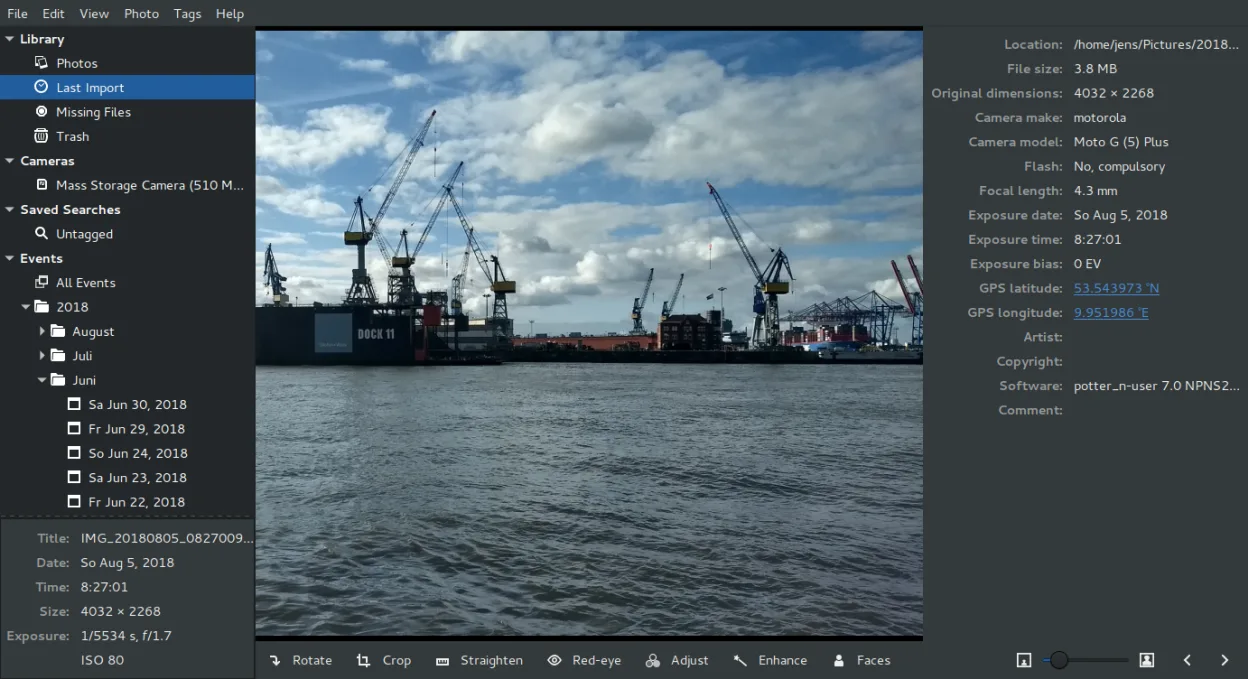
Fonctionnalités clés de Shotwell
- Importer des photos depuis un appareil photo ou un disque
- Organiser par date, balises, notes
- Recadrage, correction des yeux rouges, couleurs, redressement non destructifs
- Prise en charge des formats RAW, JPEG, PNG, TIFF
- Téléversement vers Flickr, Google Photos, etc.
- Interface rapide et légère
- Intégré au gestionnaire de fichiers GNOME
Installer Shotwell sous Linux
flatpak install flathub org.gnome.Shotwellsudo apt install shotwellsudo apt install shotwellsudo dnf install shotwellsudo pacman -S shotwellsudo zypper install shotwellQuestions fréquentes
Can Shotwell edit RAW photos like Lightroom?
Yes, Shotwell can open and apply basic non-destructive edits to RAW files, but it lacks the advanced controls like curves, HSL, or precise exposure tuning found in Lightroom.
Does Shotwell support Lightroom presets?
No, Shotwell has no preset system. You must apply edits manually and cannot import or use Lightroom profiles or .xmp presets.
Is Shotwell suitable for professional photo workflows?
No, Shotwell is designed for lightweight, personal use. Professionals need tools like Darktable or RawTherapee that offer deeper editing and cataloging.
3 autres alternatives à Adobe Lightroom CC
 darktabledarktable est un éditeur photo gratuit et open‑source qui gère les fichiers RAW et propose un flux de travail…Open sourceGratuitFlatpakdarktable ou Adobe Lightroom CC
 RawTherapeeRawTherapee est un programme de développement de photos raw open‑source et multiplateforme.Open sourceGratuitFlatpakRawTherapee ou Adobe Lightroom CC
 digiKamdigiKam est un gestionnaire de photos KDE complet pour organiser, étiqueter et retoucher des photos…Open sourceGratuitFlatpakdigiKam ou Adobe Lightroom CC