
 ShotwellLinux
vs
Windows PhotosWindows
ShotwellLinux
vs
Windows PhotosWindows
Shotwell, alternative Linux à Windows Photos
Mis à jour le
Notre avis
Shotwell is a solid Linux alternative for users who need a simple photo viewer with basic editing and decent organization features. It covers the core needs of Windows Photos—viewing JPEG/PNG/WebP, cropping, rotating, and tagging—while staying lightweight. Power users who rely on advanced AI face recognition or heavy batch processing may find it lacking, but for everyday photo browsing and light tweaks Shotwell works well.
- Licence
- LGPL-2.1+
- Prix
- Gratuit
- Dernière version
- 33.0 (13 septembre 2026)
- Note
- —
Ce qui fonctionne pareil
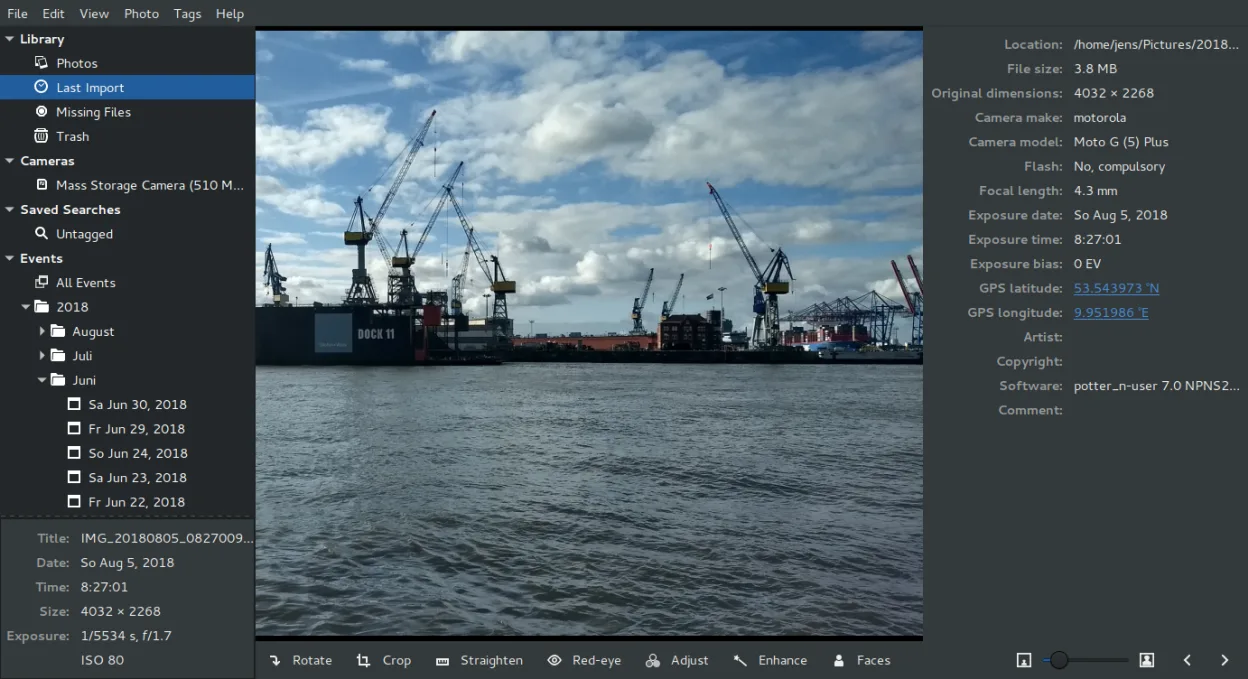
- Supports common image formats (JPEG, PNG, TIFF, WebP via GDK)
- Basic editing: crop, rotate, straighten, red‑eye removal
- Date‑based and tag‑based organization
- Fast, lightweight UI suitable for quick previews
Ce qui change
- No built‑in video playback; requires external player
- No AI face recognition or automatic sorting
- Batch processing is limited to simple edits, no advanced scripts
- Export options are manual; no one‑click “Save for web” preset
Ouvrir vos fichiers Windows Photos
Shotwell can open all standard image files that Windows Photos handles, including JPEG, PNG, and WebP (via the underlying GDK libraries). It does not use a proprietary file format, so there is no special conversion needed. Exporting edited images is straightforward—Shotwell writes the result as a new JPEG/PNG file, preserving the original.
Passer de Windows Photos à Shotwell, étape par étape
- Install Shotwell from your distro’s repository or Flathub.
- Launch Shotwell and let it scan your Pictures folder.
- Import any existing photo collections using the Import dialog.
- Create tags or albums to mirror the organization you had in Windows Photos.
- If you used video files, set the default video player (e.g., VLC) for playback.
- Adjust preferences for thumbnail size and editor shortcuts to match your workflow.
Fonctionnalités clés de Shotwell
- Importer des photos depuis un appareil photo ou un disque
- Organiser par date, balises, notes
- Recadrage, correction des yeux rouges, couleurs, redressement non destructifs
- Prise en charge des formats RAW, JPEG, PNG, TIFF
- Téléversement vers Flickr, Google Photos, etc.
- Interface rapide et légère
- Intégré au gestionnaire de fichiers GNOME
Installer Shotwell sous Linux
flatpak install flathub org.gnome.Shotwellsudo apt install shotwellsudo apt install shotwellsudo dnf install shotwellsudo pacman -S shotwellsudo zypper install shotwellQuestions fréquentes
Can Shotwell edit RAW files?
Yes, Shotwell can import and display many RAW formats, but its editing tools are limited to basic adjustments.
Is there a way to add face recognition?
Shotwell does not include face detection; you would need a separate tool like digikam or an external script.
How does Shotwell handle batch renaming?
Batch renaming is not built in; you can rename files manually or use a file manager script after export.
4 autres alternatives à Windows Photos
 digiKamdigiKam est un gestionnaire de photos KDE complet pour organiser, étiqueter et retoucher des photos…Open sourceGratuitFlatpakdigiKam ou Windows Photos
 GIMPGIMP est un éditeur de graphiques raster gratuit et open source, conçu pour la retouche photo, la peinture…Open sourceGratuitFlatpakGIMP ou Windows Photos
 darktabledarktable est un éditeur photo gratuit et open‑source qui gère les fichiers RAW et propose un flux de travail…Open sourceGratuitFlatpakdarktable ou Windows Photoseogeog (Eye of GNOME) est un visionneuse d'images légère pour le bureau GNOME, capable d'ouvrir des formats…Open sourceGratuiteog ou Windows Photos