
 ShotwellLinux
vs
Microsoft PhotosWindows
Shotwell, alternative Linux à Microsoft Photos
Mis à jour le
Notre avis
Shotwell is a solid replacement for Microsoft Photos if you're on a GNOME-based Linux system and want simple photo management with basic editing. It handles common formats like JPEG and PNG well, browses quickly, and organizes by date or tags without bloat. The non-destructive editing is reliable for crops, rotation, and lighting tweaks. However, it lacks HEIC support unless you install additional codecs, and web service integrations like Google Photos may be less reliable now. It’s ideal for users who value simplicity and Linux integration over cloud syncing.
- Licence
- LGPL-2.1+
- Prix
- Gratuit
- Dernière version
- 33.2 (5 novembre 2026)
- Note
- —
Ce qui fonctionne pareil
- View JPEG, PNG, and TIFF images directly
- Organize photos by date automatically
- Basic editing tools: crop, rotate, straighten, color adjustment
- Fast thumbnail browsing with lightweight resource use
- Supports file tagging and ratings for personal organization
Ce qui change
- No native HEIC support without extra system codecs
- No built-in video playback or editing
- Missing advanced AI-based enhancements (e.g., auto-fix, object recognition)
- Upload services like Flickr are deprecated or unreliable
- Interface is minimalist but less polished than modern Microsoft Photos
Ouvrir vos fichiers Microsoft Photos
Shotwell opens JPEG, PNG, and TIFF files without issue, matching Microsoft Photos. RAW support is broader than Microsoft Photos, but HEIC files — commonly created on iPhones — require additional system-level codecs (like libheif) to be installed and may not work out of the box. If your photos are in standard formats, Shotwell will handle them fine. Exporting edits is non-destructive by default, meaning originals stay intact, but saved adjustments are stored in sidecar files or the library, not embedded into the original image.
Passer de Microsoft Photos à Shotwell, étape par étape
- Install Shotwell via your distro’s package manager or Flatpak
- Copy your photo folders from Windows to your Linux home directory
- Launch Shotwell and set the photo library location to your copied folder
- Use 'Import from Folder' to add existing photos to the library
- Enable 'Copy files to Pictures folder' in preferences if you want automatic organization
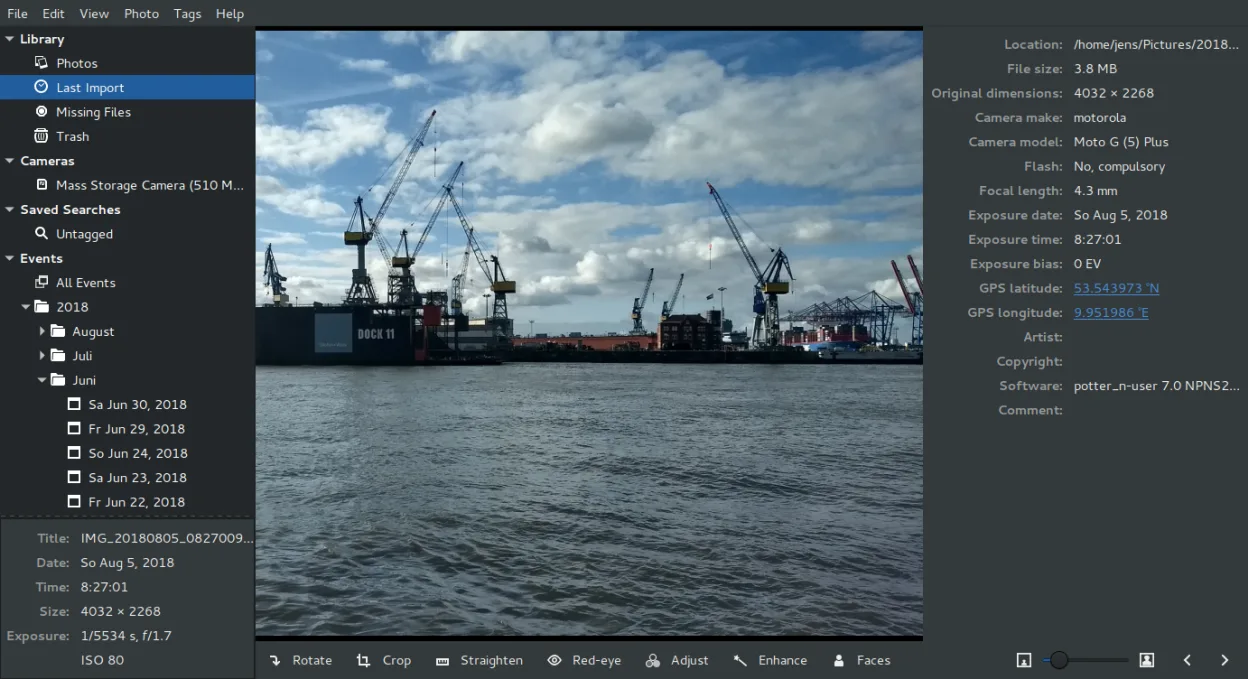
Fonctionnalités clés de Shotwell
- Importer des photos depuis un appareil photo ou un disque
- Organiser par date, balises, notes
- Recadrage, correction des yeux rouges, couleurs, redressement non destructifs
- Prise en charge des formats RAW, JPEG, PNG, TIFF
- Téléversement vers Flickr, Google Photos, etc.
- Interface rapide et légère
- Intégré au gestionnaire de fichiers GNOME
Installer Shotwell sous Linux
flatpak install flathub org.gnome.Shotwellsudo apt install shotwellsudo apt install shotwellsudo dnf install shotwellsudo pacman -S shotwellsudo zypper install shotwellQuestions fréquentes
Can Shotwell edit photos non-destructively?
Yes. Edits like crop, rotate, and exposure are stored separately and don’t alter the original file unless you explicitly export a modified version.
Does Shotwell work well on non-GNOME desktops?
It runs on other desktops like KDE or XFCE, but integration with the file manager and system settings is best on GNOME.
Is Google Photos upload still supported?
The option exists, but Google ended support for the underlying API. Uploading may fail or require third-party tools.
4 autres alternatives à Microsoft Photos
 nomacs - Image LoungeNomacs est un visionneuse d'images gratuite et open source qui prend en charge les vignettes, les…Open sourceGratuitFlatpaknomacs - Image Lounge ou Microsoft Photos
 GwenViewGwenView est le visionneur d’images rapide de KDE, doté d’outils d’édition et d’annotation de base, idéal…Open sourceGratuitFlatpakGwenView ou Microsoft Photosfehfeh est un visionneur d'images léger en ligne de commande pour Linux, souvent utilisé pour définir des fonds…Open sourceGratuitfeh ou Microsoft Photos
 darktabledarktable est un éditeur photo gratuit et open‑source qui gère les fichiers RAW et propose un flux de travail…Open sourceGratuitFlatpakdarktable ou Microsoft Photos