
 ShotwellLinux
vs
Adobe Lightroom ClassicWindows
ShotwellLinux
vs
Adobe Lightroom ClassicWindows
Shotwell, alternative Linux à Adobe Lightroom Classic
Mis à jour le
Notre avis
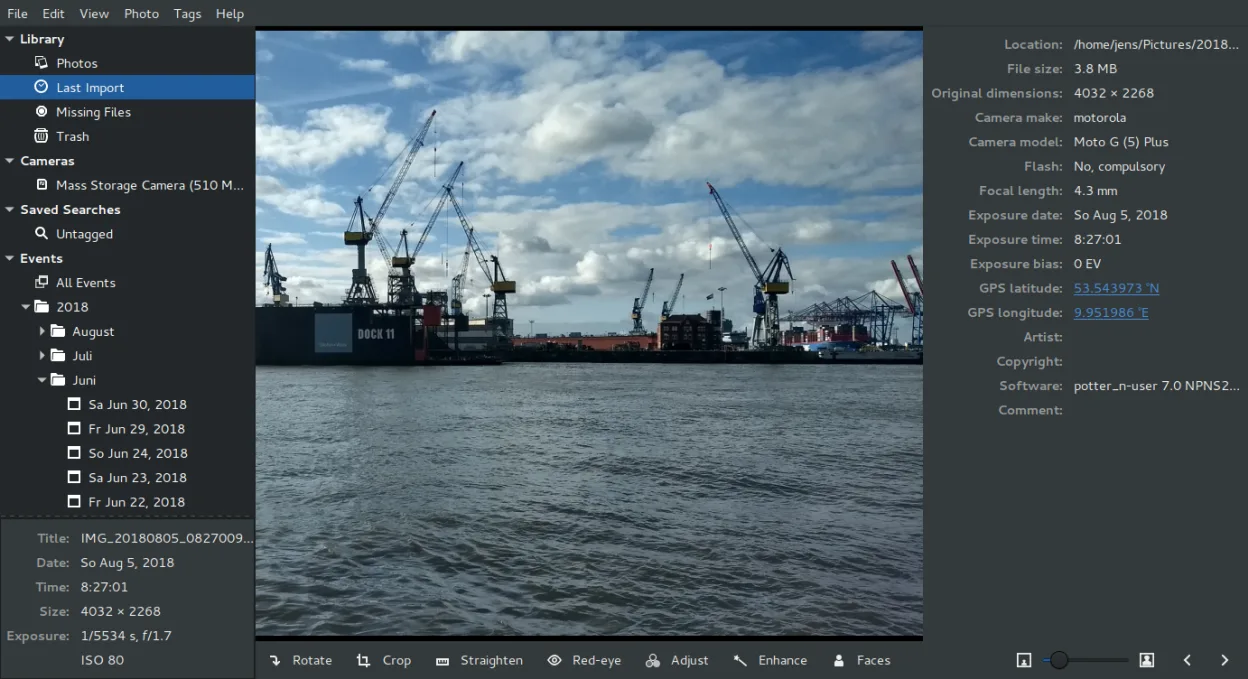
Shotwell is not a replacement for Adobe Lightroom Classic. It is a lightweight GNOME organizer for casual users who need basic import, tagging, and non-destructive adjustments like crop and color. It lacks the advanced RAW processing, extensive metadata controls, and batch preset workflows Lightroom provides. If you rely on Lightroom for professional cataloging, complex edits, or large-scale batch processing, Shotwell will feel limiting. It suits users who only need to organize family photos and make quick fixes without a steep learning curve or heavy resource usage.
- Licence
- LGPL-2.1+
- Prix
- Gratuit
- Dernière version
- 33.0 (13 septembre 2026)
- Note
- —
Ce qui fonctionne pareil
- Non-destructive editing that preserves original files
- Support for importing and organizing RAW and JPEG images
- Basic color and tone adjustments
- Ability to tag and rate photos for organization
- Export to common formats like JPEG and PNG
Ce qui change
- Lacks advanced RAW processing engine and detailed histogram controls
- No support for complex batch processing with multiple presets
- Limited metadata editing compared to Lightroom's extensive EXIF/IPTC fields
- No local library database for managing tens of thousands of high-res files efficiently
- Missing professional-grade tools like local adjustments, masks, and HSL sliders
Ouvrir vos fichiers Adobe Lightroom Classic
Shotwell can open standard RAW, JPEG, PNG, and TIFF files that Lightroom Classic uses. However, it does not read Adobe Lightroom Classic catalog files (.lrcat) or its proprietary edit history. Any edits made in Lightroom are not transferred; you must re-apply them in Shotwell. Exported files from Lightroom (like edited JPEGs) open fine in Shotwell, but the non-destructive edit stack is not compatible.
Passer de Adobe Lightroom Classic à Shotwell, étape par étape
- Export your edited photos from Lightroom Classic as JPEG or TIFF files.
- Copy these exported files to a local folder on your Linux system.
- Open Shotwell and use the Import function to add the folder.
- Re-apply any necessary basic edits like crop or color adjustments in Shotwell.
- Re-tag and rate photos in Shotwell to rebuild your organizational structure.
Fonctionnalités clés de Shotwell
- Importer des photos depuis un appareil photo ou un disque
- Organiser par date, balises, notes
- Recadrage, correction des yeux rouges, couleurs, redressement non destructifs
- Prise en charge des formats RAW, JPEG, PNG, TIFF
- Téléversement vers Flickr, Google Photos, etc.
- Interface rapide et légère
- Intégré au gestionnaire de fichiers GNOME
Installer Shotwell sous Linux
flatpak install flathub org.gnome.Shotwellsudo apt install shotwellsudo apt install shotwellsudo dnf install shotwellsudo pacman -S shotwellsudo zypper install shotwellQuestions fréquentes
Can Shotwell handle large RAW files from professional cameras?
Yes, it supports various RAW formats. However, it is not optimized for heavy professional workflows. If you shoot high-megapixel RAW files and need extensive post-processing, Shotwell may feel slow or limited compared to dedicated pro tools.
Does Shotwell sync with cloud storage automatically?
No, it does not have built-in automatic cloud sync. It can upload to services like Flickr or Google Photos manually, but it does not act as a continuous backup solution like Lightroom Cloud or third-party sync tools.
Is Shotwell free to use?
Yes, Shotwell is free and open-source software under the LGPL-2.1+ license. There are no subscription fees or watermarks.
4 autres alternatives à Adobe Lightroom Classic
 darktabledarktable est un éditeur photo gratuit et open‑source qui gère les fichiers RAW et propose un flux de travail…Open sourceGratuitFlatpakdarktable ou Adobe Lightroom Classic
 RawTherapeeRawTherapee est un programme de développement de photos raw open‑source et multiplateforme.Open sourceGratuitFlatpakRawTherapee ou Adobe Lightroom Classic
 digiKamdigiKam est un gestionnaire de photos KDE complet pour organiser, étiqueter et retoucher des photos…Open sourceGratuitFlatpakdigiKam ou Adobe Lightroom ClassicRawstudioRawstudio est un outil de traitement photo raw pour Linux qui permet d'organiser, d'éditer et d'exporter des…Open sourceGratuitAbandonnéRawstudio ou Adobe Lightroom Classic