
 ShotwellLinux
vs
ShotwellLinux
vs
 PicasaWindows
Shotwell, alternative Linux à Picasa
Mis à jour le
Notre avis
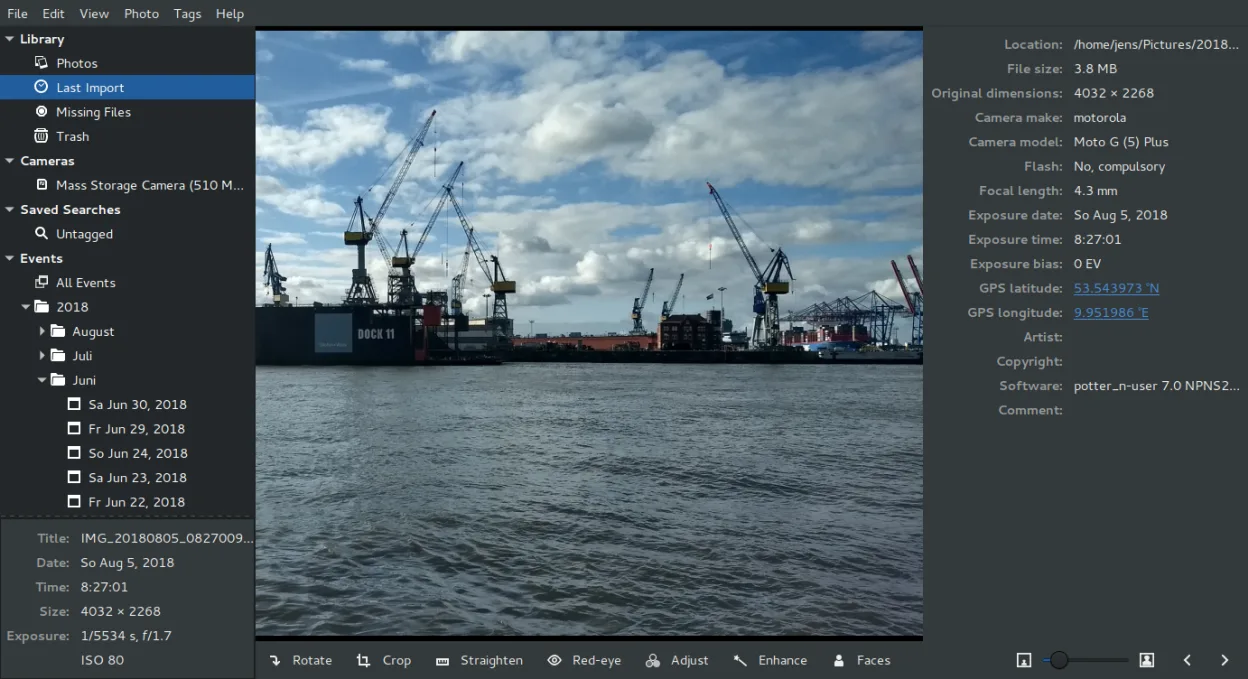
Shotwell is a solid replacement for Picasa for users who need a lightweight, GNOME‑centric photo manager with basic editing and batch handling. It covers most everyday tasks: import, date‑based organization, tagging, rating, non‑destructive crop and color tweaks, and fast viewing. It is ideal for casual photographers who use the GNOME desktop and want a free, actively maintained tool. Advanced features like full‑blown RAW editing, complex batch renaming, or sophisticated face recognition are not as mature as in digiKam, so power users may need a secondary tool.
- Licence
- LGPL-2.1+
- Prix
- Gratuit
- Dernière version
- 33.0 (13 septembre 2026)
- Note
- —
Ce qui fonctionne pareil
- Both import photos from disk or camera
- Both organize by date and allow tagging/rating
- Both provide basic non‑destructive editing (crop, color, straighten)
- Both support RAW, JPEG, PNG, TIFF
- Both can upload to online services (Flickr, Google Photos)
Ce qui change
- Shotwell lacks advanced face recognition and detailed metadata editing beyond basic tags
- Shotwell does not offer batch renaming or complex batch processing features
- Shotwell’s editor is limited to simple adjustments; it does not include full‑blown photo retouching tools
- Shotwell does not support advanced RAW processing pipelines like digiKam or Darktable
- Shotwell’s UI is GNOME‑centric and may feel limited on non‑GNOME desktops
Ouvrir vos fichiers Picasa
Shotwell can open standard image formats such as JPEG, PNG, TIFF, and many RAW files. It does not read Picasa’s proprietary database or .picasaweb folders, so any metadata stored only in Picasa’s database will be lost unless exported to a common format (e.g., XMP) first.
Passer de Picasa à Shotwell, étape par étape
- Export all photos from Picasa to a folder as JPEG/RAW, preserving folder structure
- Open Shotwell and use the Import feature to bring the exported images into a new library
- Recreate tags and ratings by selecting photos in Shotwell and applying tags/ratings manually
- Use Shotwell’s batch editing tools to crop or adjust color if needed
- Set up any desired upload destinations (Flickr, Google Photos) in Shotwell’s Preferences
Fonctionnalités clés de Shotwell
- Importer des photos depuis un appareil photo ou un disque
- Organiser par date, balises, notes
- Recadrage, correction des yeux rouges, couleurs, redressement non destructifs
- Prise en charge des formats RAW, JPEG, PNG, TIFF
- Téléversement vers Flickr, Google Photos, etc.
- Interface rapide et légère
- Intégré au gestionnaire de fichiers GNOME
Installer Shotwell sous Linux
flatpak install flathub org.gnome.Shotwellsudo apt install shotwellsudo apt install shotwellsudo dnf install shotwellsudo pacman -S shotwellsudo zypper install shotwellQuestions fréquentes
Does Shotwell support batch renaming?
No, Shotwell does not provide a built‑in batch renaming tool. You would need a separate utility like pyRenamer or a command‑line script for that.
Can I use Shotwell on a non‑GNOME desktop?
Shotwell runs on any Linux desktop that has GTK+ 3, but its integration with the file manager and the UI feel are optimized for GNOME.
Will Shotwell keep my RAW files untouched?
Yes, Shotwell’s editor is non‑destructive; it stores edits separately and never overwrites the original RAW file.
3 autres alternatives à Picasa
 digiKamdigiKam est un gestionnaire de photos KDE complet pour organiser, étiqueter et retoucher des photos…Open sourceGratuitFlatpakdigiKam ou Picasa
 F-SpotF-Spot est un organisateur de photos GNOME abandonné, doté de fonctions d'édition de base.Open sourceGratuitAbandonnéF-Spot ou Picasa
 PicasaPicasa était un organisateur et visionneur de photos multiplateforme désactivé, autrefois populaire sur…GratuitAbandonnéPicasa ou Picasa