
 SylpheedLinux
vs
SylpheedLinux
vs
 EudoraWindows
Sylpheed, alternative Linux à Eudora
Mis à jour le
Notre avis
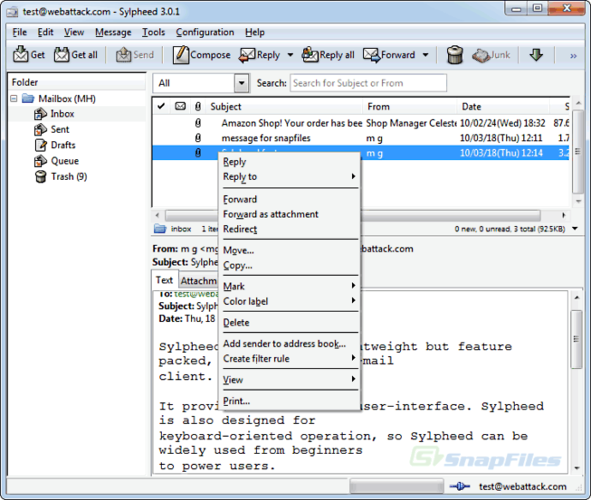
Sylpheed can replace Eudora for users who need a lightweight, open‑source mail client on Linux. It supports all core protocols (IMAP, POP3, SMTP), local storage in MH format, filtering, address book with LDAP, threading and basic HTML rendering. It is best for users comfortable with MH mailboxes and who prefer a small footprint; it may be less familiar to those who used Eudora’s MBOX storage or advanced HTML editing.
Couverture fonctionnelle
- Licence
- GPL-2.0-or-later
- Prix
- Gratuit
- Dernière version
- 3.7.0
- Note
- —
Ce qui fonctionne pareil
- Supports IMAP/POP3/SMTP for sending and receiving
- Provides address book integration and LDAP lookup
- Offers message filtering and rule‑based processing
- Includes threading and search functionality
- Renders basic HTML in messages
Ce qui change
- Uses MH mailbox storage instead of MBOX, which may require conversion
- Lacks a built‑in MBOX import/export tool, so migration may need manual conversion
- No native support for Eudora’s proprietary .eml or .db files
- No advanced HTML editor or rich‑text composition like Eudora’s editor
- No direct integration with Windows‑style account templates
Ouvrir vos fichiers Eudora
Sylpheed does not natively import Eudora’s .eml or .db files. Users can export Eudora mail to standard .eml files and then use a script or maildrop tool to move them into the MH format. There is no built‑in export function for Eudora data, so manual conversion is required.
Passer de Eudora à Sylpheed, étape par étape
- Export Eudora mail to .eml files via Eudora’s export feature.
- Create a new folder structure in Sylpheed matching your Eudora folders.
- Use a command‑line tool (e.g., mailx or a custom script) to import the .eml files into the MH mailbox directories.
- Configure the same IMAP/POP3 accounts in Sylpheed and verify connectivity.
- Set up address book entries, either by importing vCard files or manually recreating them.
- Adjust filtering rules in Sylpheed to match your Eudora rules.
- faq
Fonctionnalités clés de Sylpheed
- Stockage des courriels au format MH
- Interface graphique GTK+
- Prise en charge de SMTP, POP3, IMAP et NNTP
- Carnet d'adresses intégré avec recherche LDAP
- Filtrage et traitement des courriels par règles
- Plusieurs comptes et hiérarchie de dossiers
- Vérification orthographique via Enchant
- Fichiers de configuration portables
Installer Sylpheed sous Linux
Ubuntu / Mint
sudo apt install sylpheedDebian
sudo apt install sylpheedFedora
sudo dnf install sylpheed4 autres alternatives à Eudora
 Evolution MailEvolution est le gestionnaire intégré de messagerie, calendrier, contacts et tâches de GNOME.Open sourceGratuitFlatpakEvolution Mail ou Eudora
 Claws MailClaws Mail est un client de messagerie GTK léger et rapide pour Linux.Open sourceGratuitFlatpakClaws Mail ou Eudora
 KMailKMail est le client de messagerie complet de KDE, faisant partie de la suite Kontact, prenant en charge IMAP…Open sourceGratuitKMail ou Eudora
 Mozilla ThunderbirdMozilla Thunderbird est un client de messagerie, agenda et flux d'actualités gratuit et open‑source pour…Open sourceGratuitMozilla Thunderbird ou Eudora
Notez Sylpheed
Soyez le premier à noter
Bon remplaçant de Eudora ?
0