
 SylpheedLinux
vs
ThunderbirdWindows
SylpheedLinux
vs
ThunderbirdWindows
Sylpheed, alternative Linux à Thunderbird
Mis à jour le
Notre avis
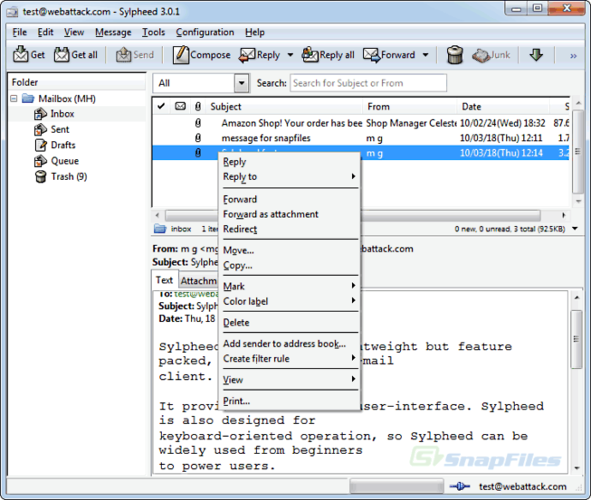
Sylpheed can replace Thunderbird for users who need a lightweight, fast mail client with basic calendar and contact features, but it lacks the rich calendar, chat, and RSS integration that Thunderbird offers. It is suitable for users who prefer a small footprint and simple configuration, such as developers or those on older hardware.
- Licence
- GPL-2.0-or-later
- Prix
- Gratuit
- Dernière version
- 3.7.0
- Note
- —
Ce qui fonctionne pareil
- Supports IMAP/POP3/SMTP for email
- Built‑in address book with LDAP lookup
- Rule‑based filtering
- Multiple account handling
- Spell checking via Enchant
Ce qui change
- No integrated calendar or contacts sync beyond address book
- No native RSS feed reader
- No chat (IRC/XMPP/Matrix) support
- No Usenet support beyond basic NNTP
- No advanced message threading or conversation view
Ouvrir vos fichiers Thunderbird
Sylpheed stores mail in the MH format, which is not compatible with Thunderbird’s mbox or Maildir. Direct import of Thunderbird profiles is not supported; users would need to export messages to a common format (e.g., mbox) and then use a conversion tool before importing into Sylpheed.
Passer de Thunderbird à Sylpheed, étape par étape
- Export Thunderbird mail to mbox or Maildir using the Export feature.
- Export contacts to a CSV or vCard file from Thunderbird’s Address Book.
- Install Sylpheed from your distribution’s package manager (e.g., apt install sylpheed).
- Configure your email accounts in Sylpheed using the same server settings as Thunderbird.
- Import the exported mail files into Sylpheed’s MH mailbox directory or use a conversion script.
- Re‑import contacts into Sylpheed’s address book via the CSV/vCard import option.
Fonctionnalités clés de Sylpheed
- Stockage des courriels au format MH
- Interface graphique GTK+
- Prise en charge de SMTP, POP3, IMAP et NNTP
- Carnet d'adresses intégré avec recherche LDAP
- Filtrage et traitement des courriels par règles
- Plusieurs comptes et hiérarchie de dossiers
- Vérification orthographique via Enchant
- Fichiers de configuration portables
Installer Sylpheed sous Linux
sudo apt install sylpheedsudo apt install sylpheedsudo dnf install sylpheedQuestions fréquentes
Does Sylpheed support the same email protocols as Thunderbird?
Yes, Sylpheed supports SMTP, POP3, IMAP, and NNTP, so it can handle the same email servers as Thunderbird.
Can I use Sylpheed on Windows?
Yes, Sylpheed is cross‑platform and runs on Windows, but it is primarily developed for Linux and uses the GTK+ toolkit.
Will my existing Thunderbird settings work automatically in Sylpheed?
No. Sylpheed does not read Thunderbird configuration files; you must manually re‑create account settings and import mail and contacts.
5 autres alternatives à Thunderbird
 MailspringUn client de messagerie de bureau rapide et complet pour Linux, doté d'un moteur de synchronisation C++ et…Open sourceGratuitFlatpakMailspring ou Thunderbird
 Claws MailClaws Mail est un client de messagerie GTK léger et rapide pour Linux.Open sourceGratuitFlatpakClaws Mail ou Thunderbird
 EvolutionEvolution est un gestionnaire d’informations personnelles complet qui combine courriel, agenda, contacts et…Open sourceGratuitFlatpakEvolution ou Thunderbird
 KMailKMail est le client de messagerie complet de KDE, faisant partie de la suite Kontact, prenant en charge IMAP…Open sourceGratuitKMail ou Thunderbird
 GearyGeary est un client de messagerie basé sur GNOME pour Linux qui vous permet d'envoyer, de recevoir et…Open sourceGratuitFlatpakGeary ou Thunderbird