
 SylpheedLinux
vs
SylpheedLinux
vs
 Forte AgentWindows
Sylpheed, alternative Linux à Forte Agent
Mis à jour le
Notre avis
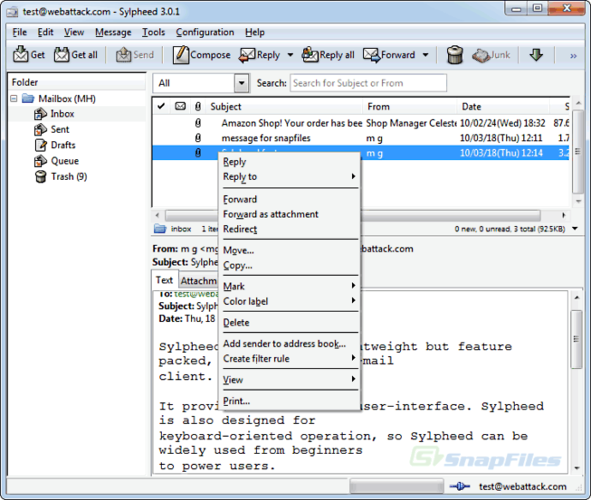
Sylpheed is a solid replacement for Forte Agent if you rely on POP email and Usenet (NNTP) access. It handles both protocols well, supports offline caching, filtering, address book management, and stores messages in a searchable MH format. Its lightweight design and active development make it reliable for users who want a simple, no-frills client. However, it lacks some advanced news features Forte Agent users might expect, such as scoring or threading in large groups. Best suited for users who prioritize stability and basic functionality over power-user newsreading tools.
- Licence
- GPL-2.0-or-later
- Prix
- Gratuit
- Dernière version
- 3.7.0
- Note
- —
Ce qui fonctionne pareil
- Supports both POP3 and NNTP for email and Usenet access
- Provides offline message caching and local storage
- Includes message filtering and rule-based processing
- Has a built-in address book with LDAP support
- Offers full-text search via standard tools on MH folders
Ce qui change
- Sylpheed uses MH mailbox format instead of Forte Agent's native format
- No built-in scoring or killfile system for Usenet noise filtering
- Limited threading options compared to Forte Agent's advanced news handling
- Interface is simpler, with fewer customization options for news views
- No direct import from Forte Agent's configuration or data files
Ouvrir vos fichiers Forte Agent
Sylpheed does not support direct import of Forte Agent's message databases or configuration files. Since Forte Agent stores data in a proprietary format and Sylpheed uses MH mailboxes, there is no automated conversion path. You would need to manually export messages to mbox or EML format if possible, then import them into Sylpheed. Configuration settings like accounts and filters must be recreated from scratch. No third-party tools are widely known to bridge this gap reliably.
Passer de Forte Agent à Sylpheed, étape par étape
- Export any important messages from Forte Agent to EML or mbox if possible
- Install Sylpheed via your package manager (e.g., apt or dnf)
- Set up POP3 and NNTP accounts manually in Sylpheed
- Recreate filtering rules and address book entries
- Import messages into Sylpheed's MH folders using tools like 'inc' or 'mbox2mh'
- Verify connections and test sending, receiving, and news posting
Fonctionnalités clés de Sylpheed
- Stockage des courriels au format MH
- Interface graphique GTK+
- Prise en charge de SMTP, POP3, IMAP et NNTP
- Carnet d'adresses intégré avec recherche LDAP
- Filtrage et traitement des courriels par règles
- Plusieurs comptes et hiérarchie de dossiers
- Vérification orthographique via Enchant
- Fichiers de configuration portables
Installer Sylpheed sous Linux
sudo apt install sylpheedsudo apt install sylpheedsudo dnf install sylpheedQuestions fréquentes
Can Sylpheed read Forte Agent's message files directly?
No. Forte Agent uses a proprietary format, and Sylpheed uses MH mailboxes. Direct reading is not supported. You must export messages to a common format first.
Does Sylpheed support IMAP, and is that a problem for replacing Forte Agent?
Yes, it supports IMAP, but that doesn't hurt its suitability. Forte Agent focuses on POP and NNTP, which Sylpheed also handles well. IMAP support is just an extra.
Is Sylpheed actively maintained and secure?
Yes. It's packaged in Debian, Ubuntu, and Fedora, and receives regular updates. It uses standard encryption via GnuTLS and has a clean security history.
3 autres alternatives à Forte Agent
 Evolution MailEvolution est le gestionnaire intégré de messagerie, calendrier, contacts et tâches de GNOME.Open sourceGratuitFlatpakEvolution Mail ou Forte Agent
 KMailKMail est le client de messagerie complet de KDE, faisant partie de la suite Kontact, prenant en charge IMAP…Open sourceGratuitKMail ou Forte Agent
 Mozilla ThunderbirdMozilla Thunderbird est un client de messagerie, agenda et flux d'actualités gratuit et open‑source pour…Open sourceGratuitMozilla Thunderbird ou Forte Agent