
 Xournal++Linux
vs
Microsoft Snip & SketchWindows
Xournal++, alternative Linux à Microsoft Snip & Sketch
Mis à jour le
Notre avis
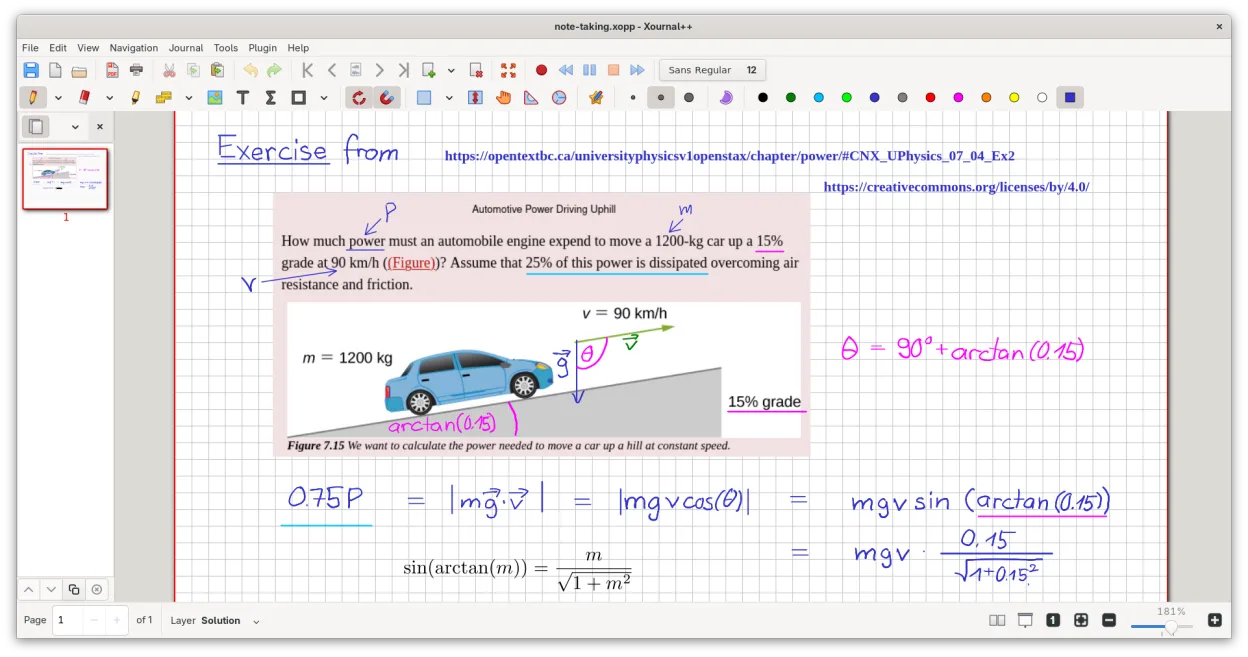
Xournal++ is a solid replacement for Microsoft Snip & Sketch if you prioritize annotation quality and stylus support over quick screenshot capture. It excels at marking up PDFs and freeform note-taking with excellent pen handling, but it doesn’t capture screenshots natively. You’ll need to import images manually or use it alongside a dedicated screenshot tool. For users who annotate documents regularly and use a tablet, it’s powerful. For casual snipping and quick sharing, it’s overkill.
- Licence
- GPL-2.0
- Prix
- Gratuit
- Dernière version
- 1.3.8 (25 septembre 2026)
- Note
- —
Ce qui fonctionne pareil
- Both support pen and highlighter tools for annotations
- Eraser tool available in both applications
- Support PNG export
- Can annotate over existing content (PDFs in Xournal++, screenshots in Snip & Sketch)
- Lightweight interface focused on quick input
Ce qui change
- Xournal++ does not have built-in screen capture — you must take screenshots separately
- No video recording feature in Xournal++
- Xournal++ lacks quick clipboard sharing workflow
- No native integration with messaging apps or cloud services for fast sharing
Ouvrir vos fichiers Microsoft Snip & Sketch
Xournal++ does not open Microsoft Snip & Sketch files (.imgAsset or clipboard formats) directly, as they are proprietary. However, if Snip & Sketch content is saved or exported as PNG, JPEG, or PDF, Xournal++ can import and annotate those files without issue. There's no automated conversion path for collections of Snips. Users must rely on exported image formats for interoperability.
Passer de Microsoft Snip & Sketch à Xournal++, étape par étape
- Install a screenshot tool like
gnome-screenshot,flameshot, orksnip - Capture and save or copy screenshot
- Open Xournal++ and import the image or paste from clipboard
- Annotate using pen, highlighter, or text tools
- Export as PNG, JPEG, or PDF, or save directly to file system
Fonctionnalités clés de Xournal++
- Support des stylets sensibles à la pression pour les tablettes Wacom, Huion et XP-Pen
- Annotation, surlignage et barrage du texte sur les fichiers PDF
- Export des notes vers PDF, PNG et SVG via l'interface graphique ou la ligne de commande
- Outils de dessin incluant le stylo, le surligneur, les formes et le support de LaTeX
- Stabilisation de la saisie pour une écriture manuscrite plus fluide
- Barre d'outils personnalisable et association des outils aux boutons du stylet
- Barre latérale avec aperçus des pages, signets PDF et gestion des calques
Installer Xournal++ sous Linux
flatpak install flathub com.github.xournalpp.xournalppsudo apt install xournalppsudo apt install xournalppsudo dnf install xournalppsudo pacman -S xournalppsudo zypper install xournalppQuestions fréquentes
Can Xournal++ capture a screenshot directly?
No. Xournal++ cannot capture screens. Use a separate tool like flameshot or gnome-screenshot, then import the image.
Can I use a graphics tablet with Xournal++ on Linux?
Yes. It supports Wacom, Huion, and XP-Pen tablets with full pressure sensitivity and stylus button mapping.
Is there a way to quickly launch Xournal++ for annotations?
Yes. You can assign a custom keyboard shortcut in your desktop environment to launch Xournal++ or open a new note instantly.
3 autres alternatives à Microsoft Snip & Sketch
 FlameshotFlameshot est un outil de capture d’écran léger avec annotation intégrée et fonctions d’envoi.Open sourceGratuitFlatpakFlameshot ou Microsoft Snip & SketchGNOME ScreenshotGNOME Screenshot est un outil léger pour capturer et enregistrer des images d’écran sous les systèmes Linux…Open sourceGratuitGNOME Screenshot ou Microsoft Snip & Sketch
 ShutterShutter est un outil de capture d'écran puissant et open source pour Linux, doté de fonctions d'édition…Open sourceGratuitShutter ou Microsoft Snip & Sketch