
 ZettlrLinux
vs
OneNote for Windows 10Windows
Zettlr, alternative Linux à OneNote for Windows 10
Mis à jour le
Notre avis
Zettlr is a solid replacement for OneNote if you prioritize text-based knowledge management over freeform canvas editing. It excels at hierarchical organization via folders and tags, offering robust Markdown editing and citation support that OneNote lacks. However, it is not a drop-in swap for users who rely heavily on handwriting, audio recording, or real-time multi-user collaboration. If your notes are primarily text and you value open standards over proprietary cloud sync, Zettlr is a strong choice. If you need to draw diagrams or share live notebooks with non-technical colleagues, stick with OneNote or consider a different tool.
- Licence
- GPL-3.0-or-later
- Prix
- Gratuit
- Dernière version
- 4.10.0 (13 novembre 2026)
- Note
- —
Ce qui fonctionne pareil
- Hierarchical organization of notes into folders and subfolders
- Support for mixed media including images and text
- Offline access with local file storage
- Cross-platform availability on Linux, Windows, and macOS
Ce qui change
- Zettlr uses plain text Markdown files, while OneNote uses a proprietary binary format
- Zettlr lacks built-in handwriting or drawing canvas capabilities
- Zettlr has no native cloud synchronization or real-time multi-user collaboration
- Zettlr does not natively record or embed audio files as primary note content
Ouvrir vos fichiers OneNote for Windows 10
Zettlr cannot open OneNote (.one) files directly. You must export your OneNote content to a compatible format like Markdown, HTML, or PDF first. Since OneNote does not natively export to Markdown, you will likely need to use a third-party converter or manually copy text and images into Zettlr. This process is manual and may require significant cleanup to preserve structure and formatting.
Passer de OneNote for Windows 10 à Zettlr, étape par étape
- Export all OneNote notebooks to HTML or PDF to preserve content
- Install a Markdown converter or use a script to transform HTML to Markdown
- Create a folder structure in Zettlr that mirrors your OneNote hierarchy
- Import the converted Markdown files into Zettlr
- Manually re-link images and verify formatting in the live preview
- Set up a backup solution for your local Zettlr directory
Fonctionnalités clés de Zettlr
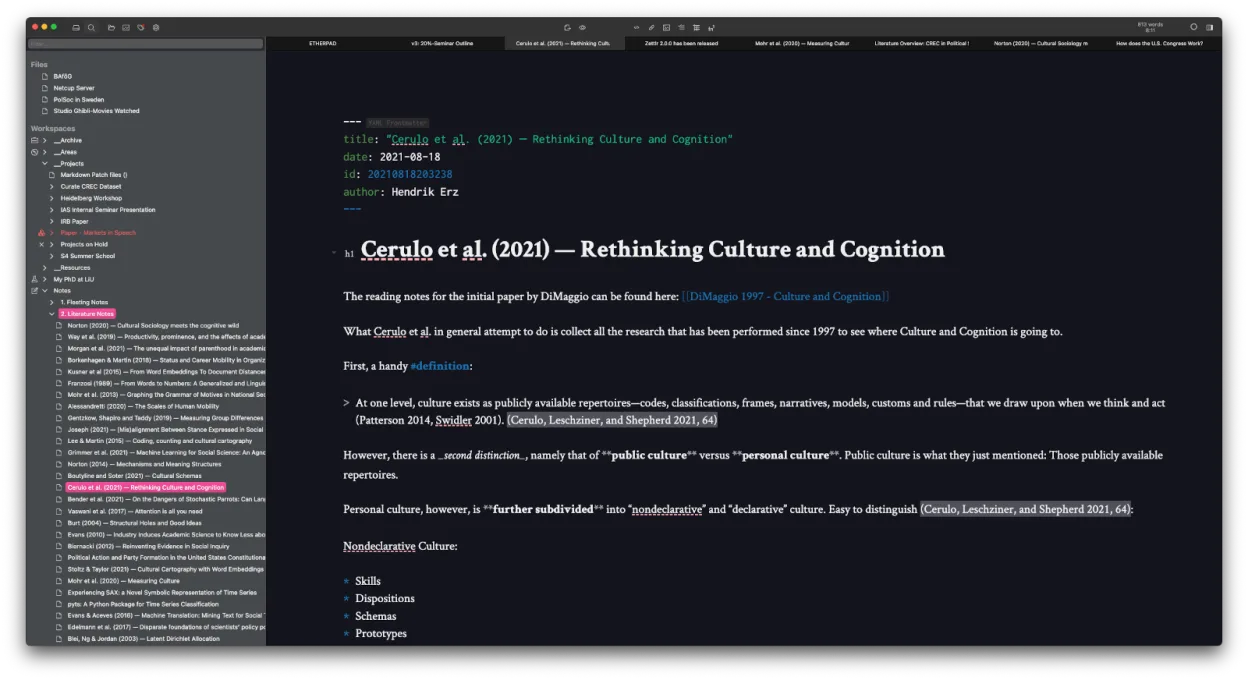
- Édition Markdown avec aperçu en direct
- Liens et tags à la Zettelkasten
- Prise en charge des citations via CSL‑JSON, BibTeX, Zotero, JabRef
- Mode sombre et multiples thèmes, CSS personnalisable
- Recherche heatmap pour découvrir rapidement les notes
- Stockage basé sur des fichiers – aucune base de données propriétaire
- Exportation vers PDF, HTML et autres formats
- Multiplateforme (Linux, Windows, macOS)
Installer Zettlr sous Linux
flatpak install flathub com.zettlr.Zettlrsudo pacman -S zettlrQuestions fréquentes
Can I sync my Zettlr notes between my Linux laptop and Windows PC?
Yes, but not natively. You must use a third-party sync tool like Syncthing, Nextcloud, or a git repository to synchronize the local folder containing your Markdown files across devices.
Does Zettlr support handwriting or drawing?
No. Zettlr is a text editor. While you can insert images of your handwriting, it does not have a built-in canvas for real-time drawing or stylus input like OneNote.
Is Zettlr free to use?
Yes, Zettlr is open-source software licensed under GPL-3.0-or-later. It is free to download and use without any subscription fees or paywalls.
5 autres alternatives à OneNote for Windows 10
 JoplinJoplin est une application open source et multiplateforme de prise de notes et de gestion de tâches qui…Open sourceGratuitFlatpakJoplin ou OneNote for Windows 10
 Standard NotesStandard Notes est une application de prise de notes sécurisée, chiffrée de bout en bout, qui synchronise vos…Open sourceGratuitFlatpakStandard Notes ou OneNote for Windows 10
 ObsidianObsidian est une application de base de connaissances basée sur le markdown qui stocke les notes sous forme…FlatpakObsidian ou OneNote for Windows 10
 LogseqLogseq est un outil de base de connaissances non linéaire, privilégiant le stockage local, qui enregistre les…Open sourceGratuitFlatpakLogseq ou OneNote for Windows 10
 SimplenoteSimplenote est une application de prise de notes gratuite, multiplateforme, qui synchronise les notes…Open sourceGratuitFlatpakSimplenote ou OneNote for Windows 10