
 ZulipLinux
vs
Microsoft TeamsWindows
ZulipLinux
vs
Microsoft TeamsWindows
Zulip, alternative Linux à Microsoft Teams
Mis à jour le
Notre avis
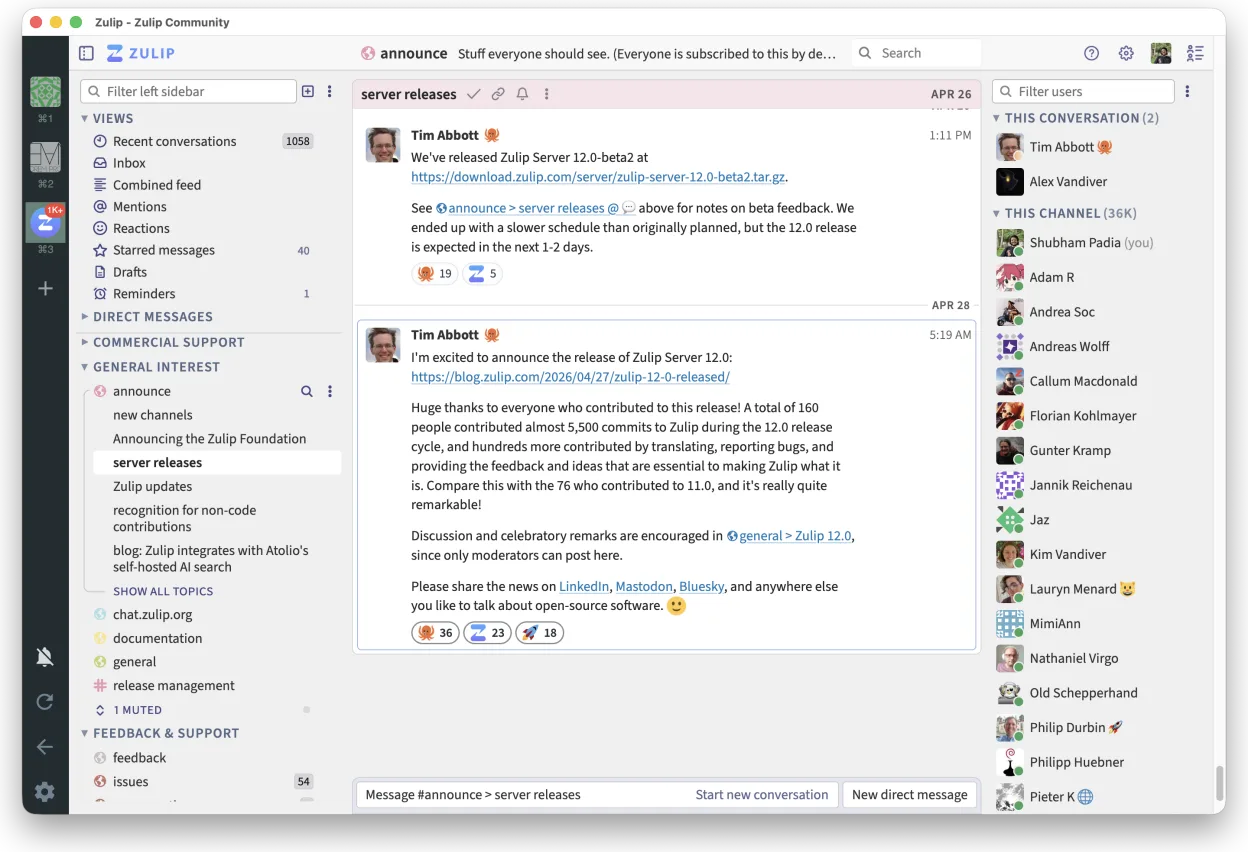
Zulip can replace Microsoft Teams for teams that need real‑time chat with threaded conversations and want an open‑source, self‑hostable solution. It works well for software developers, open‑source projects, or organizations that already use Linux desktops and prefer no vendor lock‑in. However, it lacks built‑in Office 365 integration, native video conferencing, and the extensive app ecosystem that Teams offers, so it is best suited for groups that prioritize chat and search over video calls and deep Microsoft integration.
- Licence
- Apache-2.0
- Prix
- Gratuit
- Dernière version
- 5.13.2 (21 septembre 2026)
- Note
- —
Ce qui fonctionne pareil
- Both provide real‑time group chat
- Both support threaded conversations
- Both allow file sharing within conversations
- Both are cross‑platform (Linux, Windows, macOS, mobile)
- Both have native desktop clients
Ce qui change
- Zulip does not have built‑in video or audio conferencing; Teams has Teams‑Meetings
- Teams integrates tightly with Office 365 (Word, Excel, PowerPoint) and SharePoint; Zulip does not
- Teams offers a wide range of third‑party app integrations; Zulip’s ecosystem is smaller
- Teams includes advanced meeting scheduling and calendar features; Zulip lacks a calendar
- Teams provides enterprise‑grade security and compliance tooling; Zulip relies on self‑hosted security
Ouvrir vos fichiers Microsoft Teams
Zulip can receive files shared in Teams conversations, but it cannot directly open Office 365 documents or Teams‑specific file formats. To view or edit such files you will need a separate office suite (e.g., LibreOffice) or a cloud service like Microsoft 365. Exporting from Zulip is limited to plain text or attachments; there is no native conversion to Teams‑specific formats.
Passer de Microsoft Teams à Zulip, étape par étape
- Export Teams chat history via the Teams export tool or PowerShell if available
- Download all shared files from Teams to a local folder
- Install Zulip Desktop from Flathub or the official repository
- Create a Zulip organization and invite users
- Upload the exported chat history as a text file or use the Zulip API to import messages
- Re‑share important files in Zulip channels
Fonctionnalités clés de Zulip
- Conversations en fil pour des discussions organisées
- Open source et auto-hébergeable
- Disponible en tant que client bureau natif pour Linux
- Prend en charge les grands groupes et les forts volumes de messages
- Compatibilité multiplateforme
- Fonctionnalité de recherche puissante dans l'historique
Installer Zulip sous Linux
flatpak install flathub org.zulip.ZulipQuestions fréquentes
Does Zulip support video calls?
No, Zulip does not provide native video or audio conferencing. You would need to integrate a separate tool like Jitsi or Zoom for calls.
Can I host Zulip myself?
Yes, Zulip is open source and can be self‑hosted on a Linux server using Docker or the official installation scripts.
Will my Teams files open in Zulip?
Zulip can receive files, but it does not open Office documents or Teams‑specific formats; use LibreOffice or Microsoft 365 for editing.
5 autres alternatives à Microsoft Teams
 SlackSlack est une application de communication d'équipe propriétaire pour Linux qui centralise les conversations…FlatpakSlack ou Microsoft Teams
 MattermostMattermost est une plateforme de collaboration open source et auto-hébergée, conçue pour les équipes de…Open sourceGratuitFlatpakMattermost ou Microsoft Teams
 DiscordUne application de messagerie, voix et vidéo multiplateforme pour les communautés, les jeux et les rencontres…FlatpakDiscord ou Microsoft Teams
 Rocket.ChatPlateforme open source de communication d'équipe pour le chat, la vidéo et la collaboration, souvent utilisée…Open sourceGratuitFlatpakRocket.Chat ou Microsoft Teams
 ElementElement est un client de messagerie et de visioconférence basé sur Matrix, open source, pour Linux.Open sourceGratuitFlatpakElement ou Microsoft Teams