
 PlayOnLinux 4Linux
vs
GOG GalaxyWindows
PlayOnLinux 4Linux
vs
GOG GalaxyWindows
PlayOnLinux 4 as a Linux alternative to GOG Galaxy
Updated
Our verdict
PlayOnLinux 4 is not a good replacement for GOG Galaxy. It only runs Windows games via Wine; it does not provide a unified library, social features, achievements, cloud sync, or overlay support. It may help you launch a Windows‑only GOG game on Linux, but you still need GOG Galaxy or another launcher to manage your library and social aspects.
- License
- GPL-3.0
- Price
- Free
- Latest version
- 4.4 (May 17, 2020)
- Rating
- —
What works the same
- Both can launch Windows games on Linux
- Both have a graphical interface
- Both support multiple game stores (PlayOnLinux via scripts, GOG Galaxy via built‑in store integration)
What is different
- PlayOnLinux lacks a unified library and social features
- No achievement tracking or playtime stats
- No cloud‑save sync
- No overlay during gameplay
- No easy import of existing collections
- GOG Galaxy is a native Windows app, PlayOnLinux is a Wine front‑end
Opening your GOG Galaxy files
PlayOnLinux cannot open or export GOG Galaxy library files (.gogdb or similar). You would need to manually install the games through PlayOnLinux scripts or use Wine to run GOG Galaxy itself, but the library data will not be shared.
Switching from GOG Galaxy to PlayOnLinux 4, step by step
- 1. Install PlayOnLinux 4 from your distro’s package manager.
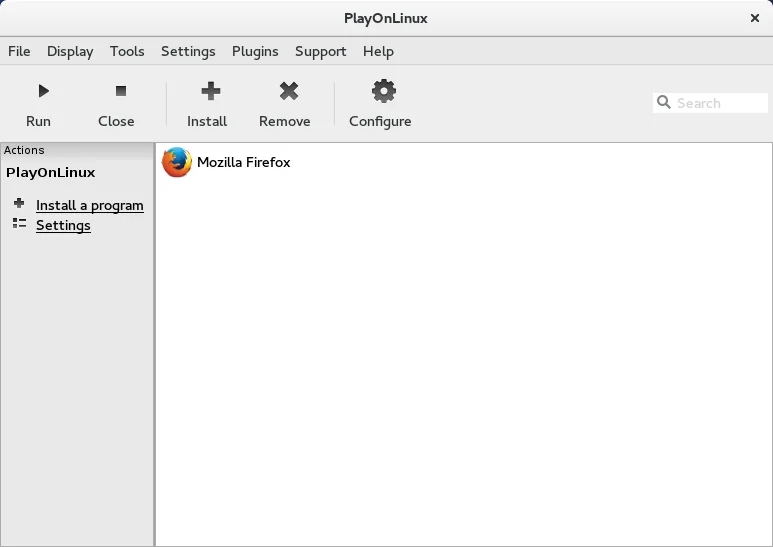
- 2. Open PlayOnLinux and use the “Install a program” button to search for the Windows version of the game you want to run.
- 3. Follow the script prompts; PlayOnLinux will create a Wine prefix and install any required libraries.
- 4. Launch the game from PlayOnLinux’s list; it will run under Wine.
- 5. (Optional) If you still want GOG Galaxy features, keep the Windows GOG Galaxy installed via Wine or use the web version for social features.
Key features of PlayOnLinux 4
- Graphical installer for Windows applications
- Automated Wine prefix creation
- Database of pre‑configured install scripts
- Support for multiple Wine versions per application
- Ability to install Windows libraries via winetricks
- Integration with Flatpak via Flathub
- Open source and community maintained
How to install PlayOnLinux 4 on Linux
flatpak install flathub com.playonlinux.PlayOnLinux4sudo apt install playonlinuxsudo apt install playonlinuxsudo dnf install playonlinuxsudo zypper install PlayOnLinuxFrequently asked questions
Can I use PlayOnLinux to run GOG Galaxy itself?
Yes, you can install the Windows GOG Galaxy client under Wine via PlayOnLinux, but it will not provide native Linux integration and will still run as a Windows app.
Will PlayOnLinux track achievements or playtime?
No. PlayOnLinux only runs the game; any achievement or playtime tracking must be handled by the game itself or by the Windows GOG Galaxy client.
Does PlayOnLinux support cloud saves?
Only if the game itself supports cloud saves and the Wine configuration allows it. PlayOnLinux does not provide its own cloud sync feature.
4 other alternatives to GOG Galaxy
 LutrisLutris is a free, open‑source platform that centralises installation and launching of PC and console games on…Open sourceFreeFlatpakLutris vs GOG GalaxyHeroic Games LauncherHeroic Games Launcher is an open‑source tool that lets Linux users install and launch games from Epic, GOG…Open sourceFreeHeroic Games Launcher vs GOG Galaxy
 SteamSteam is a digital game distribution platform with built-in store, updates, cloud saves, and social features.FreeFlatpakSteam vs GOG Galaxy
 HeroicHeroic is an open‑source launcher that lets you play Epic, GOG and Amazon games on Linux, with built‑in…Open sourceFreeFlatpakHeroic vs GOG Galaxy